

 Get 0.05 TON 💎
Earlier Versions
| Name | Size | Uploaded | Game Version | Downloads | |
| Abyss v8 beta | 209.66 KB | Feb 17, 2013 | CB 1.4.7-R1.0 | 49,390 |  Download Download |
| Abyss v7 beta | 208.86 KB | Feb 16, 2013 | CB 1.4.7-R1.0 | 889 | Download |
| Abyss v6 beta | 192.42 KB | Feb 15, 2013 | CB 1.4.7-R1.0 | 510 | Download |
| Abyss v5 beta | 177.95 KB | Feb 14, 2013 | CB 1.4.7-R1.0 | 426 | Download |
| Abyss v3 beta | 156.42 KB | Feb 11, 2013 | CB 1.4.7-R1.0 | 576 | Download |
| Abyss v2 beta | 145.33 KB | Feb 10, 2013 | CB 1.4.7-R1.0 | 817 | Download |
Screenshots


Description

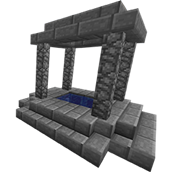
Abyss is a flexible portal system designed for players. In Abyss, a portal is a square pool of water, no smaller than two by two blocks, and no shallower than two blocks deep. Portals are linked together into networks, and travel between them is optionally limited by distance. Portals can go to other worlds, and minecarts can make use of portals.
Traveling through a portal is easy. Just jump in, and you'll be instantly ejected out of the first available destination. Momentum is preserved through portals, and minecarts will be placed on rails when at all possible.
Trailer
There are also a few older videos. If anyone would like to make a tutorial video, please contact me. I'd do it myself, but between the day job and working on features for Abyss, I'm rather busy at the moment.
Portal Features
Easy Configuration

The majority of portal configuration is performed by manipulating a set of item frames within the body of the portal, as detailed below.
Networks
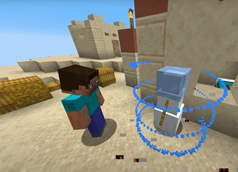
Every portal in Abyss is placed on a network based on a two-part key consisting of an item and a color, making for thousands of possible networks. Damage values of items are taken into account as well, making it possible to use unique items like specific maps as keys. The network frames are always the top, center item frames of a portal.
To set an item as the network item, right click the network item frame with the item in your hand. Doing so will not consume the item. Left clicking the network item frame will reset the portal to the default network. Repeatedly left clicking the network item frame will destroy a portal. To change the portal's color, left or right click on the color item frame to cycle through the available colors.
The Human Head item creates a special, player-specific network for the owner of the portal and is the default network item, giving players a secure network of portals straight away. Of course, if this isn't desirable for your server, you can simply change the default item to something else in the configuration.
IDs and Destinations
At times, you might want to connect a portal to a specific destination, ensuring that it goes to that destination and only that destination. To that end, portals may be assigned an ID consisting of two colors, making for 288 possible IDs per network when you include IDs that leave one of the color slots empty.
Use the two item frames to the left of the network key to set a portal's ID and the two item frames to the right to set a portal's destination. Left and right click the frames to cycle through the available colors.
Modifiers
Every portal has a number of item frames devoted to Portal Modifiers, positioned below the network key frames. Modifiers are special items that add behavior to portals, both when a player is exiting from a portal and when a player is arriving at a portal. For example, using a Dispenser as a modifier will fetch items from a chest and dispense them to players, storage minecarts, and other things with storage passing through a portal. Using a pressure plate for a modifier will toggle a lever momentarily after something arrives, making it easy to start redstone contraptions when a portal is used.
A list of all the possible modifiers and other information is available at the page about Portal Modifiers.
Covers
Leaving an unguarded portal into the heart of your base open at all hours is, of course, quite silly if you're in a bad neighborhood. To that end, portals may be temporarily closed by building a protective cover over the surface of the portal. Any block within two blocks above the surface of a portal will prevent that portal from being used, in either direction, making it simple to protect yourself from invaders, or to control the flow of entities through your portal systems.
Commands
Commands in Abyss can be performed either as a normal command, or through the use of a Portal Wand. Portal Wands are unique items that can have limited uses, and that use separate permissions from the normal commands. This makes the wands ideal for use by players. A Portal Wand's configuration is stored as a combination of a custom name and item lore, making it possible to create villagers that sell such wands. When checking for a wand's custom name, Abyss requires that a color code be present in the string to ensure that a player didn't craft the item themselves using an anvil.
To create a Portal Wand, use the command: /abwand <uses> [command] <arguments>
A list of sub-commands may be found on the Commands page.
Permissions
| Permission | Default | Description |
|---|---|---|
abyss.use |
Everyone | Allows the player to travel through and manipulate portals. |
abyss.moderate |
Ops | Allows the player to manipulate portals created by other players. |
abyss.bypass_protection |
Ops | Allows the player to bypass portal block protection by sneaking. Useful for modifying frames without having to destroy and recreate the portal. |
abyss.modifers.<material> |
Everyone | Allows the player to use a portal modifier of the material in question. |
abyss.detail.uuid |
Ops | Allows the player to see portal UUIDs with the Information command. |
abyss.detail.distance |
Ops | Allows the player to see exact distances between portals. |
abyss.detail.location |
Ops | Allows the player to see the precise root locations of portals. |
abyss.command.base |
Ops | Gives access to the root /abyss command used to perform all sub-commands. |
abyss.command.<command> |
Ops | Allows the player to use the Abyss command in question. |
abyss.wand.<command> |
Everyone | Allows the player to use a Portal Wand to perform the command in question. |
Updates
As of v4, Abyss includes automatic update functionality. If you wish to disable it, set auto-update to false in your configuration file. Alternatively, you may set auto-update to check to have it merely inform you of available updates.
Statistics
As of v7, Abyss submits usage statistics to MCStats.

Source Code
The source code for Abyss is available on GitHub at https://github.com/stendec/Abyss.


Add a comment