

 Get 0.05 TON 💎
Earlier Versions
| Name | Size | Uploaded | Game Version | Downloads | |
| AdminGUI v1 beta | 10.26 KB | Sep 9, 2013 | CB 1.6.2-R0.1 | 3,926 |  Download Download |
Screenshots

Description
AdminGUI
The very first AdminGUI plugin to work without Spout and not use inventories!
With the ability to create and customize your own Admin Menu, the possibilities are endless.
Beta Plugin as of right now. Please be sure to report any bugs here. Thank You.
Features
- Easily open an Admin Menu to execute any command!
- Ability to customize the menu and commands to your liking with an easy to use config file.
- Multiple Pages
- Keys that can access special features
- For more information see "Configuration Keys"
- Unique controls for ease of access.
Commands
/menu : Opens the menu if the player has the "AdminGUI.use" permission
- Aliases:
- m, adminm, amenu, admingui, gui
Permissions
AdminGUI.use : Ability to use the plugin
Controls
After opening the menu with one of the commands, you can scroll with your mouse wheel and select with left click!
Default Menu Configuration
Gamemode:
  Survival: gamemode survival
  Creative: gamemode creative
Ban:
  IP:
    Online: ban <playerlist>
    Offline: ban <input>
  Player:
    Online: ban <playerlist>
    Offline: ban <input>
Kick: kick <playerlist>
Kill: kill <playerlist>
Teleport: tp <playerlist> <playerlist>
OP:
  Online: op <playerlist>
  Offline: op <input>
DEOP:
  Online: deop <playerlist>
  Offline: deop <input>
Time:
  Day: time set day
  Night: time set night
Weather:
  Clear: weather clear
  Rain: weather rain
  Thunder: weather thunder
Quit: <quit>
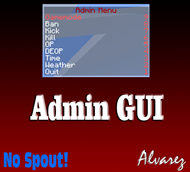
Default Menu In-Game

Configuration Keys
Configuration Keys allow for the plugin to perform hard codded tasks for the user.
<playerlist>: Allows the user to pick from any players online.
<input>: Allows the user to input something such as an IP via chat command. This helps for banning offline users etc.
Youtube Video
Coming Soon!
To-Do
- Support for multiple menus
- Anything in the comments
- Tags
- Ex. tp [Player 1]<playerlist> [Player 2]<playerlist>



Add a comment