

 Get 0.05 TON 💎
Earlier Versions
| Name | Size | Uploaded | Game Version | Downloads | |
| AdvancedWhiteList.1.2.1 release | 79.03 KB | Jul 2, 2020 | 1.16 | 98 |  Download Download |
Screenshots




Description
Welcome to AdvancedWhitelist.
This is the most advanced whitelist plugin you'll find for your server. This works for networks of all sizes.
- If you're a small server with a small amount of staff, you still have additional functionality that you normally won't have to control who's allowed on the server.
- If you're a larger server and network with lots of staff, you'll have the same benefits as a small server with being able to manage access of many users and staff quickly and easily using the available config and permissions.
Need to lockdown the server to only those with the operators bypass? No problem, there's a command for that.
Still have players that're connected due to a whitelist change after they joined? No problem, there's a command to initially send the user back to the hub/lobby, but if it's not available, then it'll kick the player from the network instead giving a custom message at your choosing
Note: The config is setup for the server it was built for, including the Not Whitelisted message and Kick messages. Feel free to change those to say what you'd like it to say.
Reviews, Feedback and questions are always welcome. Feel free to comment below to let me know if everything looks good or if there's anything you'd like to see changed or what might make something clearer.
Getting Started:
Initially the Whitelist will be disabled, but you can enable it in the config at "whitelist_enabled" and reload the config with "/awl reload" or you can use "/awl on" from console, or in-game if you have the admin permission.
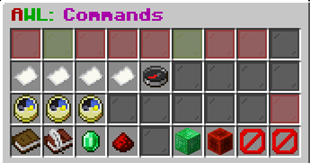
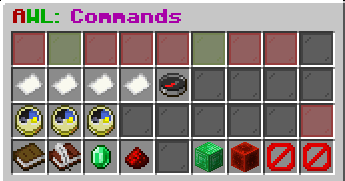
If you have the "advancedwhitelist.admin" permission, you can use "/awl" to bring up the GUI that will let you change all of the options with a click of a button.
Without any config changes, "advancedwhitelist.bypass.operators" is the only permission that will always have access to the server regardless of config settings.
Recommended Note: This permission should be restricted to a Server Owner and the most trusted Staff/Admins/Operators, whatever term your server uses for it.
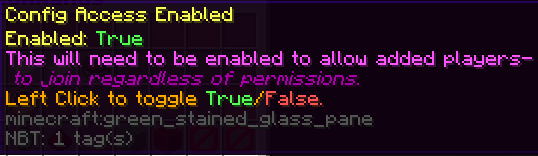
If you want to only worked based on an actual list of users, set "Config_Access" to true (or use /awl configon) and add the users to the list that should have access.
Commands:
Note: All commands require permission "advancedwhitelist.admin" to be used in game, or to be used from Console.
/awl spigot – Gets the link to the Spigot plugin page
Basic Commands:
/awl help – Gets the help menu
/awl status – Get the status of all config options in game.
/awl on/off – Set Whitelist on or off.
/awl add <name> - Adds user/name to Whitelist.
/awl remove <name> - Removed user/name to Whitelist.
/awl list – Lists all users added to the Whitelist.
/awl reload – Reloads the in-game settings based on the config file.
/awl send – Send all players not whitelisted back to hub/lobby server. If send fails, will kick player instead.
Access commands:
/awl configon/configoff – Sets the Config Access on or off
/awl ptaon/ptaoff - Sets the ProjectTeam Access on or off
/awl son/soff - Sets the Staff Access on or off
/awl ton/toff - Sets the Tester Access on or off
/awl oon/ooff – Sets the Other Access on or off
/awl lockdown – Sets Whitelist on and all access off.
/awl staffonly – Sets Whitelist, ProjectTeam, and Staff access on, and everything else off.
Messages and misc commands:
/awl notwlmsg <message> - Msg sent to the player if they aren't whitelisted for a server.
/awl bcastmsg <message> - Msg sent before everyone gets kicked from send/kick command.
/awl sendmsg <message> - Msg sent to the player just before they're sent back to Hub/Lobby.
/awl kickmsg <message> - Msg sent to player when they're kicked from the server.
/awl hubserver <servername> - This is based on what's set in Bungee.
/awl senddelay <seconds> - Set amount of time a message is displayed before players are sent and kicked from the server.
/awl kickdelay <seconds> - Set amount of time between attempting to send a player before checking if kick is needed, also delay per kicked player to not overload bungee server.
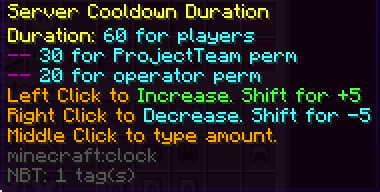
/awl scdon/scdoff – Set server start to player login cooldown on or off.
/awl scdtime <seconds> - Set amount of time for the server cooldown.
Permissions:
advancedwhitelist.admin – Allows access to run the commands/make changes in game.
advancedwhitelist.bypass.operators – Always have access to a server regardless of the different config options. It will also bypass the Server Cooldown time to only 1/3 of the time specified for players. (Recommended for Server Owners and similar only.)
Below are the permissions available to automatically assign access to certain groups of users with simple and quick changes:
advancedwhitelist.bypass.projectteam – It will bypass the Server Cooldown time to only 1/2 of the time specified for players.
advancedwhitelist.bypass.staff – Will have access to the server if Staff Access is on.
advancedwhitelist.bypass.tester – Will have access to the server if Tester Access is on.
advancedwhitelist.bypass.alternate – Will have access to the server if Alternate Access is on.
advancedwhitelist.bypass.other – Will have access to the server if Other Access is on.
Config file with all intended comments:
# Welcome to AdvancedWhitelist.
# Don't change the Config Version
config_version_dont_change: 1.1.4
whitelisted:
– "ExampleNameThatWouldHaveAccessIfConfigAccessIsOn_PleaseReplaceThis"
config:
access_enabled:
whitelist: false
# If enabled, will allow the players in whitelisted to connect to the server.
config_access: false
# If whitelist_enabled above is false, the below whitelist options won't matter.
# Each Access below is it's own permission and some can be on while others are off.
# The permissions will be AdvancedWhiteList.Bypass.<Team> – Where <Team> equals ProjectTeam, Staff, Tester, Alternate, Other, etc.
teams:
projectteam: false
staff: false
tester: false
alternate: false
other: false
messages:
# Message given to player when they weren't allowed to connect to the server.
not_whitelisted_message: "&eSorry, the server has been put into Whitelist mode, and you're not whitelisted at the moment. If you feel this is a mistake, please contact the proper staff to get it corrected. If you aren't part of the whitelist, feel free to join one of our other servers. The available lobby servers are play.ham5teak.xyz and play.ham5teak.net.au while we have various modes to play in, including Survival, Semi-Vanilla Survival, Skyblocks, Creative, Factions, Prison, and Minigames. Don't forget that some of them will have new Australian versions as well. :)"
# Broadcast sent before players start getting kicked.
send_or_kick_broadcast_message: "&eSorry, the server is currently in Whitelist mode, and those that are not whitelisted will be sent back to the lobby, if you do get sent, please enjoy one of our other modes of Survival, Semi-Vanilla Survival, Skyblocks, Creative, Factions, Prison, and Minigames! :)"
# Sent to players just before they get kicked from the server when they aren't Whitelisted.
send_message: "&eSorry, the server has been put into Whitelist mode, and you're not whitelisted at the moment. If you feel this is a mistake, please contact the proper staff to get it corrected. If you aren't part of the whitelist, feel free to join one of our other servers. The available lobby servers are play.ham5teak.xyz and play.ham5teak.net.au while we have various modes to play in, including Survival, Semi-Vanilla Survival, Skyblocks, Creative, Factions, Prison, and Minigames. Don't forget that some of them will have new Australian versions as well. :)"
# Used in case send fails
kick_message: "&eSorry, the server has been put into Whitelist mode, and you're not whitelisted at the moment. If you feel this is a mistake, please contact the proper staff to get it corrected. If you aren't part of the whitelist, feel free to join one of our other servers. The available lobby servers are play.ham5teak.xyz and play.ham5teak.net.au while we have various modes to play in, including Survival, Semi-Vanilla Survival, Skyblocks, Creative, Factions, Prison, and Minigames. Don't forget that some of them will have new Australian versions as well. :)"
durations:
server_cooldown_duration: 90
delay_before_starting_kicks: 4
kick_delay_per_player: 1
misc:
server_cooldown: true
# This is the server name to be used according to Bungeecord that the players will go to when kicked.
server_to_send_to: lobby
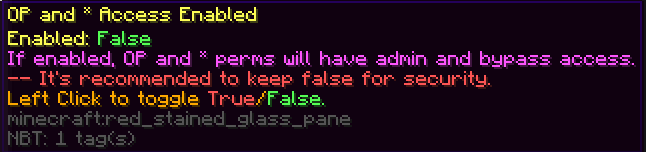
allow_op_and_star_bypass: false
gui:
enabled_row1:
true: green_stained_glass_pane
false: red_stained_glass_pane
messages_row2:
lobby: compass
not_whitelisted_message: paper
send_or_kick_broadcast_message: paper
send_message: paper
kick_message: paper
durations_row3:
server_cooldown_duration: clock
delay_before_starting_kicks: clock
kick_delay_per_player: clock
commands_row4:
status: book
whitelisted_config_list: writable_book
add: emerald
remove: redstone
add_all_online: emerald_block
remove_all: redstone_block
send_players_enforce_whitelist: barrier
restart_server: barrier
anvil_item: name_tag
Intended Config Header:
Once configured and permissions set, it will give the smoothest experience for managing access for entire teams.
Everything you can configure here in the file, can also be checked and configured in game with a customizable GUI or with various commands.
The GUI is available with just the base command of /awl when in game, or /awl gui.
All commands, permissions, and aliases are listed in the help menu at "/awl help <number>"
Important: To use any of the commands in game, you will need the permission advancedwhitelist.admin
There are other Permissions that will allow access if the below access are turned on.
The permission is "advancedwhitelist.bypass.<perm>" where <perm> is one of the following access options.
<ProjectTeam, Staff, Tester, Alternate, Other> Access
You can choose how you want to use the permissions for access.
Each perm/access is separate from each other, so if tester access is enabled but staff isn't, staff won't be able to access it unless they also have the perm.
This is still a WhiteList plugin, so you can still add players names either in the config or using the in-game commands.
For the list to be effective, you will need to turn on the Config Access option.
There's also a command setup so that it will restrict the current online players to only those that are allowed by the Whitelist
It will first attempt to send the Non-Whitelisted player to the Lobby/Hub server specified in the config below at "server_to_send_to".
If they're currently on that server, or if it fails to send for some reason, it will then kick the player.
During the send and kick, there's an initial Broadcast message, which can be configured below.
There's a message that's sent to the player just before they're sent to the lobby/hub server.
There's a separate kick message that's configurable for the players.
Sorry for other servers, the message set is for the server/network the plugin was developed for.
This plugin is also setup with a cooldown from when the plugin starts, generally when the server starts, to when players can connect.
This has been added so that you can allow a server to settle before players rush to join again. But if you don't want this, it can also be turned off.
It's on by default, but can be turned on, and the amount of time to wait can also be changed.
There are two exceptions. Users with the Operators Bypass perm will be able to connect at one-third (1/3) the time specified to allow the highest admins to connect and make changes as needed, such as if a server needs to be set to whitelist.
Second, the ProjectTeam Bypass perm will be able to connect at half (1/2) the time specified for the same reason.
Note: All times are based on seconds.
Future Plans:
* Add a kick/send summary, Put numbers instead of names for summary.
* Add conversion from EasyWhiteList and Minecraft Whitelist
* Add proper Config version check at start so that it will rename the old file and enter a new one with existing values for easy transfer
* Get Header comments to save into file.





Add a comment