


 Get 0.05 TON 💎
Earlier Versions
| Name | Size | Uploaded | Game Version | Downloads | |
| Archeology Mod v0.1.10 [Fabric] beta | 354.14 KB | Aug 18, 2022 | 1.19 | 0 | ![download Archeology Mod Archeology Mod v0.1.10 [Fabric] beta](https://minecraftpatch.com/wp-content/themes/template/img/download.png) Download Download |
| Archeology Mod v0.1.9 [Fabric] beta | 324.54 KB | Jun 15, 2022 | 1.19 | 3,566 | Download |
| Archeology Mod v0.1.9 [Fabric] beta | 326.17 KB | Jun 11, 2022 | 1.18.2 | 1,516 | Download |
| Archeology Mod v0.1.8 [Fabric] beta | 277.20 KB | Jan 23, 2022 | 1.18.1 | 28,727 | Download |
| Archeology Mod v0.1.8 [Fabric] beta | 282.50 KB | Jan 23, 2022 | 1.17.1 | 378 | Download |
Screenshots


Description
Archeology Mod is a Fabric mod for Minecraft, that adds Archeology System! My goal was to make it as Vanilla-like as I possibly could, to try to imagine how Mojang will implement it (and maybe even give them inspiration).
This is my first-ever mod, so don't expect too stable experience or sensible code. If you found a bug, or have a suggestion, advice, please create a GitHub Issue or message me on Discord.

The mod requires Cloth Config API (Fabric) and Fabric API to work! Also, this is recommended to use Mod Menu to easily edit mod's config.
What is the Archeology System?
Archeology was firstly introduced at Minecraft Live 2020, but was later delayed from 1.17 Caves and Cliffs Update. Officially announced features of the Archeology System:
- Excavation Dig Sites (structures)
- Archeology Brush (presumably made of Copper and can oxidize)
- Brushing mechanic (removing layers from soft blocks to get loot)
- Ceramic Shards
- Hardened and Raw Clay Pots
- Hardening (firing up) Clay Pots
Mod features
Some of the features that I added wasn't announced by Mojang and was made up by me. There is a full list of all implemented features:
Copper Brush (AKA Archeology Brush)
Copper Brush is a new tool, used for excavating special blocks for getting loot. It is made using a Copper Ingot and a Feather.
- Less durability left on a brush, more oxidized it gets, until it breaks.
- More oxidized brush is, rarer loot you get (similar to Luck of the Sea enchantment), but harder to control brushing.

Brushing Excavation Blocks
New block type — Excavation Block! Currently, there are two excavation blocks in the mod: Excavation Dirt and Gravel, since this is two blocks that was shown to be able to be brushed by Mojang.
- They look similar to regular block (e.g., Dirt or Gravel), but have white stripes, and you can use a Copper Brush on them to start brushing layers off.
- When fully brushed off, the block drops random loot (depending on excavation site you found it, and oxidation level of the brush)
- While brushing, you should move your camera to stop the block from breaking. If you don't move enough, the block will break eventually, and you won't get anything. The more oxidized your brush is, the faster the block breaks, and therefore faster you need to move.
Actually, Mojang showed this feature as completely opposite: if you move your screen too much, the block will break. You can enable this instead, if you prefer it more than mine.

Ceramic Shards
Ceramic Shards are items, that are dropped from brushing the Excavation Blocks. You can place them on the Raw Clay Pot, so that when hardened, this pot will remain placed shards and have pretty drawing on it.
- Different shards have different drawings on them, and the drawing of the shard depends on the Excavation Site you found it.
Raw Clay Pots
This is block, that used to make (Hardened) Clay Pot. It is made of 5 Clay Balls. When broken, it drops 2-4 clay balls (and shards, if had). The fastest tool is shovel.
- You can put up to 8 shards on one raw clay pot: 4 on the sides and 4 on the corners.
- If you light up a fire or a campfire underneath it, it will harden after some time and become a Clay Pot.

Clay Pots (AKA Hardened Clay Pots)
This is a container block, that have 9 item slots (shards contained separately). The player cannot interact with this container in any way, and should rather use a hopper or a dropper to insert items. However, after inserting, there's no way to get these items back without breaking the pot. Think about it like a Piggy Bank.
- Clay Pots are Gravity-Affected Blocks, and preserve inserted items after landing. This makes it sorta-movable container block.
- If a Clay Pot don't find a place to land (like sand landed on a torch), or despawn over time, it will break and pop all items in it, without block itself.

Excavation Sites
Excavation Sites are structures in where you can find Excavation Blocks. This is the only place where these blocks spawn naturally and where you can find them in Survival. Currently, there is only one type of Excavation Site – Ancient Ruins. You can find them in such biomes as Plains, Savanna, Desert, Forest, Birch Forest and Taiga.
When you enter any Excavation Site, you get an advancement called "Forgotten Legacy".
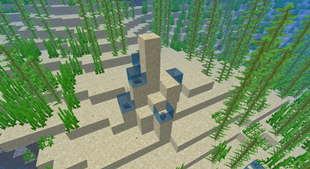
It consists of 2 parts: Surface and Main ruins. Surface ruins are the structure you see on the picture above. They are located on the ground and indicate an Ancient Ruins underneath. Main ruins are structures buried under the Surface ones, surrounded with Excavation Blocks. You can find a Clay Pots with loot in them!
Unimplemented Features (yet)
- Dyeing the Clay Pots (separate from Ceramic Shards)
- Copper Brush enchantments
- Advancements
- Structures (Excavation Sites)
- More ceramic shards
- (Maybe) The Copper Golem



Add a comment