

 Get 0.05 TON 💎
Earlier Versions
| Name | Size | Uploaded | Game Version | Downloads | |
| ArmorPoints++ v3.0.6 [FORGE 1.16.5] release | 142.65 KB | Jul 3, 2022 | 1.16.5 | 3 | ![download Armor Points ++ / Health Stacking ArmorPoints++ v3.0.6 [FORGE 1.16.5] release](https://minecraftpatch.com/wp-content/themes/template/img/download.png) Download Download |
| ArmorPoints++ v3.0.5 [FABRIC 1.19] release | 347.82 KB | Jun 16, 2022 | 1.19 | 736 | Download |
| ArmorPoints++ v3.0.4 [FORGE 1.19] release | 129.26 KB | Jun 11, 2022 | 1.19 | 3,510 | Download |
| ArmorPoints++ v3.0.3 [FORGE 1.19] release | 129.64 KB | Jun 9, 2022 | 1.19 | 358 | Download |
| ArmorPoints++ v3.0.3 [FABRIC 1.19] release | 347.69 KB | Jun 7, 2022 | 1.19 | 559 | Download |
| ArmorPoints++ v3.0.3 [FORGE 1.12.2] release | 144.70 KB | May 29, 2022 | 1.12.2 | 992 | Download |
| ArmorPoints++ v3.0.2 [FORGE 1.16.5] release | 142.37 KB | May 26, 2022 | 1.16.5 | 1,794 | Download |
| ArmorPoints++ v3.0.2 [FORGE 1.12.2] release | 145.03 KB | May 26, 2022 | 1.12.2 | 132 | Download |
| ArmorPoints++ v3.0.1 [FABRIC 1.18.2] release | 347.62 KB | Apr 30, 2022 | 1.18.2 | 6,712 | Download |
| ArmorPoints++ v3.0.1 [FORGE 1.18.2] release | 129.54 KB | Apr 30, 2022 | 1.18.2 | 42,984 | Download |
| ArmorPoints++ v3.0.1 [FORGE 1.16.5] release | 137.82 KB | Apr 30, 2022 | 1.16.5 | 9,760 | Download |
| ArmorPoints++ v3.0.1 [FORGE 1.12.2] release | 140.74 KB | Apr 30, 2022 | 1.12.2 | 695 | Download |
| ArmorPoints++ v3.0.0 [FABRIC 1.18.2] release | 347.60 KB | Apr 29, 2022 | 1.18.2 | 99 | Download |
| ArmorPoints++ v3.0.0 [FORGE 1.18.2] release | 129.52 KB | Apr 29, 2022 | 1.18.2 | 355 | Download |
| ArmorPoints++ v3.0.0 [FORGE 1.17.1] release | 129.54 KB | Apr 29, 2022 | 1.17.1 | 170 | Download |
| ArmorPoints++ v3.0.0 [FORGE 1.16.5] release | 137.79 KB | Apr 29, 2022 | 1.16.5 | 162 | Download |
| ArmorPoints++ v3.0.0 [FORGE 1.12.2] release | 140.72 KB | Apr 29, 2022 | 1.12.2 | 77 | Download |
| ArmorPoints++ v2.1.4 [1.18] release | 43.25 KB | Dec 9, 2021 | 1.18.1 | 13,692 | Download |
| ArmorPoints++ v2.1.3 [1.17.1] release | 42.80 KB | Oct 17, 2021 | 1.17.1 | 2,114 | Download |
| ArmorPoints++ v2.1.1 [1.17.1] release | 43.46 KB | Oct 12, 2021 | 1.17.1 | 129 | Download |
| ArmorPoints++ v2.1.0 [1.17.1] release | 43.46 KB | Jul 30, 2021 | 1.17.1 | 1,462 | Download |
| ArmorPoints++ v2.0.1 [1.12.2] release | 37.47 KB | Jul 30, 2021 | 1.12.2 | 14,663 | Download |
| ArmorPoints++ v2.0.0 [1.8] release | 31.71 KB | May 31, 2021 | 1.8 | 339 | Download |
| ArmorPoints++ v2.0.0 [1.16.5] release | 40.22 KB | May 29, 2021 | 1.16.5 | 36,457 | Download |
| ArmorPoints++ v2.0.0 [1.12.2] release | 37.41 KB | May 29, 2021 | 1.12.2 | 1,002 | Download |
| ArmorPoints++ v1.2 release | 32.65 KB | Nov 21, 2020 | 1.16.5 | 9,821 | Download |
| ArmorPoints++ v1.2 release | 30.65 KB | Nov 21, 2020 | 1.8 | 145 | Download |
| ArmorPoints++ v1.1.6 release | 30.68 KB | Nov 8, 2020 | 1.16.4 | 444 | Download |
| ArmorPoints++ v1.1.6 release | 30.68 KB | Sep 19, 2020 | 1.16.3 | 219 | Download |
| ArmorPoints++ v1.1.6 release | 28.49 KB | Sep 19, 2020 | 1.8 | 61 | Download |
| ArmorPoints++ v1.1.5 release | 30.61 KB | Sep 11, 2020 | 1.16.2 | 50 | Download |
| ArmorPoints++ v1.1.5 release | 28.41 KB | Sep 11, 2020 | 1.8 | 50 | Download |
| ArmorPoints++ v1.1.4 release | 30.60 KB | Sep 8, 2020 | 1.16.2 | 68 | Download |
| ArmorPoints++ v1.1.4 release | 28.39 KB | Sep 8, 2020 | 1.8 | 43 | Download |
| ArmorPoints++ v1.1.3 release | 30.57 KB | Jul 29, 2020 | 1.16.1 | 177 | Download |
| ArmorPoints++ v1.1.3 release | 28.33 KB | Jul 29, 2020 | 1.8 | 53 | Download |
| ArmorPoints++ v1.1.2 release | 30.55 KB | Jul 29, 2020 | 1.16.1 | 56 | Download |
| ArmorPoints++ v1.1.2 release | 28.32 KB | Jul 29, 2020 | 1.8 | 50 | Download |
| ArmorPoints++ v1.1.1 release | 28.31 KB | Jul 16, 2020 | 1.8 | 63 | Download |
Screenshots




Description
Found any bugs or want to request a feature? – Head over to the Issues-Tab!
Why is there still no fabric version even though I promised it?
Due to the nature of fabric I need to completely restructure ArmorPoints++ to support fabric.
This may or may not take quite some time, as I do not know if I even want to do this.
Please don't ask for a fabric version in the comments, I am aware that some of you want it.
You can see some of my progress over on GitHub.
I hope you can understand this.
Features:
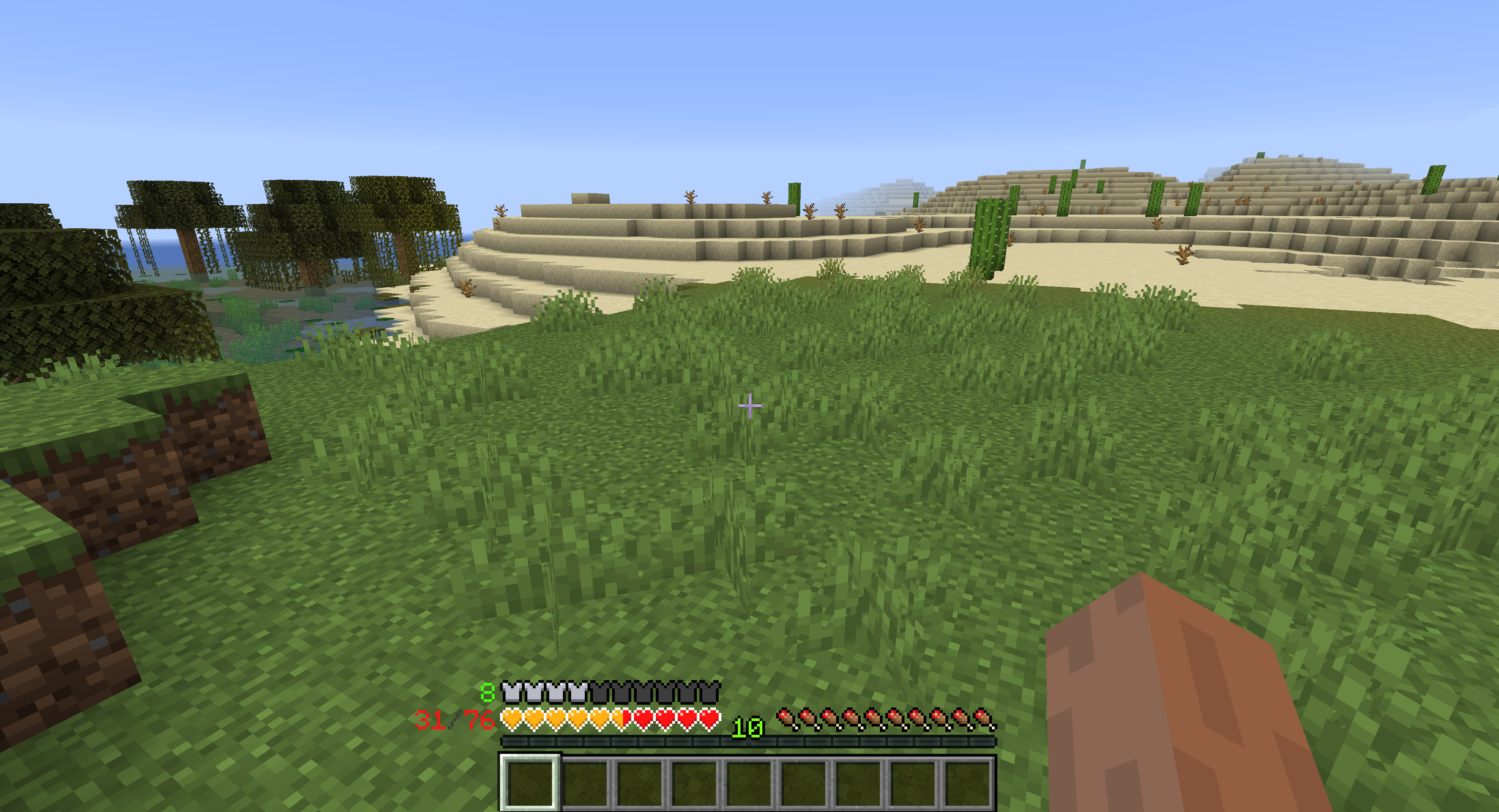
- Armor values above 20 get shown in the armor bar [see below]
- Resistance gets rendered as a border around the armor bar [see below]
- Armor Toughness overlay for the armor bar [see below]
- Protection Enchantment overlay for the armor bar [see below]
- Multiple health bars get stacked onto one colored bar [see below]
- Absorption gets rendered as a border around the health bar [see below]
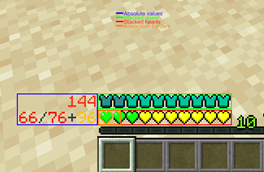
- Armor and health values get shown as text next to their respective bars [see below]
- Fully configurable [see below]
- Clientside ONLY [no need to put this on your server]
- Please note that AttributeFix is required if armor points are handled via attribute modifiers to reach more than 30 armor points. (Not required when playing old versions of Minecraft)
- Some mods which override/draw over the armor/health bar may be incompatible and must either be removed or some config setting must be changed for this mod to work correctly
Here you can find a list of currently supported Minecraft versions.
Please note that only the latest version of this mod will ever receive support and that Minecraft versions in the 'Unsupported' column may not receive any updates.
What's up with my new armor bar? How does it work?:
Usually when playing minecraft, your armor bar will only consist of up to 10 silver armor icons.
These 10 icons allow minecraft to display up to 20 armor points.
But somethimes, when playing with mods or LuckyBlocks, displaying up to 20 points is simply not enough.
That's when ArmorPoints++'s colored icons come into place!
They allow up to 240 armor points to be displayed within your armor bar.
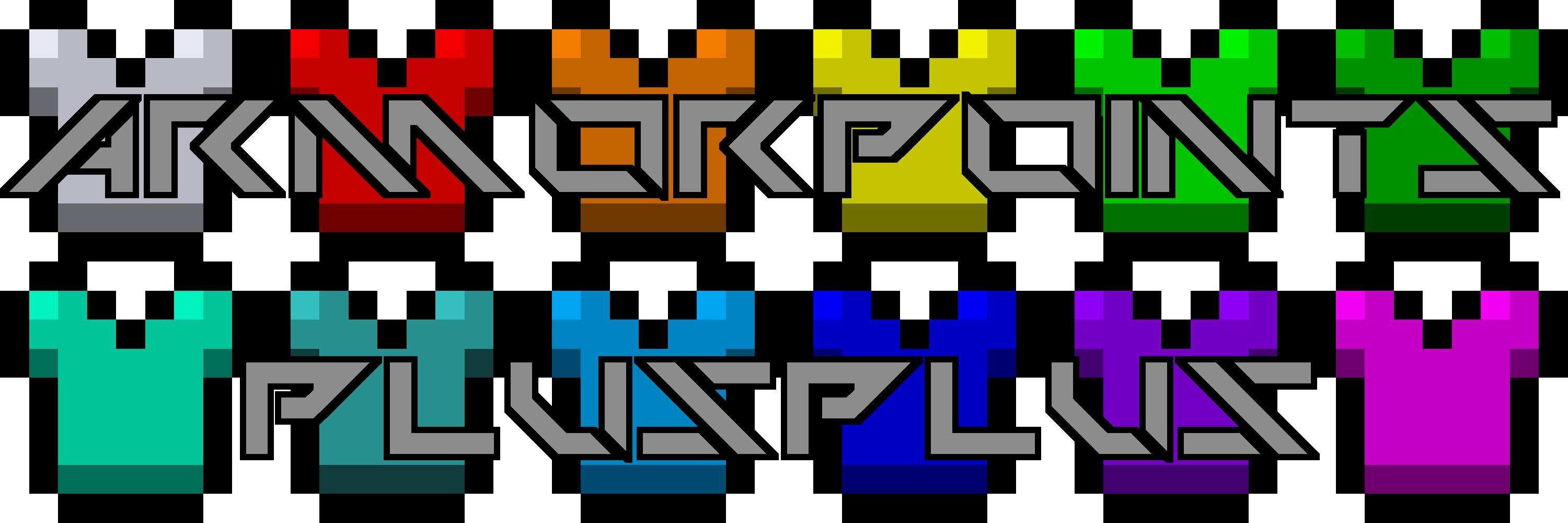
There are a total of 12 different colors your armor bar can have (including the vanilla one).
Below will be an overview of all the colors; you'll see ingame screenshots over at the screenshots-tab.

This icon looks like the vanilla one, because it is exactly that. No additional meaning, no hidden things, just up to 20 plain armor points as you're used to see.

Now it's getting interesting… When you see this icon in your armor bar, your armor exceeded the mark of 20 points.

And just like red, this one is just displaying a higher armor value. In this case, it is 41 – 60 points.

This icon tells you that you're reached the area of 61 – 80 armor points.

You've nearly reached the 100 points mark when you see this icon in your armor bar.

And now… now what? Does there even exist armor that gives you more than 100 points? Sadly yes, otherwise this mod would be pretty useless, wouldn't it?

I don't even know why we're here… 121 – 140 points is an incredible amount, right?

I think, I just did this color, to fill up some empty space in my texture file… but it also displays 141 – 160 points!

Now we're nearing the end of my icon pallete. 161 – 180 points! We've nearly done it! Just some more!

Ok, why are you even doing this now? Is there any point of having 181 – 200 armor points?

I think you're overdoing it a little… you already turned invincible at 25 points, but now… now you got over 200 of them!

At this point even I stopped doing more icons, because… which sane humen would create armor that gives you 221 – 240 points???
You said something about resistance borders?:
Yeah, when turned on and if you have the minecraft:resistance effect, you'll see a faint red border around your armor bar.
Each 2 icons surrounded by this border indicate one level of the effect, because… you really turn invincible at resistance 5!

Example for resistance 3 at 7 armor points. Note: How many icons get shown for a resistance of 1 can be set in the config.
Armor Toughness overlay? Yes – it's here!
Your very precious armor toughness will get shown as an overlay on top of your armor bar. Awesome!
Whenever you see two of these little icons, you know that you got 1 or 2 (rounded up) points of armor toughness.

Yeah. That's about it… not that spectacular, really. Note: How many icons get shown for a toughness of 1 can be set in the config.
Protection as an overlay? You can now see it without even opening your inventory!
These overlays will show the combined value of all types of protection (Fire Protection, Protection, etc.) on your armor items.
Similar to armor toughness, one icon shows a value of 1 or 2 (rounded up) of combined protection.

Quite shiny, isn't it? Note: How many icons get shown for a protection of 1 can be set in the config.
Multiple health bars in one? What do the colors mean?:
When playing minecraft, you sometimes get extra hp through the minecraft:health_boost effects or some other mod.
Those hearts then get displayed as an additional bar, if that gets filled up, a third bar gets added and so on.
Health stacking completely removes those additional health bars and replaces them with one single, colored one.
Using this feature of ArmorPoints++ will ensure that your screen is never cluttered with too many hearts.

Those hearts really are something! When you get a lot of these red little beasts, they usually clutter your screen. With this mod, you only get to see red hearts when you have 1 – 20 hp.

Orange hearts, much like the orange armor icon, show you that you have more hearts than usual. 21 – 40 in this case.

Yellow it is! You have now 41 – 60 hp.

Lime reminds me of life. And you have a lot of it [ 61 – 80 hp ].

Green seems a little boring after all those flashy colors… and still, it exists! [ 81 – 100 hp ]

'Turquoise'… what an odd name for a color… but it tells you that you have now more than 100 hp!

Good ol' cyan… how nice to have 121 – 140 hp.

Blue, like water, right? But you won't drown today, 'cause you got yourself 141 – 160 hp!

Another shade of blue, ha? Mabe you'll drown now, now that you've gone so deep into the water that you can't even see the sun anymore. [ 161 – 180 hp ]

Aaaah… purple… what a nice feeling to see nearly 200 hp in one health bar!

And now, well… there aren't any more colors left… more than 200 – 220 hp will be shown by this little pink heart 🙂
Where'd my absorption hearts go?:
Do not worry, my friend, Your absorption hearts aren't gone!
They just moved.
You can now find them as a border around your hearts.
Each pixel of your heart border displays 4 absorption hp [ = 2 absorption hearts ], making it 80 absorption points per heart border or 800 [ = 400 absorption hearts ] for your entire health bar.


Some examples for absorption borders on vanilla hearts [ I won't put all of them here, making all those individual images took long enough ] Note: How many pixels get shown for one absorption heart can be set in the config.
You said, I could see absolute health/armor values?:
Yeah. Your armor, health and absorption values get shown as text beneath their respective bar in your hud.
If you want to see this ingame, I recommend checking out the screenshots-tab.
Shhh! Let me tell you a secret: You can turn this off in the config if you don't like it, and you can even configure every color of the text!
Fully configurable? Let me see the config!
Notice: Curseforge apparently forgot on how to interpret tabs… sorry.
You can see the config files here (prettier than on Curseforge), too: 1.8 [v1.2] 1.12 [v2.0.0] 1.16 [v2.0.0]
1.8 [v1.2]:
Are you ready to see the config?
Really?
It's kinda ugly, you know…
But here it is anyways:
[ You can toggle all the features of ArmorPoints++ individually here. ]
# Configuration file
general {
B:debug=false
# Determines whether or not the numeric armor value should be shown beside the armorbar [default: true]
B:showArmorValue=true
# Determines whether or not the numeric health value should be shown beside the healthbar [default: true]
B:showHealthValue=true
# Determines whether or not the current resistance value should be shown as a border around armor values [default: true]
B:showResistanceBorder=true
# Determines whether or not the armorbar should be drawn when armor equals to zero [default: false]
B:showZeroArmor=false
# Determine which type of suffix should be used for number grouping (possibilities: SCI, GER, ENG) [default: SCI]
S:siSuffixType=SCI
# Determines whether one color-coded health bar (true) or the vanilla health bars (false) should be used [default: true]
B:stackHealth=true
# Determines whether or not the vanilla armor bar should be rendered instead of the custom one [default: false]
B:vanillaArmor=false
}
textcolors {
# The textcolor used for absorption hearts [default: 0xffc300]
S:absorptionColor=0xffc300
# The textcolor used when the armor value is equal to 25 [default: 0xff8811]
S:armorEqual25Color=0xff8811
# The textcolor used when the armor value is greater than 25 [default: 0xff3311]
S:armorGreater25Color=0xff3311
# The textcolor used when the armor value is smaller than 25 [default: 0x44ff11]
S:armorSmaller25Color=0x44ff11
# The textcolor used when resistance is greater than 5 [default: 0x4c0000]
S:fullResistanceColor=0x4c0000
# The textcolor used when the player is neither poisoned nor withered [default: 0x000000]
S:heartColor=0xff1313
# The textcolor used when the player is poisoned [default: 0x947818]
S:heartPoisonColor=0x947818
# The textcolor used when the player is withered [default: 0x2b2b2b]
S:heartWitherColor=0x2b2b2b
# The textcolor used when no armor is equipped [default: 0x3d3d3d]
S:noArmorColor=0x3d3d3d
# The textcolor used for separation characters [default: 0x3d3d3d]
S:valueSeparatorColor=0x3d3d3d
}
1.12 [v2.0.0+]:
This one is the most pretty code-wise…
I quite like the forge 1.12 config system, to be honest.
[ You can toggle all the features of ArmorPoints++ individually here. ]
# Configuration file
debug {
# You don't want this to be on. Believe me
# Available: true, false [default: false]
B:debug=false
}
general {
# Enable custom armor bar
# Available: true, false [default: true]
B:enableArmorBar=true
# Enable custom health bar
# Available: true, false [default: true]
B:enableHealthBar=true
# Show absorption as border around health
# Available: true, false [default: true]
B:showAbsorption=true
# Show armor value text next to bar
# Available: true, false [default: true]
B:showArmorValue=true
# Show armor bar when armor is zero
# Available: true, false [default: false]
B:showArmorWhenZero=false
# Show health value text next to bar
# Available: true, false [default: true]
B:showHealthValue=true
# Show protection as overlay over armor
# Available: true, false [default: true]
B:showProtection=true
# Show resistance as border around armor
# Available: true, false [default: true]
B:showResistance=true
# Show toughness as overlay over armor
# Available: true, false [default: true]
B:showToughness=true
# Suffix type used for displaying armor values
# Available: SI, SCI, GER, ENG [default: SI]
S:suffix=SI
}
representative {
# Number of pixels to show an absorption of 1
# Available: 0.0 ~ 200.0 [default: 0.25]
# Min: 0.0
# Max: 200.0
D:absorption=0.25
# Number of icons to show a protection of 1
# Available: 0.0 ~ 10.0 [default: 0.5]
# Min: 0.0
# Max: 10.0
D:protection=0.5
# Number of icons to show a resistance of 1
# Available: 0.0 ~ 10.0 [default: 2.0]
# Min: 0.0
# Max: 10.0
D:resistance=2.0
# Number of icons to show a armor toughness of 1
# Available: 0.0 ~ 10.0 [default: 0.5]
# Min: 0.0
# Max: 10.0
D:toughness=0.5
}
textcolors {
# Color of absorption
# Available: 0x000000 ~ 0xffffff [default: %s]
S:absorption=0xffc300
# Color when armor = 0
# Available: 0x000000 ~ 0xffffff [default: %s]
S:armor0=0x3d3d3d
# Color when armor = 25
# Available: 0x000000 ~ 0xffffff [default: %s]
S:armorEQ25=0xff8811
# Color when armor > 25
# Available: 0x000000 ~ 0xffffff [default: %s]
S:armorGT25=0xff3311
# Color when armor < 25
# Available: 0x000000 ~ 0xffffff [default: %s]
S:armorLT25=0x44ff11
# Color normal status
# Available: 0x000000 ~ 0xffffff [default: %s]
S:heart=0xff1313
# Color when poisoned
# Available: 0x000000 ~ 0xffffff [default: %s]
S:heartPoison=0x947818
# Color when withered
# Available: 0x000000 ~ 0xffffff [default: %s]
S:heartWither=0x2b2b2b
# Color when resistance > 5
# Available: 0x000000 ~ 0xffffff [default: %s]
S:resistanceFull=0x4c0000
# Color of separator
# Available: 0x000000 ~ 0xffffff [default: %s]
S:separator=0x3d3d3d
}
1.16 [v2.0.0+]:
As I support multiple versions of Minecraft and each version has it's own config system (why, forge :c), there's multiple of them…
So… here it is… the fabled 1.16+ configuration file, which can be used to toggle every single feature of ArmorPoints++.
[general]
# Show protection as overlay over armor
# Available: true, false [default: true]
showProtection = true
# Show toughness as overlay over armor
# Available: true, false [default: true]
showToughness = true
# Show absorption as border around health
# Available: true, false [default: true]
showAbsorption = true
# Show health value text next to bar
# Available: true, false [default: true]
showHealthValue = true
# Show armor value text next to bar
# Available: true, false [default: true]
showArmorValue = true
# Show armor bar when armor is zero
# Available: true, false [default: false]
showArmorWhenZero = false
#Available: SI, SCI, GER, ENG [default: SI]
suffix = "SI"
# Show resistance as border around armor
# Available: true, false [default: true]
showResistance = true
# Enable custom health bar
# Available: true, false [default: true]
enableHealthBar = true
# Enable custom armor bar
# Available: true, false [default: true]
enableArmorBar = true
[general.debug]
# You don't want this to be on. Believe me
# Available: true, false [default: false]
debug = false
[representative]
# Number of pixels to show an absorption of 1
# Available: 0.0 ~ 200.0 [default: 0.25]
#Range: 0.0 ~ 200.0
absorption = 0.25
# Number of icons to show a protection of 1
# Available: 0.0 ~ 10.0 [default: 0.5]
#Range: 0.0 ~ 10.0
protection = 0.5
# Number of icons to show a armor toughness of 1
# Available: 0.0 ~ 10.0 [default: 0.5]
#Range: 0.0 ~ 10.0
toughness = 0.5
# Number of icons to show a resistance of 1
# Available: 0.0 ~ 10.0 [default: 2.0]
#Range: 0.0 ~ 10.0
resistance = 2.0
[textcolors]
# Color when armor = 25
# Available: 0x000000 ~ 0xffffff [default: 0xff8811]
armorEQ25 = "0xff8811"
# Color when armor > 25
# Available: 0x000000 ~ 0xffffff [default: 0xff3311]
armorGT25 = "0xff3311"
# Color when poisoned
# Available: 0x000000 ~ 0xffffff [default: 0x947818]
heartPoison = "0x947818"
# Color when armor < 25
# Available: 0x000000 ~ 0xffffff [default: 0x44ff11]
armorLT25 = "0x44ff11"
# Color when withered
# Available: 0x000000 ~ 0xffffff [default: 0x2b2b2b]
heartWither = "0x2b2b2b"
# Color of absorption
# Available: 0x000000 ~ 0xffffff [default: 0xffc300]
absorption = "0xffc300"
# Color when resistance > 5
# Available: 0x000000 ~ 0xffffff [default: 0x4c0000]
resistanceFull = "0x4c0000"
# Color of separator
# Available: 0x000000 ~ 0xffffff [default: 0x3d3d3d]
separator = "0x3d3d3d"
# Color when armor = 0
# Available: 0x000000 ~ 0xffffff [default: 0x3d3d3d]
armor0 = "0x3d3d3d"
# Color normal status
# Available: 0x000000 ~ 0xffffff [default: 0xff1313]
heart = "0xff1313"
FAQ [ please read before asking anything ]:
Why did you create this mod?
Well… I was playing a lot of LuckyBlocks and I just couldn't find any good mods (in 1.8) for doing what Armorpoints++ does,
so I created one myself. – I hope, you like it!
Why aren't there any versions before 1.1.1?
So… about that… There was a lot of internal testing going on and I didn't name those test versions beta or so,
so the first release just happened to be v1.1.1.
Why isn't <version> supported?
I just so happen to be human and don't want to bother with too many different versions,
so I'll mostly just update the 1.8 version and the releases for the latest version of Minecraft.
[ 1.8 because this mod was created primarily to help with LuckyBlocks ]
Well… since I released this mod, the main version shifted from 1.8 to 1.16…
And forge 1.8 currently won't compile, so is the 1.8 version dead? Hopefully not!
Can you implement <feature>? [ Is there anyting missing you want to see in this mod? ]
Open a new Issue here using the "Feature request"-Template, if the feature fits this mod, I'll happily implement it for all supported versions.
Can you port this mod to <version>?
Head over to https://github.com/Cheos137/ArmorpointsPlusplus/projects/3 – if the version you'd like to see this mod ported to
is not there (and not in the unsupported column), ask me 🙂
I will answer you for sure, whether or not I'll make a port to the requested version.
I found a bug, what should I do?
Open a new Issue here using the "Bug report"-Template, I'll then see what I can do.
Resource pack support?
[< v2.0.0] If you're making a resourcepack that supports this mod, you'll have to override the
armorplusplus:textures/gui/armor.png and the
armorplusplus:textures/gui/health.png texture.
[v2.0.0+] As of v2.0.0, both atlases mentioned above are merged into one single file:
armorpointspp:textures/gui/icons.png
I know this is not perfectly ideal, but I don't intend to overlay a color above the vanilla icons because it would limit my possibilities.
May I use this mod in my modpack?
Yes, of course, I'd appreciate it;
But please don't write me a dm or something like that. I don't like full inboxes. 😛
Once this mod reaches 5k downloads I'm gonna add a little easter-egg ^^ — Well you did it! The 'easter-egg' (?) (or something hidden 😛 ) will be in v2.0.0 release.

Add a comment