


 Get 0.05 TON 💎
Earlier Versions
| Name | Size | Uploaded | Game Version | Downloads | |
| BackpacksRemastered-2022.1.8 release | 137.86 KB | Nov 16, 2022 | 1.19.3 | 605 |  Download Download |
| BackpacksRemastered-2022.1.7 release | 138.71 KB | Oct 21, 2022 | 1.19.1 | 1,031 | Download |
| BackpacksRemastered-2022.1.6 release | 138.78 KB | Oct 19, 2022 | 1.19.1 | 216 | Download |
| BackpacksRemastered-2022.1.5 release | 138.91 KB | Sep 23, 2022 | 1.19.1 | 1,190 | Download |
| BackpacksRemastered-2022.1.4 release | 138.90 KB | Sep 14, 2022 | 1.19.1 | 1,786 | Download |
| BackpacksRemastered-2022.1.3 release | 139.99 KB | Jun 15, 2022 | 1.19 | 9,764 | Download |
| BackpacksRemastered-2022.1.1 release | 139.20 KB | Jan 23, 2022 | 1.17 | 18,316 | Download |
| BackpacksRemastered-2021.1.1 release | 138.14 KB | Jun 28, 2021 | 1.17 | 16,680 | Download |
| BackpacksRemastered-2020.0.5 release | 132.29 KB | Oct 14, 2020 | 1.16 | 32,112 | Download |
| BackpacksRemastered-2020.0.4 release | 133.01 KB | Apr 29, 2020 | 1.15 | 10,743 | Download |
| BackpacksRemastered-2020.0.3 release | 121.92 KB | Apr 17, 2020 | 1.15 | 1,344 | Download |
| BackpacksRemastered-2020.0.2 release | 121.35 KB | Jan 11, 2020 | 1.15 | 6,589 | Download |
| BackpacksRemastered-2020.0.1 release | 121.44 KB | Dec 27, 2019 | 1.15 | 1,370 | Download |
| BackpacksRemastered-2019.1.7 release | 93.50 KB | Dec 19, 2019 | 1.15 | 888 | Download |
| BackpacksRemastered-2019.1.6 release | 93.45 KB | Sep 9, 2019 | 1.14 | 5,925 | Download |
| BackpacksRemastered-2019.1.5 release | 93.41 KB | Sep 9, 2019 | 1.14 | 164 | Download |
| BackpacksRemastered-2019.1.4 release | 93.46 KB | Sep 5, 2019 | 1.14 | 740 | Download |
| BackpacksRemastered-2019.1.3 release | 91.88 KB | Sep 1, 2019 | 1.14 | 542 | Download |
| BackpacksRemastered-2019.1.2 release | 91.69 KB | Sep 1, 2019 | 1.14 | 129 | Download |
| BackpacksRemastered-2019.1.1 release | 91.63 KB | Aug 15, 2019 | 1.14 | 2,346 | Download |
| BackpacksRemastered-2019.1.0 release | 88.59 KB | Aug 10, 2019 | 1.14 | 575 | Download |
| BackpacksRemastered-2019.0.9 release | 87.20 KB | Aug 9, 2019 | 1.14 | 644 | Download |
| BackpacksRemastered-2019.0.8 release | 88.03 KB | Jul 24, 2019 | 1.14 | 2,042 | Download |
| BackpacksRemastered-2019.0.7 release | 84.48 KB | Jul 19, 2019 | 1.14 | 2,006 | Download |
| BackpacksRemastered-2019.0.6 release | 85.59 KB | Jul 17, 2019 | 1.14 | 612 | Download |
| BackpacksRemastered-2019.0.5 release | 67.35 KB | Jul 15, 2019 | 1.14 | 486 | Download |
| BackpacksRemastered-2019.0.4 release | 66.75 KB | Jul 14, 2019 | 1.14 | 359 | Download |
| BackpacksRemastered-2019.0.3 release | 54.33 KB | Jul 10, 2019 | 1.14 | 819 | Download |
| BackpacksRemastered-2019.0.2 release | 45.01 KB | Jul 9, 2019 | 1.14 | 282 | Download |
| BackpacksRemastered-2019.0.1 release | 36.72 KB | Jun 26, 2019 | 1.14 | 1,313 | Download |
| Backpacks-0.1.3 release | 44.04 KB | Oct 16, 2015 | 1.9 | 500,887 | Download |
| Backpacks-0.1.2 release | 44.92 KB | Oct 3, 2015 | 1.8.1 | 136,709 | Download |
| Backpacks-0.1.1 release | 44.92 KB | Aug 21, 2015 | 1.8.1 | 91,401 | Download |
| Backpacks-0.1.0 release | 44.86 KB | Aug 3, 2015 | 1.8.1 | 147,925 | Download |
| Backpacks-0.0.9 release | 44.79 KB | Jul 26, 2015 | 1.8.1 | 15,408 | Download |
| Backpacks-0.0.8 release | 42.23 KB | Jul 20, 2015 | 1.8.1 | 45,466 | Download |
| Backpacks-0.0.7 release | 41.44 KB | Jul 13, 2015 | 1.8.1 | 1,669 | Download |
| Backpacks-0.0.6 release | 28.02 KB | Jul 11, 2015 | 1.8.1 | 6,868 | Download |
| Backpacks-0.0.5 release | 26.74 KB | Jul 6, 2015 | 1.8.1 | 1,181 | Download |
| Backpacks-0.0.4 release | 58.89 KB | Jun 24, 2015 | 1.8.1 | 1,520 | Download |
| Backpacks-0.0.3 release | 25.58 KB | Jun 19, 2015 | 1.8.1 | 1,084 | Download |
| Backpacks-0.0.2 release | 25.57 KB | Jun 17, 2015 | 1.8.1 | 1,891 | Download |
Screenshots


Description
Backpacks
 BackpacksRemastered adds — well — backpacks, to Minecraft, the catch being without the use of any client-side modifications. Completely vanilla backpacks! This plugin was the first of its kind due to the fact that it adds backpacks as an
 ItemStack that will persist its inventory even without the plugin installed! Backpacks also allows you to inspect the NBT data of items which is handy for getting an under-the-hood look at how the game works.
Features
- High version compatibility – Backpacks supports a vast number of old versions and will most like support many more to come. Even if a version isn’t explicitly stated as being supported, give it a try.
- NBT Data Storage – Backpack data is stored in that item’s NBT data (the same way Minecraft stores data about enchantments). This means you don’t have to worry about databases, configs, or anything like that. You can even backup the world and all of the backpack’s contents will be backed up with it.
- Fully functioning backpack item – Backpacks from this plugin are just like backpacks from the mod. They can be traded, destroyed, cloned, etc.
- Different backpack types – This plugin introduces many different backpack types that extend far beyond just simply storage. Check them out under the crafting section of this page.
- Highly customizable – Almost every aspect of the backpacks is customizable, including the crafting recipe! So if you don’t like the default recipes, change them to something you do.
- Multilingual support – Backpacks uses a proprietary automatic translation system known as i18nExtractor in its build chain. This means that you can automatically translate Backpacks into ANY language supported by Google Translate. See the GitHub about building Backpacks in your language.
Commands
- /bp – Shows help information.
- /bp help – Also shows help info.
- /bp config:reload – Reloads the configuration.
- /bp info – Displays info about the plugin.
- /bp item:info – Lists NBT data keys about the item you are holding.
- /bp item:info:get – Gets the type/data of a particular NBT data key.
- /bp item:give – Gives a player a backpack.
- /bp split – Splits the backpack held in your hand.
- /bp materials – Lists all item types available to custom recipes in the configuration.
- /bp materials:search – Searches all of these materials for a specified one.
- /bp vfurnace – Lists all virtual furnaces and that vfurnace’s current inventory location, whether it be a chest, player’s inventory, the ground, etc. Note: A virtual furnace is the underlying furnace operation tied to a furnace backpack.
Permissions
See a full list of permissions (as well as their default status) in the plugin.yml
Configuration
You can view the configuration file here.
Crafting
Backpack recipes, names, lore, etc. may be customized via the configuration. Below are the defaults:
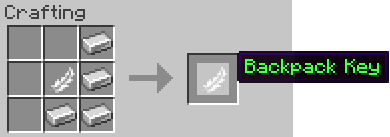
Key – Used to open the backpacks.
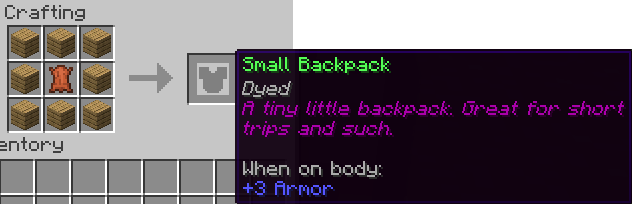
Small – Smallest of the backpacks. Size of normal chest.
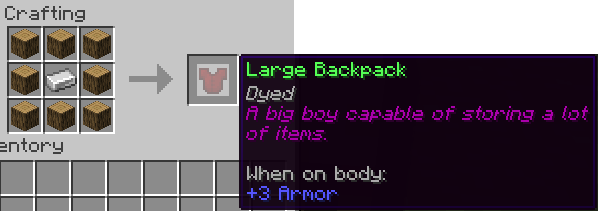
Large – A pretty dang large backpack. Size of double chest.
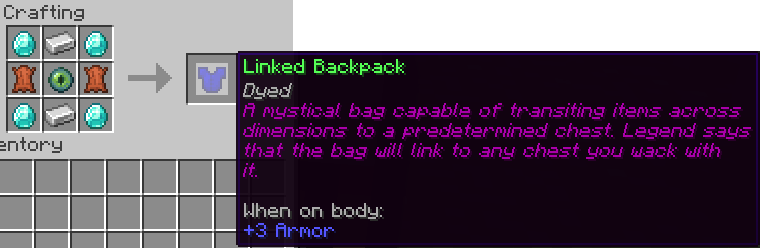
Linked – A backpack capable of interfacing with many different types of containers: chest, double chests, furnaces, etc. It works at any distance, even across dimensions. It is the ultimate backpack. To link it, hold it in your hand and left-click the desired container.
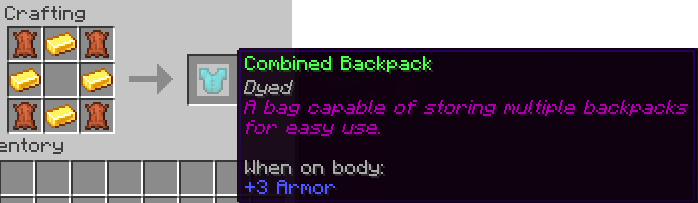
Combined – A backpack which can store multiple backpacks for quick use.
To add, place the combined backpack along with the to-be-inserted bag in a crafting grid.
To remove, see: /bp split.
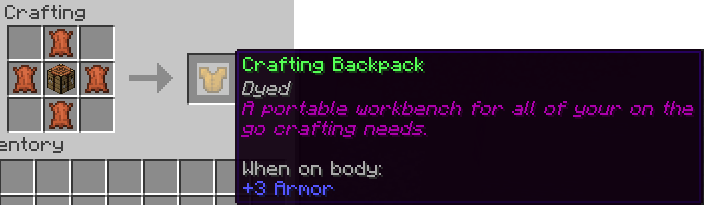
Craft – A crafting table in a backpack.
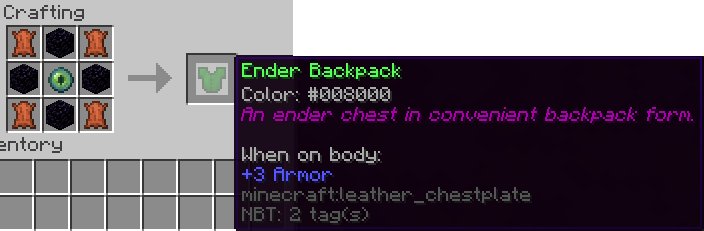
Ender – An enderchest in a backpack.
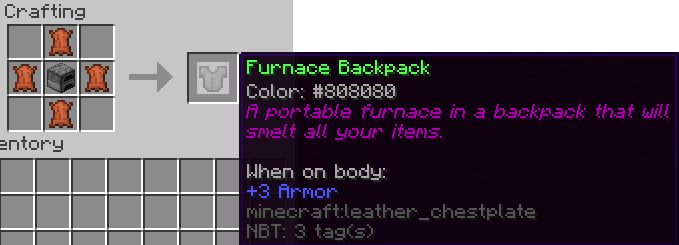
Furnace – A first of its kind portable furnace.
Usage
Backpacks exist as chestplate items, however, they may be combined in a crafting grid w/ any item that can be equipped in this slot. To open, right-click with a backpack key in your hand.
Backpacks may be removed from their combined item using the /bp split command.
Donate
You can donate by using the button at the top of the page or here. Any donation is appreciated. 😀
Installation
The installation is literally just drag and drop, so if you are used to installing plugins, you shouldn’t have to read this next part.
- Locate your “plugins” folder which is located in your servers home folder.
- Drop the downloaded .jar file into the plugins folder.
- Run the server once to complete the installation!
- NOTE: Backpacks will create some files. Do NOT delete or modify these files unless you know what you are doing. You could mess up someones backpack.
Showcases
NOTE: This tutorial is of a much older version of backpacks. ITS NOT EVEN REMOTELY THE SAME.
Known Bugs
See the open issues here for a list of known bugs.
10-19-2022: I changed the project name from Backpacks -> BackpacksRemastered because bukkit had a bug where I couldn’t update the project settings for the longest due to conflicting legacy projects by the same name (you used to be able to do that). Anyhow, its better this way.



Add a comment