

 Get 0.05 TON 💎
Earlier Versions
| Name | Size | Uploaded | Game Version | Downloads | |
| Batty's Coordinates for Forge-1.7.10_1.4.3.jar release | 12.81 KB | Jul 10, 2014 | 1.7.10 | 25,323 |  Download Download |
| Batty's Coordinates for Forge-1.7.2_1.4.2.jar release | 12.81 KB | Jun 10, 2014 | 1.7.2 | 1,317 | Download |
| Batty's Coordinates for Forge-1.7.2_1.4.1.jar release | 12.38 KB | May 18, 2014 | 1.7.2 | 324 | Download |
| Batty_s_Coordinates_for_Forge-1.7.2_1.4.0.jar release | 12.38 KB | Mar 26, 2014 | 1.7.2 | 409 | Download |
| Batty_s_Coordinates_for_Forge-1.7.2_1.3.0.jar release | 9.07 KB | Feb 12, 2014 | 1.7.2 | 334 | Download |
| Batty_s_Coordinates_for_Forge-1.7.2_1.2.1.jar release | 7.82 KB | Jan 13, 2014 | 1.7.2 | 477 | Download |
| Batty_s_Coordinates_Mod_for_Forge_v1.1.1.zip release | 7.14 KB | Sep 28, 2013 | 1.6.4 | 706 | Download |
| Batty_s_Coordinates_Mod_for_Forge_v1.1.0.zip release | 7.14 KB | Sep 21, 2013 | 1.6.2 | 360 | Download |
| Batty_s_Coordinates_for_Forge_v1.0.1.zip release | 7.12 KB | Jul 27, 2013 | 1.6.2 | 248 | Download |
| Batty's Coordinates Mod for Forge (1.8.0_1.5.0) beta | 12.68 KB | Dec 6, 2014 | 1.8 | 16,852 | Download |
Screenshots


Description
Batty's Coordinates for Forge
Please Note: This Mod was discontinued, replaced by the Batty's Coordinates PLUS Mod for Forge. See here for the new Mod.
See your Location at a glance
The X, Y and Z coordinates that locate the player's position in the world are normally displayed on the F3 Debug screen.
This mod displays them discreetly in a corner of the main game screen, so you don't have to leave F3 open to see them.
It also indicates the direction that you are facing, in compass-direction terms.


Video Spotlight
A Mod Spotlight (covering all variations of my mods) by EddCase and OddyC of TheMobCave.
Bigger? Better?
If you like this mod but would like a few more features, why not check out Batty's Coordinates Mod PLUS! for Forge? – Coordinates, an inbuilt Stopwatch Timer, Biome reminder, and an indicator of how your coordinates will change when you walk.
Controls
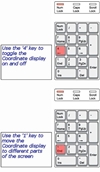
From version 1.7.2_1.3.0 the Controls have been completely revamped
All controls use keys from the NumPad (Be sure to have NumLock set on!)

NOTE 1 Coordinates can appear:
- Top Left
- Top Right
- Bottom Right
NOTE 2 All of the Control Keys are fully reconfigurable via the Options Menu in-game
NOTE 3 Screen locations and display modes are remembered when you quit Minecraft
Custom Colours
You can customise the colours in which Batty's Coordinates appear on the screen.
This done by creating a small file called BatMod.properties in your .minecraft folder.
NOTE: Be very careful that the file is called BatMod.properties and not BatMod.properties.txt especially if using Notepad to create it!
If this file is not present, the Coordinates all appear in the default colours.
The following lines are permitted in the file:
- Coords.shade = <true or false>
- Coords.colours.TitleText = <colour from the list>
- Coords.colours.PosCoordText = <colour from the list>
- Coords.colours.NegCoordText = <colour from the list>
- Coords.colours.CoordText = <colour from the list>
- Coords.colours.CompassText = <colour from the list>
NOTE 1: PosCoordText and NegCoordText can be used to distinguish positive and negative coordinates from each other by giving them different colours
NOTE 2: You can still use CoordText, and this will override anything you put in PosCoordText and NegCoordText
The full list of recognised colours:

(*Note* that you must type all of the entries exactly as they appear here – capitals and lowercase – or they will be ignored and the default colours will be used by the game)
So, for example, if you like all-white lettering and no shaded panel, make this file:
BatMod.properties

Compatibility
Batty's Coordinates for Forge is designed to run under Minecraft Forge. It will therefore be compatible with other Forge mods that you load, within the rules structure of Forge.
Installing
Make sure you have Forge installed: download and run the latest recommended Forge installer.
Download Batty's Coordinates for Forge .jar file and place it in your /.minecraft/mods folder. (%appdata%/.minecraft/mods)
Create the /mods folder if it does not already exist.
Select the latest Forge profile in the Minecraft Launcher, or MagicLauncher.
Check that Batty's Coordinates for Forge has been recognised as an External Mod.
Run Minecraft from the Launcher.




Add a comment