


 Get 0.05 TON 💎
Earlier Versions
| Name | Size | Uploaded | Game Version | Downloads | |
| BedCraftAndBeyond-1.8.9-2.0.3.jar release | 174.55 KB | Aug 12, 2016 | 1.8.9 | 7,213 |  Download Download |
| BedCraftAndBeyond-1.10.2-2.4.1.jar release | 302.25 KB | Jul 27, 2016 | 1.10.2 | 9,487 | Download |
| BedCraft and Beyond - Release 2.4 release | 308.75 KB | Jul 13, 2016 | 1.10.2 | 920 | Download |
| BedCraftAndBeyond-1.8.9-2.0.1.jar release | 149.78 KB | Mar 6, 2016 | 1.8.9 | 3,933 | Download |
| bedcraftbeyond-1.7.10-1.1.5.jar release | 130.66 KB | Jan 29, 2016 | 1.7.10 | 16,447 | Download |
| bedcraftbeyond-1.7.10-1.1.0b.jar release | 128.44 KB | Jan 12, 2016 | 1.7.10 | 2,438 | Download |
| bedcraftbeyond-1.7.10-1.1.0a.jar release | 128.40 KB | Dec 6, 2015 | 1.7.10 | 660 | Download |
| bedcraftbeyond-1.7.10-1.1.0.jar release | 128.40 KB | Dec 2, 2015 | 1.7.10 | 434 | Download |
| bedcraftbeyond-1.7.10-1.0.5a.jar release | 115.79 KB | Jul 29, 2015 | 1.7.10 | 9,104 | Download |
| bedcraftbeyond-1.7.10-1.0.5.jar - DEOBF release | 114.08 KB | Jul 27, 2015 | 1.7.10 | 463 | Download |
| bedcraftbeyond-1.7.10-1.0.4.jar - DEOBF release | 113.96 KB | Jul 26, 2015 | 1.7.10 | 457 | Download |
| BedCraftAndBeyond-1.10.2-2.3.5.jar beta | 260.37 KB | Jul 1, 2016 | 1.10.2 | 794 | Download |
| BedCraftAndBeyond-1.9.4-2.3.4.jar beta | 262.94 KB | Jun 30, 2016 | 1.10.2 | 290 | Download |
| BedCraftAndBeyond-1.9.4-2.3.3.jar beta | 236.38 KB | Jun 23, 2016 | 1.9.4 | 330 | Download |
| BedCraftAndBeyond-1.9.4-2.3.2.jar beta | 236.67 KB | Jun 20, 2016 | 1.9.4 | 289 | Download |
| BedCraftAndBeyond-1.8.9-2.0.jar beta | 149.57 KB | Mar 6, 2016 | 1.8.9 | 508 | Download |
| bedcraftbeyond-1.7.10-1.1.3.jar beta | 129.08 KB | Jan 27, 2016 | 1.7.10 | 454 | Download |
| bedcraftbeyond-1.7.10-1.1.1.jar beta | 128.93 KB | Jan 13, 2016 | 1.7.10 | 313 | Download |
| BedCraftAndBeyond-1.9.4-2.3.0.jar alpha | 227.90 KB | Jun 20, 2016 | 1.9.4 | 317 | Download |
Screenshots


Description
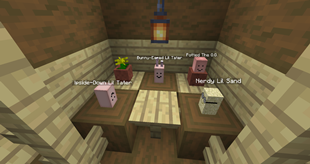
Add over 3000 different combinations of beds to your world (and that's just with Vanilla Planks, even MORE when you add other mods to your game!), along with rugs that connect up the sides of other blocks!
Wooden Beds (and Frames)
(Previously known as Colored Beds)
So, frames. There's a new concept. We made a pretty major change since 1.8: Wooden beds are split up into frames and linens.
Why, you ask? The linens let you dye your bed fabrics to ANY color you want, and the frames can be made out of any block you want. Yes, even the sparkly rainbow ones (soon, anyway- we're making the rainbow bed fabrics a bit more interesting) can be used now.
Yup, you read that right. Look below on how the dying mechanic works, but here's a summary of what to expect:
- An eyedropper and dye bottles, for dying shenanigans.
- A blanket item and a sheet item. (Linens – dyed to color the beds)
- A drawer item, to tuck under that bed to store your stuff.
- A frame, to put all these nice things on.
You craft a wooden frame to get started (and the stone frames too), and right click the dyed linens onto the bed to make a colored one. The drawer works the same way, too, and holds its inventory when you remove it. (Makes for a nice way to move beds around.) You'll get these items back if you break the frame, don't worry.
The recipes in JEI show oak wood, but in reality, that's a placeholder. The frame registry has final say on what can be used to craft wood and stone frames, and that's completely up to you. Whatever you have white-listed (check with "/bedcraftbeyond frames check [type] [x] [y] [z]" to see if a block in-world is a valid material for a type) is what you can craft with.
About the Frame Registry (Tech Details)
The valid frame types are controlled by a file in the config folder, and in addition, there's full ore dictionary support too. You can specify what frames to add, and what to blacklist– ever have a wood plank that just messes everything up, since it's ore-dictionary enabled? Yeah. We got rid of that little problem now.
In addition, server operators can happily modify everything in-game, just by looking at a block in world and typing out the frame modification commands:
bedcraftbeyond frames [command]
- add [type] [x] [y] [z] [all/meta] – Add a given block to the list, under frameType. (Wood, stone, etc)
- remove [type] [x] [y] [z] [all/meta] – Same as above, but removes it from the list (blacklists).
- check [type] [x, y, z] – Checks if the given block is whitelisted for [type]. Super handy if you want to see if a block is valid without crafting anything!
- list [type] – Spits out a list with all the valid frame materials for a given type.
- save [type] – Saves the current whitelist to ./config/bedcraftbeyond/frames/{type}.json. Useful for saving your list after getting it exactly the way you want it.
The Eyedropper and Dye Bottles
The eyedropper is your one-stop method to grab exactly the color you're looking for. You shift-click it in your hand and it will open a gui to slide around a few bars (or enter in codes, if that's your style) to set a color. Once you have the color you're looking for, just close the gui and it'll sync to the server. Use the eyedropper in a shaped recipe (a red, green, and blue dye, a water bottle, and the eyedropper in the middle) and you're off to making the world more colorful!
Rugs:
Rugs are like Vanilla carpets, in which they are a block that are 1/16th the height of a Wool block. The main difference being that Rugs will flow over the sides of blocks to connect to Rugs on the next block up, as well as flow over Slabs and Stair blocks in any possible orientation for either block (connecting up to the next block disabled for now for 1.8.9, will be fixed soon!). Please note their bounding box is hovering in the block space above when they are placed on top of half slabs and stairs, and they will connect to other Rugs regardless of color.

Recipe:
You can also change the color of rugs individually with any oredictionary-enabled dye.
Known Issues:
Sometimes mods add stuff that you don't want. You can blacklist and whitelist stuff by editing frame files under config/bedcraftbeyond/frames/whatever.json, where {whatever} is, well. Whatever you want. The filename doesn't matter.
Please see the following files for documentation on these files:
Documentation on Frame File Format
Example Frame File (Vanilla, Biomes O Plenty, and Forestry support)


Add a comment