

 Get 0.05 TON 💎
Earlier Versions
| Name | Size | Uploaded | Game Version | Downloads | |
| BugsysPartySystem 1.2 beta | 88.72 KB | Mar 26, 2016 | 1.9 | 907 |  Download Download |
| BugsysPartySystem 1.1 beta | 89.69 KB | Mar 22, 2016 | 1.9 | 159 | Download |
| BugsysPartySystem beta | 41.87 KB | Mar 15, 2016 | 1.9 | 123 | Download |
| BugsysPartySystem beta | 41.48 KB | Mar 14, 2016 | 1.9 | 124 | Download |
Screenshots

Description
Bugsy's Party System
With this plugin, you and your friends will be able to face new challenges with a party! With the plugin you can see other's player's health, how many blocks away from you, being able to teleport. Also you have your own private Party chest, where you keep the loot your party gathered for later distribution.
Some bugs are to be expected, as i developed/tested this alone in a plugin which requires more players, if any please leave a comment with description!

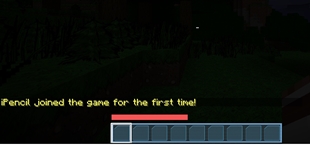
In this Image i'm Inviting the player to my party, by executing the command '/party invite <name>', below you can see the response.

In this Image, the player is accepting the invitation, by typing 'accept <name_underlined>' but you can also 'decline <name_underlined>'
_________________________
Features
- Create a party with 2+ players with a sidebar Scoreboard display with players health.
- Party Max Player is 8.
- PartyGUI with players head, location and teleportion option.
- Party Chest with all collected loot from killing enemies.
- Easy configuration and party management/creation.
- Party Chat.
- Receive Multiple Invites.
- Effects & Sounds.
- Party Prefix.
- Party roll (Will be making an indepth system for this).
Commands
- /party – Open's party GUI.
- /party invite <name> – Invites a player to your party.
- /party leave – Leaves current party
- /party kick <name> – Kicks a player from Party. If you have privileges.
- /party roll – Rolls a number between 0 and 100
- (Will be making an indepth system for this).
- /party leader <name> – Set's a new party leader
- /p <text> – Send a message through the party chat
- 'accept <leader_name> – Not a command, but the option accept the party invitation!
- 'decline <'leader_name> – Not a command, but the option to decline the party invitation!
Configuration
You can find these configurations on 'config.yml', if you want any more be sure to leave a suggestion.
Party:
# PVP Between party members
  PVP: false
# Invitation time the invitee has to accept the invitation.
  Invitation-Time: 15
# Enables teleportion between party members & Lock their movement when teleporting.
  Teleportion:
    Enable: true
    Lock-Moviment: true
# Party Prefix
  Prefix: '&c[P]&f'
# Invitee needs to be in a radious to receive the invite.
  Invite:
    Nearby: true
    Radious: 15
# More for debugging.
Player:
  Damage-Output: false
How to Play
The plugin is super easy to use and intuitive but for those who don't follow, here's an explanation.
Creating party & Inviting
Firstly make sure you have configured everything to your liking. Then get someone to party with, you can make a party with only 2 members if you want, after that just invite the player to the party with /party invite <name>, make sure the player is within the specific radius to invite.
PartyGUI/Configuration
- To open the PartyGUI, you can open it with /party , this command will open, if you're in a party, an Inventory that will show the heads of other party members, the distance from you to them in blocks, and if you have Privileges you can teleport to another party member. If you're party leader you can give another member party privileges by shift-right-click on their name, you can also enable the Party Chest, by default is disabled.
- Then the invitee has the option to 'accept <name>' or 'decline <name>', the name is the Party's Leader's Name, which appears underlined when invited. If the invitee accepts, it creates the party and adds you to it. Setting the prefix, which you can change to your liking and you now have the possibility to enter the GUI through /party.
PartyGUI/Configuration
- To open the PartyGUI, you can open it with /party, this command will open, if you're in a party, an Inventory that will show the heads of other party members, the distance from you to them in blocks, and if you have Privileges you can teleport to another party member and invite players. If you're party leader you can give another member party privileges by shift-right-click on their name, removing privileges and kicking players, you can also enable the Party Chest, by default is enabled.
- Privileges is a list of party members who have access to specific set of 'privileges', very intuitive, the player who have access to this can teleport to other players, enable/disable the party chest(May change this to only leader) and some other features yet to be implemented.
- The Party Leader is the only one who can give & remove privileges. (Some known bugs with this, fixing in next version).
Permissions
- bparty.create – Allows a player to create parties.
Known Bugs
* If you find any bugs be sure to make a comment with situation & stack trace (The error on the console)

# When receiving invite from same party and accepting, it will cause a few issues.
# All members who have privileges can give privileges to other members, only party leader should be able to.
Images






Add a comment