

 Get 0.05 TON 💎
Earlier Versions
| Name | Size | Uploaded | Game Version | Downloads | |
| Challenges v0.3 release | 11.82 KB | Jul 6, 2012 | CB 1.2.5-R4.0 | 1,425 |  Download Download |
| Challenges v0.2 release | 10.71 KB | Jul 5, 2012 | CB 1.2.5-R4.0 | 781 | Download |
| SignCheckpoints v0.1 release | 6.27 KB | Jul 4, 2012 | CB 1.2.5-R4.0 | 768 | Download |
Screenshots

Description
_____
Challenges v0.3
_____
Features:
– Create checkpoints that set the spawnpoint of players who use them
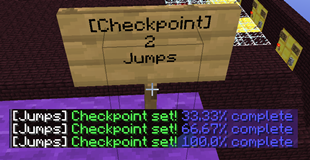
– Group checkpoints into challenges that allow players to see their progress through a map
– Make reset signs, warp to checkpoints, set your spawn anywhere
Installation:
– Download the jar and move it into the plugins folder
– Start/restart your server
Usage:
Players right-click signs to set their spawn at checkpoints throughout the map.
Create checkpoints by making a sign with "[Checkpoint]" on the first line and a name on the second line. You can repeat the same name in different challenges, but not in the same one. After making the sign, look at it and use "/ch register" to make it usable. Do the same thing with "[Reset]" to make reset signs. Use "/ch warp <checkpoint>" to teleport to a sign.
To make a new challenge use "/ch create <name>". Register signs to it with "/ch register <challenge>". List all challenges with "/ch list" and see their checkpoints with "/ch info <challenge>". Remove challenges with "/ch remove <challenge>".
Commands:
– /ch register [challenge] (Register a checkpoint sign, optionally to a challenge. This will overwrite any existing checkpoints)
– /ch warp <checkpoint> (Warp to a checkpoint sign)
– /ch create <name> (Create a new challenge)
– /ch list (List all challenges)
– /ch info <challenge> (List checkpoints in a challenge)
– /ch remove <challenge> (Remove a challenge)
– /ch spawnhere (Set your spawn here)
– /ch reset (Reset your spawn)
Permissions:
– challenges.use (Use a checkpoint/reset sign, use /ch reset)
– challenges.create (Create a challenge, register signs)
– challenges.break (Break checkpoint/reset signs)
– challenges.list (List checkpoints)
– challenges.remove (Remove a challenge)
– challenges.spawnhere (Set your spawn)
– challenges.warp (Warp to a checkpoint)
Changelog:
Version v0.3 (7/5/12)
– Challenge names on checkpoints
– The same checkpoint name can be used for multiple challenges
– Challenges display progress
Version v0.2 (7/4/12)
– Name changed to Challenges
– [Reset] sign creates a reset
– Permissions are needed to remove signs
– Signs can now be grouped into challenges
– Checkpoints are removed upon destruction
– Warp command for getting to checkpoints
Version v0.1 (7/3/12)
– Release on bukkit.org



Add a comment