


 Get 0.05 TON 💎
Earlier Versions
| Name | Size | Uploaded | Game Version | Downloads | |
| ClickSort v1.6.1 release | 1.93 MB | Aug 13, 2022 | 1.19.1 | 167 |  Download Download |
| ClickSort v1.6.0 release | 1.93 MB | Mar 6, 2022 | 1.18.2 | 5,297 | Download |
| ClickSort v1.5.2 release | 126.44 KB | Dec 19, 2021 | 1.18 | 3,366 | Download |
| ClickSort v1.5.1 release | 127.24 KB | Dec 15, 2021 | 1.18 | 442 | Download |
| ClickSort v1.5.0 release | 124.79 KB | Nov 30, 2021 | 1.17 | 492 | Download |
| ClickSort v1.4.6 release | 123.95 KB | Oct 26, 2021 | 1.17 | 661 | Download |
| ClickSort v1.4.5 release | 121.32 KB | Oct 10, 2021 | 1.17 | 326 | Download |
| ClickSort v1.4.4 release | 122.65 KB | Aug 21, 2021 | 1.17 | 941 | Download |
| ClickSort v1.4.3 release | 113.54 KB | Jan 15, 2021 | 1.17 | 2,134 | Download |
| ClickSort v1.4.2 release | 114.17 KB | Nov 24, 2020 | 1.16 | 617 | Download |
| ClickSort v1.4.1 release | 114.37 KB | Nov 18, 2020 | 1.16 | 89 | Download |
| ClickSort v1.3.7 release | 112.55 KB | Dec 14, 2018 | 1.13 | 3,215 | Download |
| ClickSort v1.3.6 release | 112.53 KB | Dec 1, 2018 | 1.13 | 245 | Download |
| ClickSort v1.3.5 release | 125.43 KB | Nov 25, 2018 | 1.12 | 585 | Download |
| ClickSort v1.3.4 release | 125.37 KB | Jul 5, 2018 | 1.12 | 598 | Download |
| ClickSort v1.3.3 release | 124.94 KB | Sep 2, 2016 | 1.10 | 1,274 | Download |
| ClickSort v1.3.2 release | 112.37 KB | Apr 3, 2016 | 1.9 | 787 | Download |
| ClickSort v1.3.1 release | 120.75 KB | Mar 25, 2015 | 1.8.1 | 1,304 | Download |
| ClickSort v1.3.0 release | 119.64 KB | Mar 7, 2014 | CB 1.7.2-R0.3 | 1,230 | Download |
| Clicksort v1.2.1 release | 143.50 KB | Jul 12, 2013 | 1.6.2 | 1,218 | Download |
| ClickSort v1.1.2 release | 127.52 KB | Mar 5, 2013 | CB 1.4.7-R1.0 | 1,152 | Download |
| ClickSort v1.1.0 release | 125.88 KB | Feb 27, 2013 | CB 1.4.7-R1.0 | 731 | Download |
| ClickSort v1.0.1 release | 58.05 KB | Jan 16, 2013 | CB 1.4.6-R0.3 | 783 | Download |
Screenshots
Description
ClickSort
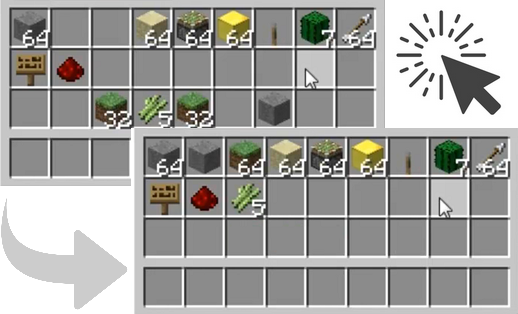
ClickSort is a Bukkit plugin which makes it very easy for players to sort their inventories (player/chest/dispenser) with a single or double click of the mouse. Players can sort by item ID, item name, switch between single- and double-clicking, or disable sorting entirely, all on a per-player basis and without needing any commands; it's all done with mouse clicks in inventory windows.
Latest Version
- ClickSort v1.4.3 for CraftBukkit 1.13.x~1.16.x
- ClickSort v1.3.4 for CraftBukkit 1.10.x~1.12.x
- ClickSort v1.3.2 for CraftBukkit 1.9.x
- ClickSort v1.3.1 for CraftBukkit 1.8.x
- ClickSort v1.3.0 for CraftBukkit 1.6.x/1.7.x
- ClickSort v1.1.2 for CraftBukkit 1.4.6+
All versions above should work on Spigot.
Video
A review of v1.0.0, with thanks to VariationVault :
Installation
- Copy ClickSort.jar into your
bukkit/pluginsfolder and reload/restart your CraftBukkit server. - The
bukkit/plugins/ClickSortfolder will be automatically created, containing aconfig.ymlfile. - You may edit this file as you please, and run
/clicksort reloadto reload. See Configuration for details.
As of v1.3.2, you'll have to put your item names into items.yml manually if you want to sort by item names.
Usage
ClickSort operates as follows:
- In middle-click mode (the default) players can sort their own inventory, a chest/dispenser/hopper/dropper inventory by middle-clicking any slot in that inventory (including slots with items in).
- In double-click mode, players can sort by double-left-clicking any slot in that inventory (including slots with items in).
- In single-click mode, players can sort inventories by single-left-clicking any empty slot in that inventory.
- By default, items are sorted by item ID (see http://www.minecraftwiki.net/wiki/Data_Value for a full list of ID's) and the click mode is middle-click (in v1.1 and earlier, the default click mode was double-click).
- Players can Shift-left-click any empty inventory slot to cycle through sorting by item ID, item name, item group, or item value (see Sort Modes for more detail on each sort mode).
- Players can Shift-right-click any empty inventory slot to cycle between double-click and single-click mode, or disabled sorting.
Any mode changes will give the player a feedback message indicating the new sort or click mode. Player sort/click modes are persistent across server restarts.
As of v1.1.0, it is also possible for players to disable shift-click mode changing (on a per-player basis); some players may find themselves annoyed by accidentally shift-clicking empty inventory slots. To avoid this, players can use the /clicksort shiftclick command to toggle shift-clicking for themselves.
Also as of v1.1.0, two commands have been added to allow players to set their sort or click modes directly; these are most useful if shift-click mode changing has been disabled:
/clicksort sort <id|name|group|value>/clicksort click <middle|double|single|none>
Protection
ClickSort attempts to respect protection plugins which cancel InventoryClickEvent by running its own event handler as late as possible and ignoring cancelled events.
Documentation
- Commands
- Configuration
- Permissions
- Sort Modes
Planned
- Possible sort mode to compact items? E.g. 9 iron ingot -> iron block, 9 diamond -> diamond block etc. Might require the player to have a crafting table in their inventory, or be standing near one.
- Maybe a sorting "wand" to have the option of sorting chests without having the inventory open? A stick with some appropriate metadata set on it, for example.
Source
- https://github.com/NewbieOrange/clicksort
Changelog
- Full Changelog
Usage Statistics
Fully anonymous usage statistics are collected using bStats.

Add a comment