

 Get 0.05 TON 💎
Earlier Versions
| Name | Size | Uploaded | Game Version | Downloads | |
| CommandStructures-Fabric v4.0.1 (1.19.3 MC) release | 36.29 KB | Dec 8, 2022 | 1.19.3 | 1 |  Download Download |
| CommandStructures-Forge v4.0.0 (1.19.3 MC) release | 31.39 KB | Dec 8, 2022 | 1.19.3 | 2 | Download |
| CommandStructures-Fabric v4.0.0 (1.19.3 MC) release | 36.29 KB | Dec 8, 2022 | 1.19.3 | 7 | Download |
| CommandStructures-Fabric v3.1.0 (1.19 MC) release | 36.06 KB | Oct 25, 2022 | 1.19.2 | 55 | Download |
| CommandStructures-Forge v3.1.0 (1.19 MC) release | 31.28 KB | Oct 25, 2022 | 1.19.2 | 99 | Download |
| CommandStructures-Fabric v3.0.0 (1.19 MC) release | 29.35 KB | Jun 9, 2022 | 1.19.2 | 189 | Download |
| CommandStructures-Forge v3.0.0 (1.19 MC) release | 24.53 KB | Jun 9, 2022 | 1.19.2 | 248 | Download |
| CommandStructures-Fabric v2.0.1 (1.18.2 MC) release | 47.74 KB | Apr 3, 2022 | 1.18.2 | 213 | Download |
| CommandStructures-Forge v2.0.1 (1.18.2 MC) release | 39.43 KB | Apr 3, 2022 | 1.18.2 | 662 | Download |
| CommandStructures-Fabric v2.0.0 (1.18.2 MC) release | 47.74 KB | Mar 3, 2022 | 1.18.2 | 67 | Download |
| CommandStructures-Forge v2.0.0 (1.18.2 MC) release | 39.43 KB | Mar 2, 2022 | 1.18.2 | 63 | Download |
| CommandStructures-Fabric v1.4.4 (1.18.1 MC) release | 48.65 KB | Feb 6, 2022 | 1.18.1 | 1,045 | Download |
| CommandStructures-Forge v1.4.4 (1.18.1 MC) release | 39.66 KB | Feb 6, 2022 | 1.18.1 | 102 | Download |
| CommandStructures-Fabric v1.4.3 (1.18.1 MC) release | 48.62 KB | Feb 3, 2022 | 1.18.1 | 34 | Download |
| CommandStructures-Forge v1.4.3 (1.18.1 MC) release | 39.62 KB | Feb 3, 2022 | 1.18.1 | 46 | Download |
| CommandStructures-Fabric v1.4.2 (1.18.1 MC) release | 48.60 KB | Jan 29, 2022 | 1.18.1 | 23 | Download |
| CommandStructures-Forge v1.4.2 (1.18.1 MC) release | 39.60 KB | Jan 29, 2022 | 1.18.1 | 40 | Download |
| CommandStructures-Fabric v1.4.1-testing (1.18.1 MC) release | 47.62 KB | Jan 22, 2022 | 1.18.1 | 58 | Download |
| CommandStructures-Fabric v1.4.1 (1.18.1 MC) release | 47.61 KB | Jan 22, 2022 | 1.18.1 | 15 | Download |
| CommandStructures-Forge v1.4.1 (1.18.1 MC) release | 38.69 KB | Jan 21, 2022 | 1.18.1 | 51 | Download |
| CommandStructures-Forge v1.4.0 (1.18.1 MC) release | 37.52 KB | Jan 19, 2022 | 1.18.1 | 34 | Download |
| CommandStructures-Fabric v1.4.0 (1.18.1 MC) release | 46.52 KB | Jan 19, 2022 | 1.18.1 | 55 | Download |
| CommandStructures-Fabric v1.3.0 (1.18.1 MC) release | 32.53 KB | Jan 14, 2022 | 1.18.1 | 312 | Download |
| CommandStructures-Forge v1.3.0 (1.18.1 MC) release | 28.81 KB | Jan 14, 2022 | 1.18.1 | 41 | Download |
| CommandStructures-Forge v1.2.2 (1.18.1 MC) release | 20.30 KB | Jan 9, 2022 | 1.18.1 | 44 | Download |
| CommandStructures-Fabric v1.2.1 (1.18.1 MC) release | 22.82 KB | Jan 9, 2022 | 1.18.1 | 43 | Download |
| CommandStructures-Forge v1.2.1 (1.18.1 MC) release | 20.03 KB | Jan 8, 2022 | 1.18.1 | 29 | Download |
Screenshots


Description
Files
Forge download: Click here
Forge repo: https://github.com/TelepathicGrunt/CommandStructures-Forge
Fabric download: Click here
Fabric repo: https://github.com/TelepathicGrunt/CommandStructures-Fabric
————————————————————————————————————–
INFO
This utility mod for both Forge and Fabric is great for any modder or datapacker that is looking to create custom jigsaw structures but wants a way to spawn the structures quickly or have all nbt pieces laid out neatly. It also provides a way to spawn configuredfeatures and placedfeatures to make debugging those easier.
What this mod does is it created the /spawnstructure, /spawnpieces, /spawnfeature/ and spawnplacedfeature command that you can use. The full args for the commands are:
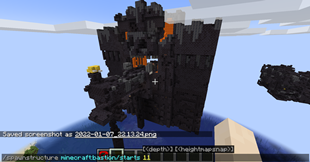
/spawnstructure <location> <startpoolresourcelocation> <depth> <heightmapsnap> <legacyboundingboxrule> <disableprocessors> <randomseed>
Details of each arg:
<location> – Where to spawn the structure. Can do ~ ~ ~ to spawn it where you currently are or ~50 ~ ~ to spawn it 50 blocks away from you.
<startpoolresourcelocation> - The path to the template pool to use to start the structure gen from. For plains vanilla village, this would be "minecraft:village/plains/town_centers" which is the start pool for villages. You can choose other pools for testing purposes. This is a required argument. The rest of the arguments past this one are optional.
<depth> – How many pieces outward from the starting piece should the jigsaw structure generate. Think of it like how long a branch should go in length. Not how many pieces in the structure total. Villages are 6 in depth.
<heightmapsnap> – Whether the structure should generate at top land or should spawn where the player is.
<legacyboundingboxrule> – Special internal rule that fiddles with bounding boxes of the pieces. This is required to be true for villages to generate properly. All other structures should have this be false.
<disableprocessors> – Whether structure processors should be turned off for this structure generation or not. Processors are often used to randomized a structure's block or replace blocks based on conditions like how village roads turns into planks when it goes into water.
<randomseed> – Use this and pass in a seed if you want to keep generating the same structure layout over and over every time you run the command anywhere. Great for testing to see if you fixed why a piece wasn't spawning in your structure.
/spawnpieces <resourcelocationpath> <location> <savepieces> <floorblock> <fillerblock> <rowlength>
Details of each arg:
<resourcelocationpath> – The path to search under for all nbt pieces to spawn in a grid. This command can target a single nbt piece as well. This is the only required argument. All other arguments are optional.
<location> – Where to start placing the pieces down at. ~ ~ ~ is the default which is where the player is standing.
<savepieces> – Whether to auto save every nbt piece spawned into the "generated" folder in the world's save folder.
<floorblock> – What block to place on the floor that the nbt pieces will sit on. This is usually Barrier blocks or Stone.
<fillerblock> – What block to place to clear the area for the nbt piece. Common blocks chosen here are Air or Structure Void.
<rowlength> – How many nbt pieces should be placed per row before the next row of pieces is started.
/spawnfeature <configuredfeatureresourcelocation> <location>
Details of each arg:
<configuredfeatureresourcelocation> – The resourcelocation of the configuredfeature to spawn. Do note, some features have internal checks to know if a spot is valid such as Desert Wells requiring to be placed on sand.
<location> – Where to spawn the configuredfeature at.
/spawnplacedfeature <placedfeatureresourcelocation> <location>
Details of each arg:
<placedfeatureresourcelocation> - The resourcelocation of the placedfeature to spawn. Do note, some placedfeatures have internal checks to know if a spot is valid or rarity placements. For example, Desert Wells have a 1/1000 rarity placement so you could be doing this command around a 1000 times before a Desert Well decides to spawn.
<location> – Where to spawn the placedfeature at. NOTE: to better simulate worldgen, the location here will pass the bottommost corner position of the chunk it is in to the placedfeature. So using this command is like normal worldgen spawning without the biome checking being done. If your placedfeature has a "minecraft:biome" placement check, it will be ignored to help with debugging easier without needing to be in the right biome.

Add a comment