

 Get 0.05 TON 💎
Earlier Versions
| Name | Size | Uploaded | Game Version | Downloads | |
| CosmicNPCs-1.19.2-1.4.0.jar release | 164.50 KB | Oct 27, 2022 | 1.19.2 | 3 |  Download Download |
| CosmicNPCs-1.18.2-1.4.0.jar release | 156.25 KB | Oct 9, 2022 | 1.18.2 | 255 | Download |
| CosmicNPCs-1.18.2-1.3.2.jar release | 134.39 KB | Jul 4, 2022 | 1.18.2 | 2,344 | Download |
| CosmicNPCs-1.18.1-1.3.2.jar release | 134.42 KB | Jul 4, 2022 | 1.18.1 | 112 | Download |
| CosmicNPCs-1.17.1-1.3.3.jar release | 134.40 KB | Jul 4, 2022 | 1.17.1 | 205 | Download |
| CosmicNPCs-1.16.5-1.3.4.jar release | 138.14 KB | Jul 4, 2022 | 1.16.5 | 2,217 | Download |
| CosmicNPCs-1.18.2-1.3.1.jar release | 134.38 KB | Jul 3, 2022 | 1.18.2 | 39 | Download |
| CosmicNPCs-1.18.1-1.3.1.jar release | 134.40 KB | Jul 1, 2022 | 1.18.1 | 58 | Download |
| CosmicNPCs-1.16.5-1.3.3.jar release | 138.12 KB | Jun 9, 2022 | 1.16.5 | 594 | Download |
| CosmicNPCs-1.18.1-1.3.0.jar release | 134.35 KB | Jan 21, 2022 | 1.18.1 | 2,594 | Download |
| CosmicNPCs-1.16.4-1.3.2.jar release | 132.38 KB | Jan 21, 2022 | 1.16.5 | 6,394 | Download |
| CosmicNPCs-1.17.1-1.3.2.jar release | 134.39 KB | Jan 21, 2022 | 1.17.1 | 389 | Download |
| CosmicNPCs-1.17.1-1.3.1.jar release | 134.27 KB | Jan 20, 2022 | 1.17.1 | 93 | Download |
| CosmicNPCs-1.16.4-1.3.1.jar release | 132.24 KB | Jan 20, 2022 | 1.16.5 | 396 | Download |
| CosmicNPCs-1.17.1-1.3.0.jar release | 133.98 KB | Aug 5, 2021 | 1.17.1 | 3,064 | Download |
| CosmicNPCs-1.16.4-1.3.0.jar release | 131.67 KB | Apr 20, 2021 | 1.16.5 | 27,588 | Download |
| CosmicNPCs 1.2.1 release | 524.80 KB | Feb 7, 2019 | 1.12.2 | 86,694 | Download |
| CosmicNPCs 1.2 release | 524.09 KB | Feb 5, 2019 | 1.12.2 | 1,082 | Download |
| CosmicNPCs 1.1 release | 46.36 KB | Dec 18, 2018 | 1.7.10 | 3,587 | Download |
| CosmicNPCs 1.0 release | 43.79 KB | Mar 26, 2018 | 1.7.10 | 992 | Download |
| CosmicNPCs-Fabric-1.18.2-1.3.0.jar beta | 150.33 KB | May 4, 2022 | 1.18.2 | 347 | Download |
Screenshots


Description
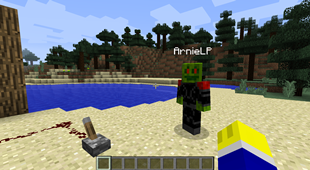
CosmicNPCs gives you the ability to create player-like NPCs in your Single-player world! It works just like the Mocap Mod (Made by EchebKeso) via motion capture. In other words, you can record yourself doing whatever you want and then replay everything by spawning a NPC which does the same things you recorded.
This Mod technically IS the Mocap Mod, but slightly further developed and I will update it with more extra features in the future. There are also a few more differences in the current state. For example a Command Hotkey System for spawning the NPCs by touch of a button.
How to use:
There are 2 new commands in the Mod.
To record your actions use:
/npc-rec <File name>
Replace <File name> with the name you want as your File name.
To replay your actions use:
/npc-play <File name> <NPC name> <Texture name> [Model] {Additional Options}
(Fields with [ ] or { } are optional and can be left out if not required)
Replace <File name> with the name of the file you want to replay. <NPC name> is the Name of your NPC. You know, the name above its head and in chat messages. In <Texture name> you type the name of your NPC Skin/Texture PNG file (without the .png!) which is located in the CosmicNPCs texture folder.
You can find the texture folder at: …/.minecraft/config/cosmicnpcs/assets/npctextures.
(Note: In version 1.3+ it is at: …/.minecraft/config/cosmicnpcs/resources/textures/main)
Put your Minecraft Skins you want to use for the NPCs into the last folder of the path.
Warning: In Mod versions under 1.2 your Skin must have a resolution of 64×32 otherwise it will glitch!
Similarly in versions of 1.2+ it must have a Resolution of 64×64.
New arguments in Mod versions of 1.2+ are [Model] and {Additional Options}.
[Model] allows you to specify the model for the NPC. Currently there are six models at choice:
Player, PlayerSlim, Villager, Witch, Vex and Chicken.
Just use the exact name of one of the models in the list above. //eg: /npc-play test Chicken default Chicken
Note: As with version 1.3+ models of all the LivingEntities that are in the game can be used
{Additional Options}
This can be seen like NBT-Data as in Commands. Exactly like NBT-Data use curly braces and the argument to adjust additional options for the NPC. The syntax is like following:
{Argument:Option}
The current arguments are as follows:
-ShowNameTag: Used to specify if the nametag of the npc is visible or not. Options are 0 (Not Visible), 1 (Always Visible) and 2 (Visible when looking at it).
-Invulnerable: Specify if the npc is invulnerable when attacked (And the attacking player isn't in creative mode) Options: 0 (Not Invulnerable), 1 (Invulnerable)
Complete preferences can be seperated by a comma but blank characters between them are NOT allowed.
Note: Additional Options can only be used if the model is specified.
Also Note: With version 1.3+ there are some more sub arguments. Please check out the changelog for version 1.3.0 for more information
Example: /npc-play test Steve steve Player {ShowNameTag:0,Invulnerable:1}
Command GUI:
You can open a special Command GUI with Numpad3 where you can temporarily save your replay command and execute it by using Numpad9. (Controls are customizable in options) But after pressing Numpad9 again, it will NOT execute the same command! Instead it executes the command of the next page in the GUI. So you can spawn different NPCs in a specific order. However it is planed to add a repeat function though.
Check out EchebKeso's Mocap Mod: https://www.minecraftforum.net/forums/mapping-and-modding-java-edition/minecraft-mods/1445402-minecraft-motion-capture-mod-mocap-16-000

![Spatial Harvesters [FORGE]](https://files.minecraftpatch.com/addons_new/spatial-harvesters-forge-401744/screenshots/spatial-harvesters-forge-scr-1-mini.png)
Add a comment