


 Get 0.05 TON 💎
Earlier Versions
| Name | Size | Uploaded | Game Version | Downloads | |
| PrivateMessages 1.3 release | 4.69 KB | Sep 28, 2016 | 1.9 | 315 |  Download Download |
| PrivateMessages 1.3 release | 4.69 KB | Sep 28, 2016 | 1.8 | 77 | Download |
| PrivateMessages 1.9 beta | 4.17 KB | Sep 21, 2016 | 1.9 | 112 | Download |
| PrivateMessages alpha | 4.12 KB | Sep 18, 2016 | 1.8 | 117 | Download |
| PrivateMessages alpha | 2.44 KB | Sep 14, 2016 | 1.8 | 106 | Download |
Screenshots
Description
THE VERSION 1.3 IS OUT!**
- Check the download page for the change logs
- PrivateMessages name changed to CustomMessages
–––––––––—
THE VERSION 1.2 IS OUT!**
- Updated to 1.9!
- And more coming soon…
–––––––––—
THE VERSION 1.1 IS OUT!
- Added broadcasts!
–––––––––—
Hi, first this is my first java plugin!
This plugin is on experimental and allows you to send private message to each other but soon i'm gonna add more options, like the /r or a customisable color chat, broadcast and more!
So let's get started. To install PrivateMessages plugin, you need first, download it and make sure it's compatible with your server version. Then, you need to move the file you just downloaded to your plugin folder in the server file. All you need to do now is reload your server and ENJOY! 😀
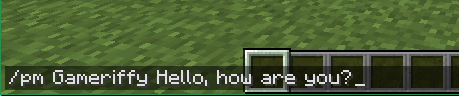
To send a Message to a specific player, you will need to tap "/pm <To> <Message>" NOTE: If you are sending a message to somebody using the console, the plugin gonna say you this: "you're not a player!" and that's normal! I'm gonna add some new features soon that allows to broadcast like i said before.
Please, I will really APPRECIATE if you send me any bugs or errors, that's gonna help me alot!

Add a comment