

 Get 0.05 TON 💎
Earlier Versions
| Name | Size | Uploaded | Game Version | Downloads | |
| 1.8.6 Dokucraft TSC Light release | 17.68 MB | Jul 6, 2021 | 1.8.9 | 14 |  Download Download |
| 1.10 Dokucraft TSC Light release | 17.54 MB | Jul 6, 2021 | 1.10.2 | 2 | Download |
| 1.11 Dokucraft TSC Light release | 17.81 MB | Jul 6, 2021 | 1.11.2 | 2 | Download |
| 1.12 Dokucraft TSC Light release | 17.89 MB | Jul 6, 2021 | 1.12.2 | 16 | Download |
| 1.13 Dokucraft TSC Light release | 18.10 MB | Jul 6, 2021 | 1.13.2 | 1 | Download |
| 1.14 Dokucraft TSC Light release | 29.12 MB | Jul 6, 2021 | 1.14.4 | 2 | Download |
| 1.16.4 Dokucraft TSC Light release | 32.69 MB | Jan 23, 2021 | 1.16.5 | 4,727 | Download |
| 1.15 Dokucraft TSC Light release | 30.62 MB | Jan 19, 2020 | 1.15.2 | 3,933 | Download |
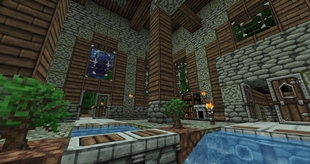
Screenshots


Description




Anyone can contribute to the project. That includes you. Even if you don't know how to create textures or other assets needed for the pack, there are community members willing to help you learn how. We also have a quick start guide to get you going with resource pack editing. Feel free to ask us any questions on Discord. If you are not sure if a texture you have made is good enough, post it in the appropriate Discord channel and ask for feedback. Someone will hopefully take a good look at it and help you make it better. Remember to always be open to criticism, it will help you improve.
If you don't know what to work on, you can always check our update status page or ask on Discord. If you want to find textures posted by others, check out DokuStash.
INSTALLING ON JAVA
Installing Optifine is optional, but recommended.
- Download the pack from one of the links above.
- Start Minecraft.
- Go to Options -> Resource Packs.
- Click Open resource pack folder.
- Place the pack you downloaded in this folder.
- Select the pack from the Resource Packs menu.
- Enjoy!
Add a comment