

 Get 0.05 TON 💎
Earlier Versions
| Name | Size | Uploaded | Game Version | Downloads | |
| 0.80 release | 20.64 KB | Jan 14, 2015 | 1.8.1 | 7,422 |  Download Download |
| v0.70 release | 20.99 KB | Sep 14, 2014 | CB 1.7.9-R0.2 | 1,759 | Download |
| v0.60 release | 19.26 KB | Jul 8, 2013 | CB 1.5.2-R1.0 | 6,972 | Download |
| v0.50 release | 17.69 KB | Mar 20, 2013 | 1.5.0 | 2,347 | Download |
| v0.40 release | 17.50 KB | Feb 4, 2013 | CB 1.4.7-R1.0 | 1,723 | Download |
| v0.30 release | 16.01 KB | Sep 3, 2012 | CB 1.3.2-R0.1 | 3,571 | Download |
| v0.10 release | 11.41 KB | Mar 13, 2012 | CB 1.1-R8 | 2,196 | Download |
Screenshots

Description
Latest stable and unstable builds
Source Code
Wiki
IRC: irc.esper.net #dynmap
Supported versions:
- Dynmap v1.9 or later
- GriefPrevention 7.8 B296 or later
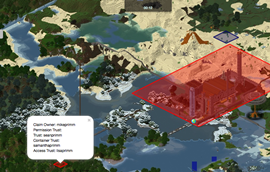
Dynmap-GriefPrevention provides a simple way to add visibility of GriefPrevention claims to Dynmap's maps. The plugin depends on the presence of both Dynmap and GriefPrevention, and interacts directly with the GriefPrevention API. Updates to claims are automatically updated (on a settable period – default is once per 5 minutes (300 seconds)). By default, the plugin will be active after simply installing it (by unzipping the distribution into the plugins/ directory and restarting the server.
Visibility of regions can be controlled via the 'visibleregions' and 'hiddenregions' settings. Besides listing the owners of the regions to be made visible or hidden, entries with the format 'world:<worldname>' can be used to make all claims on a given world visible or hidden.
Also, the display of the region outlines can be restricted to a minimum zoom-in level, via the 'minzoom' setting. When non-zero, this setting causes the region outlines to only be displayed at or beyond the given zoom-in level.

Configuration:
After the first load, there will be a config.yml file in the plugins/Dynmap-GriefPrevention directory. Details of the default configuration, and all the provided settings, can be found here
This plugin utilizes Hidendra's plugin metrics system, which means that the following information is collected and sent to mcstats.org:
- A unique identifier
- The server's version of Java
- Whether the server is in offline or online mode
- The plugin's version
- The server's version
- The OS version/name and architecture
- The core count for the CPU
- The number of players online
- The Metrics version
Add a comment