


 Get 0.05 TON 💎
Earlier Versions
| Name | Size | Uploaded | Game Version | Downloads | |
| ETB ETB 1.16 v1.2 release | 17.71 KB | Aug 20, 2020 | 1.16 | 238 |  Download Download |
| ETB 1.16 v1.1 release | 16.46 KB | Aug 11, 2020 | 1.16 | 14 | Download |
| ETB 1.16 v.1.0 release | 15.87 KB | Aug 9, 2020 | 1.16 | 9 | Download |
| ETB-1.12.2 release | 14.75 KB | Oct 3, 2017 | 1.12 | 683 | Download |
| EasyTpBook-1.10-1.2 release | 13.62 KB | Nov 19, 2016 | 1.10 | 197 | Download |
| EasyTpBook-1.9-1.2 release | 13.62 KB | Nov 19, 2016 | 1.9 | 49 | Download |
| EasyTpBook-1.8-1.2 release | 13.39 KB | Nov 19, 2016 | 1.8 | 95 | Download |
| EasyTpBook-1.9-1.1 release | 9.76 KB | Nov 18, 2016 | 1.9 | 82 | Download |
| EasyTpBook-1.8-1.1 release | 9.51 KB | Nov 18, 2016 | 1.8 | 66 | Download |
| EasyTpBook-1.10-1.1 release | 9.77 KB | Nov 18, 2016 | 1.10 | 59 | Download |
| EasyTpBook-v1.0 release | 8.08 KB | Nov 17, 2016 | 1.9 | 60 | Download |
| ETB 1.3_1.11 beta | 14.72 KB | Mar 10, 2017 | 1.11 | 118 | Download |
| ETB 1.3_1-10 beta | 14.78 KB | Mar 10, 2017 | 1.10 | 48 | Download |
| ETB 1.3_1.9 beta | 15.08 KB | Mar 10, 2017 | 1.9 | 44 | Download |
Screenshots

Description
If you have some idea feel free to comment!
This is a simple plugin that allows to save locations in a book.
The locations are saved in a paper , then you can store this paper into a book that can be crafted.
Recipe:
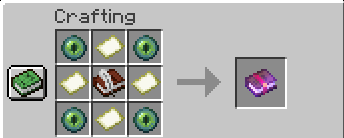
This is the book that stores the locations : 4 Ennder Eyes , 4 Empty Maps, 1 Book and Quill
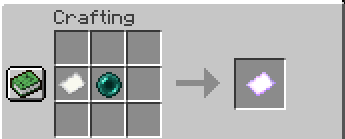
This is the paper that stores the locations : 1 Paper , 1 Ender Pearl
Usage:
- 1 – First of all you will need to craft the book.
- 2 -Then with a tp paper type the command /etb name {and here the name of the location} ex: "/etb name home".
- 3 – Now with that same paper shift + right click a block to save that location
- 4 – With the book in your main hand , shif + left click to open the "Location Editor" , here you can place up to 36 tp paper.
- 5 – Once the paper is stored , with the book in your main hand , shif + right click and you will open the locations panel , and now just click any paper to get teleported.
- Another feature that the tp paper has is the ability to tp yourself and all entity aorund you in a 5x5x5 radius. To do this you just need to follow the step 2 and 3 , but this time instead of saving the paper , just shift + drop the paper (sifht + q).
Permissions:
- Any for now , probably will add a give command with permissions
Commands:
- /etb name [name]: set the name for the location to save.
Notes:
- The papers can be used for any player . If player gives his paper to another player and this one store the paper in his book he can use it too.
- Player can re-use the same paper to store another location.
- If You miss something please feel free to sugest ideas.
Next Update:
- Player can slect what entity will be teleported with the area tp!
- Player can execute "/etb give" to get a tp book


Add a comment