

 Get 0.05 TON 💎
Earlier Versions
| Name | Size | Uploaded | Game Version | Downloads | |
| EBugReporter-v2.1 release | 10.04 KB | Jan 16, 2014 | CB 1.7.2-R0.1 | 990 |  Download Download |
| EBugReporter v2.0 (1.4.7) release | 10.03 KB | Aug 2, 2013 | CB 1.4.7-R1.0 | 400 | Download |
| EBugReporter v2.0 (1.5.2) release | 10.02 KB | Aug 2, 2013 | CB 1.5.1-R0.2 | 192 | Download |
| EBugReporter v2.0 beta | 9.90 KB | Jul 25, 2013 | 1.6.2 | 177 | Download |
| EBugReporter v1.0 beta | 7.51 KB | Jul 22, 2013 | 1.6.2 | 228 | Download |
Screenshots

Description
UPDATED TO 1.7.* AND UPDATED COMMANDS
EBugReporter
EBugReporter the ultimate lightweight reporting plugin.
What it does:
EBugReporter is a simple to use light weight report tool. It is perfect for plugin developers that are live testing their plugin, or for server admins that need a little help finding bugs.
When a player types: /report bug <report msg>
The plugin will send a message to all Ops and any player with the View permission.
The plugin will then log the information within a Report config file located in /plugins/EBugReporter/Reports.
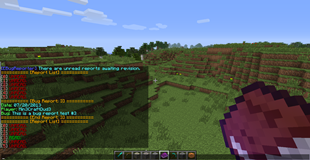
If no Ops are online when a report is submitted they will be notified when they login that there are unread reports waiting.
When an Op or a player that has the permission List, types: /list
The plugin will loop through all available reports and display them as either Read or Unread along with a number:
Example: [0] UNREAD
When an Op or a player that has the permission Read types: /read <number>
It will display the full bug report to the player that typed the command.
Installation:
Drag n drop EBugReporter into the plugin directory of your server and either start or reload your server.
The plugin will then create all necessary files and you are good to go.
Commands:
- /report <bug/player/glitch/hack> <message>
- /reports – List reports (uses EBugReporter.List Permission)
- /read <number>
- /lang – Reloads Language file without the need of a server reload (you can also reload the server)
Permissions:
- EBugReporter.View
- EBugReporter.Read
- EBugReporter.List
- EBugReporter.ReloadLanguage
Setting up server language:
- Open the LanguageFile.yml located in (/plugins/EBugReporter).
- Change the language to either English(default), German, French or Spanish.
- Save the LanguageFile.yml
- Reload your server or type /lang in game.
- Setup is complete your plugin language should be changed.
Future Plans:
- Open to suggestions.
Up-To-Date Language File Link:
Language File
- Now Includes Dutch!
Buy me a pizza! Donate!




Add a comment