


 Get 0.05 TON 💎
Earlier Versions
| Name | Size | Uploaded | Game Version | Downloads | |
| FancyRanks v1.1 release | 27.01 KB | Nov 23, 2016 | 1.10 | 2,256 |  Download Download |
| FancyRanks v1.0 release | 27.02 KB | Nov 22, 2016 | 1.10 | 150 | Download |
Screenshots

Description

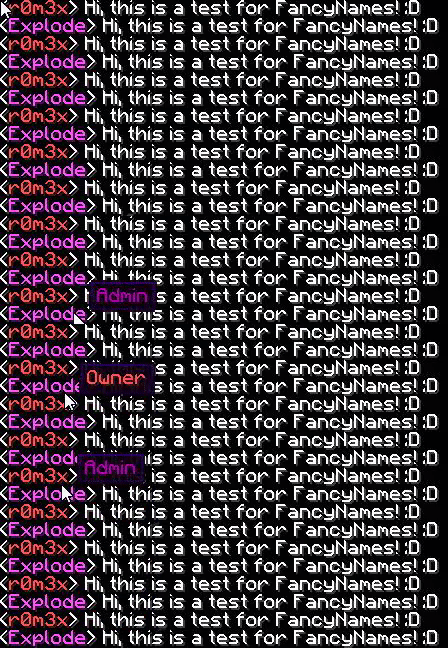
FancyRanks is a new way to show off your ranks! Instead of tags showing off your ranks, just hover over the player's name in the chat to see their rank!
Features
– Compact
– User Friendly
– Extremely easy to use
Installation
Download FancyRanks.jar and drag the file into your plugins folder in your server folder. Easy as that!
Commands
/fr – Basic Command for FancyRanks
/fr reload – Reloads the config.yml
Permissions
fancyranks.use – Allows the usage of /fr
fancyranks.reload – Allows the user to reload the config
Note
EXTREMELY IMPORTANT: PLEASE NOTE THAT THIS PLUGIN IS INCOMPATIBLE WITH ESSENTIALS.
YOU CAN FIX THIS BY DISABLING "change-displayname" in plugins/Essentials/config.yml!
Config
# This is the Default Config for FancyRanks Made by r0m3x
# This plugin is mostly for cosmetic/appearance purposes.

# EXTREMELY IMPORTANT: PLEASE NOTE THAT THIS PLUGIN IS A BIT INCOMPATIBLE WITH ESSENTIALS.
# YOU CAN FIX THIS BY DISABLING "change-displayname" in plugins/Essentials/config.yml!

# This is an example of a rank's section, add any MC names that you want that person to be for that certain rank in the chat.
# Owners:
# - r0m3x
# - Notch

# Managing Groups #

#NOTE: You can leave a group empty without any names, if you wish. This is not recommended.

Owners:
  - Name1

Admins:
  - Name2

Mods:
  - Name3


# Owner Section #

# OwnerPlayerColor is the color of the player's name when they talk in chat, they must be in the OWNER group.
# NOTICE: Use ONLY the color's letter/number, i.e: 4 = dark red, b = aqua.
OwnerPlayerColor: 'c'

# OwnerRank is the rank name and the color of the rank when you hover over it.
# DO NOT USE the color's letter/number, use '&' and then the color's letter/number.
# You can you use some variables I have added in. Such as, %crown1% for ♛ or %crown2% for ♚ (I might add more symbols soon.)
OwnerRank: "&cOwner"

# OwnerRankPrefix is the prefix before the player's name.
# DO NOT USE the color's letter/number, use '&' and then the color's letter/number.
OwnerRankPrefix: "<"

# OwnerRankSuffix is the prefix after the player's name, and before the message that they type in chat.
# DO NOT USE the color's letter/number, use '&' and then the color's letter/number.
OwnerRankSuffix: "> "


# Admin Section #

# OwnerPlayerColor is the color of the player's name when they talk in chat, they must be in the ADMIN group.
# NOTICE: Use the color's letter/number, i.e: 4 = dark red, b = aqua.
AdminPlayerColor: 'd'

# AdminRank is the rank name and the color of the rank when you hover over it.
# DO NOT USE the color's letter/number use '&' and then the color's letter/number.
# You can you use some variables I have added in. Such as, %crown1% for ♛ or %crown2% for ♚ (I might add more symbols soon.)
AdminRank: "&5Admin"

# AdminRankPrefix is the prefix before the player's name.
# DO NOT USE the color's letter/number, use '&' and then the color's letter/number.
AdminRankPrefix: "<"

# AdminRankSuffix is the prefix after the player's name, and before the message that they type in chat.
# DO NOT USE the color's letter/number, use '&' and then the color's letter/number.
AdminRankSuffix: "> "


# Mod Section #

# ModPlayerColor is the color of the player's name when they talk in chat, they must be in the Mod group.
# NOTICE: Use the color's letter/number, i.e: 4 = dark red, b = aqua.
ModPlayerColor: 'd'

# ModRank is the rank name and the color of the rank when you hover over it.
# DO NOT USE the color's letter/number use '&' and then the color's letter/number.
# You can you use some variables I have added in. Such as, %crown1% for ♛ or %crown2% for ♚ (I might add more symbols soon.)
ModRank: "&5Mod"

# ModRankPrefix is the prefix before the player's name.
# DO NOT USE the color's letter/number, use '&' and then the color's letter/number.
ModRankPrefix: "<"

# ModRankSuffix is the prefix after the player's name, and before the message that they type in chat.
# DO NOT USE the color's letter/number, use '&' and then the color's letter/number.
ModRankSuffix: "> "
Milestones
[ ] 1000 Downloads
[ ] 2000 Downloads
[ ] 3000 Downloads
[ ] 4000 Downloads
[ ] 5000 Downloads
[ ] 10000 Downloads
[ ] 15000 Downloads
[ ] 25000 Downloads
[ ] 50000 Downloads
[ ] 75000 Downloads
[ ] 100000 Downloads
Bugs
Found any bugs? Report them here! I'll reply to it as soon as I can.
Also…
Checkout my other plugins!
Donate
Like my work? Buy me a cake!





Add a comment