

 Get 0.05 TON 💎
Earlier Versions
| Name | Size | Uploaded | Game Version | Downloads | |
| FUTURE 2021???? release | 1.71 MB | Dec 7, 2021 | 1.18 | 0 |  Download Download |
| FUTURE 2020 ???? release | 1.71 MB | Dec 7, 2021 | 1.16.5 | 1 | Download |
| FUTURE 2020 ???? release | 1.63 MB | Dec 7, 2021 | 1.14.4 | 1 | Download |
| FUTURE 2021 ???? release | 1.71 MB | Sep 26, 2021 | 1.17.1 | 102 | Download |
| FUTURE 2020 ???? release | 1.63 MB | Mar 28, 2020 | 1.15.2 | 302 | Download |
Screenshots


Description
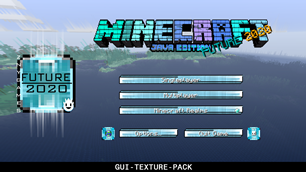
FUTURE 2020-21 🤖 GUI/UI TEXTURE PACK BY ZNYGAMES

|
|
FUTURE 2021
is a new GUI/UI for
Minecraft JAVA
But NOT only:
WIN 10 Edition
|
🤖🤖🤖🤖🤖🤖🤖🤖🤖🤖🤖🎮🎮🎮🎮🎮🎮🎮🎮🎮🎮🎮🎮🎮🎮🤖🤖🤖🤖🤖🤖🤖🤖🤖🤖🤖

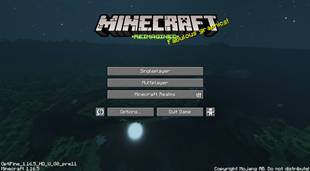
Future 2021 is now. This is a Texture Pack for Minecraft [JAVA]. You got a new overlay for the start screen, settings, hub and container. Little new animation are includet. The start screen got a new background and buttons. Settings buttons are new and the hub got new window, select and bars. The creative mode gets also new graphics. Have fun wit it an support me for more new Texture Packs.
See more details below. THX! znygames
🤖🤖🤖🤖🤖🤖🤖🤖🤖🤖🤖🎮🎮🎮🎮🎮🎮🎮🎮🎮🎮🎮🎮🎮🎮🤖🤖🤖🤖🤖🤖🤖🤖🤖🤖🤖


🤖🤖🤖🤖🤖🤖🤖🤖🤖🤖🤖🎮🎮🎮🎮🎮🎮🎮🎮🎮🎮🎮🎮🎮🎮🤖🤖🤖🤖🤖🤖🤖🤖🤖🤖🤖
If you like the texturepack 💝 SUBSCRIBE:
(っ^▿^)۶🍸🌟🍺٩(˘◡˘ ) www.youtube.com/zadro0
🤖🤖🤖🤖🤖🤖🤖🤖🤖🤖🤖🎮🎮🎮🎮🎮🎮🎮🎮🎮🎮🎮🎮🎮🎮🤖🤖🤖🤖🤖🤖🤖🤖🤖🤖🤖
🤖 INFO:
WIN10 Edition available: FUTURE 2021
GUI/UI Texture Pack for Minecraft 1.17.x/ 1.16.x/ WIN10
🤖🤖🤖🤖🤖🤖🤖🤖🤖🤖🤖🎮🎮🎮🎮🎮🎮🎮🎮🎮🎮🎮🎮🎮🎮🤖🤖🤖🤖🤖🤖🤖🤖🤖🤖🤖
🕹️ INSTALL:
|
|
1) Download GUI Texture Pack
2) Extract the file and copy the extracted folder 3) Start Minecraft and click on "Options". 4) Click "Secure Package". 5) Click "Open Folder" 6) Insert Pack in the opened window |
🤖🤖🤖🤖🤖🤖🤖🤖🤖🤖🤖🎮🎮🎮🎮🎮🎮🎮🎮🎮🎮🎮🎮🎮🎮🤖🤖🤖🤖🤖🤖🤖🤖🤖🤖
THX! |ZNYGAMES


![New Glass with Connected Textures! [16x]](https://files.minecraftpatch.com/addons_new/new-glass-with-connected-textures-16x-286654/screenshots/new-glass-with-connected-textures-16x-scr-1-mini.png)
Add a comment