


 Get 0.05 TON 💎
Earlier Versions
| Name | Size | Uploaded | Game Version | Downloads | |
| GhostUtils-1.15.2-1.2.0.1 release | 37.27 KB | Aug 4, 2020 | 1.15.2 | 160 |  Download Download |
| GhostUtils-1.15.2-1.2.0.0 release | 36.70 KB | Aug 4, 2020 | 1.15.2 | 5 | Download |
| GhostUtils-1.14-1.1.0.2 release | 32.01 KB | Jan 2, 2020 | 1.14.4 | 1,855 | Download |
| GhostUtils-1.14-1.1.0.1 release | 31.10 KB | Jan 2, 2020 | 1.14.4 | 12 | Download |
| GhostUtils-1.14-1.1.0.0 release | 25.72 KB | Dec 29, 2019 | 1.14.4 | 51 | Download |
| GhostUtils-1.12.2-1.0.2.1 +1 More release | 21.69 KB | Mar 10, 2019 | 1.12.2 | 641 | Download |
| GhostUtils-1.12.2-1.0.2.0 +1 More release | 20.96 KB | Mar 4, 2019 | 1.12.2 | 49 | Download |
| GhostUtils-1.12.2-1.0.1.0 release | 11.07 KB | Dec 30, 2017 | 1.12.2 | 854 | Download |
| GhostUtils-1.11.2-1.0.1.0 +2 More+2 Others release | 11.36 KB | Dec 30, 2017 | 1.11.2 | 241 | Download |
| GhostUtils-1.10.2-1.0.0.2 +2 More+2 Others release | 11.36 KB | Jun 16, 2017 | 1.10.2 | 375 | Download |
| GhostUtils-1.10.2-1.0.0.0 +2 More+2 Others release | 8.69 KB | Mar 4, 2017 | 1.10.2 | 168 | Download |
Screenshots


Description
Ghost Utils is small client-sided mod with useful overlays.
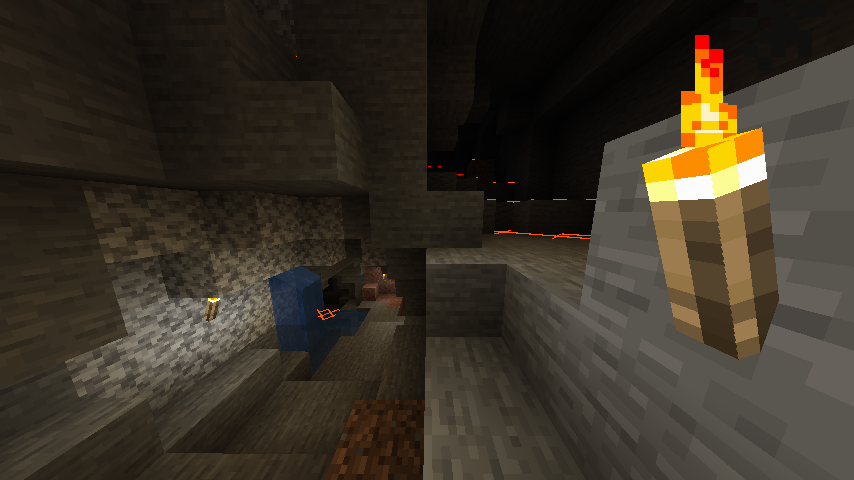 You probably seen something like this, yes, it's another Light Overlay. Shows 'X' signs on surfaces that hostile mobs can be spawned. Yellow if the surface is exposed to sunlight enough to prevent mobs to spawn in daytime, orange if the surface is exposed to some lights but not enough to block spawning, and red if the blocks are in complete darkness.
You can toggle this feature by pressing F7. (Can be changed in control settings)
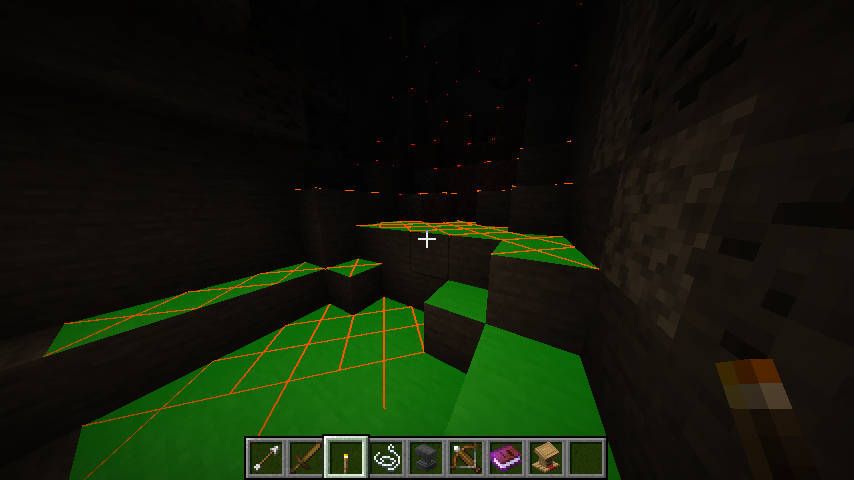 In addition to previous Light Overlay, Ghost Utilities adds Light Source Preview. When you look some block while holding light source that can be placed, green translucent area will be displayed. The area is equal to area the light source can prevent mob spawning when placed on block you looking.
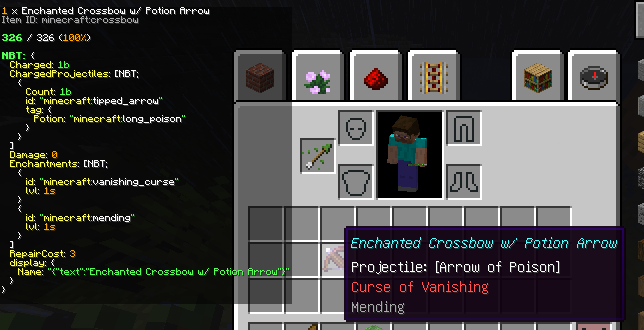
Finally, Ghost Utilities adds Item Data Viewer. Item Data Viewer displays information of item picked up by cursor, or below cursor. The data shown is:
- Name of the item and count
- Internal item/block ID
- Durability
- Item/block tags
- NBT data
The text is set to tiny to prevent it from consuming one third of screen every time. Press sneak key (LShift by default) to zoom in.
If the screen is too small to display information, you can 'scroll down' the information by picking up the item, and moving them up to down.
This feature is disabled by default. If you want to enable it / or disable it again, press F9.
Configurables:
- Enable/Disable Light Overlay feature
- Enalbe/Disable Item Info feature
- Item Info Viewer text zoom level
- Item Info Viewer text zoom level while sneaking


Add a comment