


 Get 0.05 TON 💎
Earlier Versions
| Name | Size | Uploaded | Game Version | Downloads | |
| GlobalGamerules-1.0.0.jar release | 30.77 KB | Aug 3, 2020 | 1.17 | 118 |  Download Download |
Description
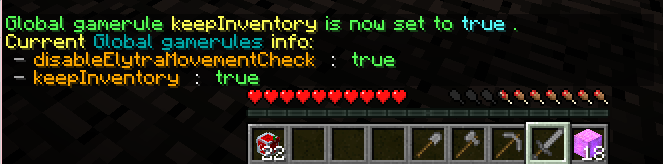
This is a plugin that allows applying global gamerule when a world is loaded.
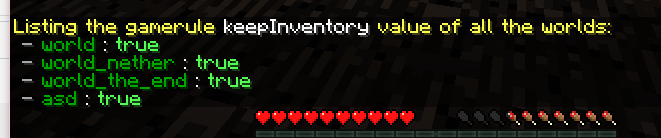
Also, the plugin allow you to check per world gamerules.
Features:
- Supports MC 1.7-1.17.
- Allow to set the exempt worlds.
- The global gamerules will be applied when a world is loaded or a command called.
- Allow to check per world gamerules.
- Two configuration methods are available.
- Easy to use.
- For some worlds where the gamerules cannot be saved in some modded server.
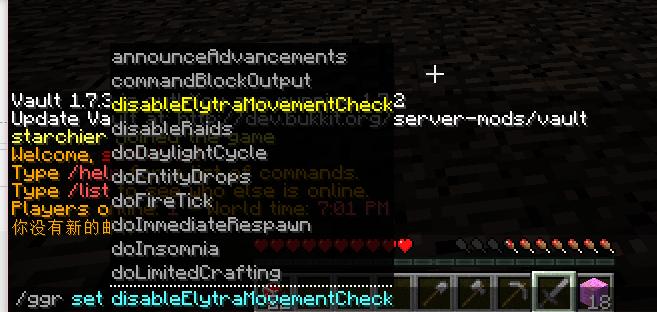
- All commands support TAB auto completion.
Getting started:
You can choose to edit config.yml or directly use command to set exempt worlds/ global gamerules.
1.Editing config.yml:
Set the gamerules in group gamerules .
Example:
gamerules:
keepInventory: 'true'
doFireTick: 'false'
2.Using commands (Easiest):
Use /ggr set <gamerule> <value> to set global gamerules
Use /ggr remove <gamerule> to remove a set gamerule
Use /ggr world to manage exempt world.
Support TAB auto completion.
Commands & Permissions:
Command – Description – Permission
/ggr reload – Reload config. - globalgamerules.reload
/ggr sync – Apply the global gamerules to all the worlds now. - globalgamerules.sync
/ggr set <gamerule> <value> – Set a global gamerule - globalgamerules.set
/ggr remove <gamerule> – Remove a set global gamerule. - globalgamerules.remove
/ggr check – Check global gamerules value. - globalgamerules.check
/ggr check [gamerule] – Check the specific gamerule value of all the worlds. - globalgamerules.check
/ggr world – Manage exempt worlds. - globalgamerules.world
/ggr world info – Check the exempt world list.
/ggr world add <world> - Add a exempt world.
/ggr world remove <world> – Remove a set exempt world.
Admin permission: globalgamerules.admin (Default : OP)
Player with this permission can access all commands.
Configuration:
gamerules: {}
#Global gamerules
locale: zh_CN
#choose the plugin language.(Language file stored in languages folder in jar file)
#Exempt worlds – will not be applied global gamerules
exempt-worlds:
– disabled-world
Translation:
The language file stored in the languages folder in the jar file.
Screenshots:
Support:
Welcome to donate us if you think the plugin helps you!
Add a comment