

 Get 0.05 TON 💎
Earlier Versions
| Name | Size | Uploaded | Game Version | Downloads | |
| GUIShop 2.1 release | 39.39 KB | Nov 3, 2013 | 1.7.2 | 87,821 |  Download Download |
| GUIShop_2.0 release | 29.51 KB | Oct 21, 2013 | 1.6.4 | 3,564 | Download |
| GuiShop 1.3 beta | 28.33 KB | Jun 10, 2013 | CB 1.5.2-R0.1 | 6,157 | Download |
| GuiShop 1.2 beta | 27.96 KB | Jun 7, 2013 | CB 1.5.2-R0.1 | 1,479 | Download |
| GuiShop 1.1 beta | 32.11 KB | Jun 1, 2013 | CB 1.5.2-R0.1 | 929 | Download |
| GUIShop 1.0 beta | 22.69 KB | Jun 1, 2013 | CB 1.5.2-R0.1 | 525 | Download |
Screenshots

Description
This plugin simply adds one command for your players; /shop.
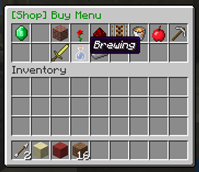
This command will open a clickable GUI with the shop on top and your inventory on the bottom.
Simply navigate to the item you want, and click on it to buy or sell it.
Please read the whole thread if you can.
Features:
1. Easy to use click GUI.
2. Buy or sell any item at a configurable price.
3. Sell enchantments books with any enchantment.
4. Sort item into categories for ease of use.
5. Hooks into vault for economy.
Permissions:
shop.buy:
description: Gives access to buying menu.
shop.sell:
description: Gives access to selling menu.
shop.enchantments:
description: Gives access to the enchantment menu.
shop.tab.<tabID>:
description: Gives access to the specified tab.
shop.tab.* to give permission for all tabs.
shop.creative:
description: Gives access to shopping in creative mode.
shop.admin:
description: Gives access to admin commands like /reloadshop.
Commands:
/shop opens the shop GUI.
/reloadshop reload prices and config for the plugin. *working in v1.3.
Download:
Direct download:
(Use the files button)
You will also need to install vault and a economy plugin like BOSEconomy or iConomy.
Images:


Configuration:
There are four configuration files, Options, Tabs, Prices and EnchantmentPrices.
Options
There are five options:
SHOP_TITLE=§2[Shop]
DONATE_MESSAGE_ON=true
DONATE_MESSAGE=§cDonate to gain access!
ALLOW_BROWSE=false
PRICE_MULTIPLIER=1.0
SHOP_TITLE will change the prefix of all messages and GUIs made by the shop plugin. This must be under 20 characters long.
DONATE_MESSAGE_ON turns the message about donating on.
DONATE_MESSAGE lets you set the message that will ask people to donate.
ALLOW_BROWSE lets players look through tabs that they do not have permission for, but they can not buy/sell anything in those tabs.
PRICE_MULTIPLIER all the prices will be multiplied by this number, good for quickly scaling up the prices to suit your server.
Tabs
tabID=0 tabName=Building_Blocks IconID=45
Each tab must have a unique ID (tabID=0 in this case). This is used to identify which tab each item goes into.
The second part (tabName=Building_Blocks) is to set what this group of items is called, in this example "Building Blocks". Instead of spaces use underscores, '_', in the name of the tab.
The last part (IconID=45) is to change the icon of the tab. It is the item ID of the icon, eg 45 is the ID for bricks. You can find the icon IDs of items on minecraft wiki.
Example:
tabID=0 tabName=Building_Blocks IconID=45
tabID=1 tabName=Decorations IconID=38
tabID=2 tabName=Redstone IconID=331
tabID=3 tabName=Transportation IconID=27
Prices
WOOD_BIRCH itemID=5:2 buyPrice=4.0 sellPrice=0.5 tabID=0
The first part (WOOD_BIRCH) is not important, just for you to remember what item the configuration is for and it is not interpreted by the plugin at all.
The second part (itemID=5:2) is the minecraft ID of an item. You can find these on minecraft wiki or just google it.
To get a different version of an item (eg birch wood instead of Oak wood) just add a semicolon (:) and the appropriate data for the alternative version (also available on minecraft wiki).
The third and fourth part (buyPrice=4.0 sellPrice=0.5) is the price of a single item, eg one wood.
The plugin will automatically generate a list of possible block for you to use, and it will set a default price for these blocks. You can always add or remove any block you want to the list, and I recommend you modify the prices o suit your server
The last part (ItemTAB=0) is which tab (group of items) in the shop GUI the item will appear in.
0 is Building Blocks, 1 is Decorations, 2 is Redstone, 3 is Transportation, 4 is Misc, 5 is Foodstuffs, 6 is Tools, 7 is Combat, 8 is Brewing and 9 is Materials, you can change these in the tabs config.
Example:
SAND itemID=12 buyPrice=4.0 sellPrice=0.5 tabID=0
GRAVEL itemID=13 buyPrice=4.0 sellPrice=2.0 tabID=0
GOLD_ORE itemID=14 buyPrice=45.0 sellPrice=22.5 tabID=0
DIRT itemID=3 buyPrice=4.0 sellPrice=0.5 tabID=0
COBBLESTONE itemID=4 buyPrice=4.0 sellPrice=0.5 tabID=0
WOOD_BIRCH itemID=5:2 buyPrice=4.0 sellPrice=0.5 tabID=0
WOOD_DARK itemID=5:1 buyPrice=4.0 sellPrice=0.5 tabID=0
Enchantments
DURABILITY enchantmentID=34 enchantmentLevel=3 enchantmentPrice=10
Again the first part (DURABILITY) is just for you; not used by the plugin.
The second part is the enchanment ID for the enchantment type, these can be found here:
http://www.minecraftforum.net/topic/1711629-enchantment-id-list/
The third part is pretty simple, just how strong the enchantment is. This one (enchantmentLevel=3) will get you unbreaking level III.
The last bit (enchantmentPrice=10) is simple as well, just the price to buy one enchantment book.
Example:
LOOT_BONUS_BLOCKS enchantmentID=35 enchantmentLevel=3 enchantmentPrice=40
PROTECTION_FIRE enchantmentID=1 enchantmentLevel=4 enchantmentPrice=30
DIG_SPEED enchantmentID=32 enchantmentLevel=5 enchantmentPrice=50
PROTECTION_FALL enchantmentID=2 enchantmentLevel=4 enchantmentPrice=50
SILK_TOUCH enchantmentID=33 enchantmentLevel=1 enchantmentPrice=100
Please comment if you use the plugin or would like to make a suggestion.
Videos
English:
http://youtu.be/bJyvUOLr33g
Credits: SimplyAussieGamer
Portuguese:
https://www.youtube.com/watch?v=u5r01sSCE-I
Credits: AbsintoJ
Metrics

Thanks for taking time to read this,
~ Waffles
Add a comment