

 Get 0.05 TON 💎
Earlier Versions
| Name | Size | Uploaded | Game Version | Downloads | |
| HeadsLeaderBoards V4.0.2 release | 83.36 KB | Jan 28, 2015 | 1.8.1 | 9,857 |  Download Download |
| HeadsLeaderBoards V4.0 release | 83.22 KB | Jan 16, 2015 | 1.8.1 | 278 | Download |
| HeadsLeaderBoards V3.6 release | 76.15 KB | Jan 14, 2015 | 1.8.1 | 179 | Download |
| HeadsLeaderBoards V3.51 release | 75.63 KB | Jan 10, 2015 | 1.8.1 | 206 | Download |
| HeadsLeaderBoards V3.5 release | 75.80 KB | Jan 9, 2015 | 1.8.1 | 240 | Download |
| HeadsLeaderBoards V3.1 release | 58.30 KB | Jan 5, 2015 | 1.8.1 | 265 | Download |
| HeadsLeaderBoards V3.0.2 release | 57.71 KB | Dec 10, 2014 | CB 1.7.9-R0.2 | 741 | Download |
| HeadsLeaderBoards V3.0 release | 57.68 KB | Dec 10, 2014 | CB 1.7.9-R0.2 | 157 | Download |
| HeadsLeaderBoards V2.1 release | 49.74 KB | Dec 8, 2014 | CB 1.7.9-R0.2 | 165 | Download |
| HeadsLeaderBoards V2.0.3 release | 44.90 KB | Dec 1, 2014 | CB 1.7.9-R0.2 | 180 | Download |
| HeadsLeaderBoards V2.0.2 release | 44.95 KB | Nov 29, 2014 | CB 1.7.9-R0.2 | 133 | Download |
| HeadsLeaderBoards V2.0.1 release | 45.27 KB | Nov 28, 2014 | CB 1.7.9-R0.2 | 103 | Download |
| HeadsLeaderBoards V2.0 release | 44.91 KB | Nov 27, 2014 | CB 1.7.9-R0.2 | 141 | Download |
| HeadsLeaderBoards V1.2 release | 36.49 KB | Sep 16, 2014 | CB 1.7.9-R0.2 | 223 | Download |
| HeadsLeaderBoards V1.1 release | 27.44 KB | Jul 10, 2014 | CB 1.7.9-R0.1 | 334 | Download |
| HeadsLeaderBoards V1.0b beta | 27.16 KB | Jul 4, 2014 | CB 1.7.9-R0.1 | 238 | Download |
Screenshots

Description
HeadsLeaderBoards

VERSION 4.0 HAS BEEN RELEASED
This update brings some major changes to Heads Leaderboards. But don't worry, it's still backwards compatible with your old leaderboards!! 🙂
The first change you will notice is that the leaderboard.yml is gone and replaced with a Leaderboards directory containing a separate file for each leaderboard. Everything else is related to MySQL leaderboards. In the new yml's for the leaderboards you will notice plenty of new options. First, Database is now a variable for each leaderboard. This will allow you to connect different leaderboards to different databases. Solving one of the most requested features. Second, you will notice a variable for usingUUID. When set to true, you can use a UUID column instead of playernames and the plugin will plugin the playername from Mojang. Third, you will notice the variable for multiStat. When enabled and setup this will allow you to show two stats on one table. For instance you could have a pvp leaderboard that shows both Kills and Deaths of the leaders. The leaderboard will still be sort by the first stat.
INFO FROM PREVIOUS RELEASE
FFS – Head's Leaderboards Finally Supports Flat File Storage. You don't have MySQL, NO WORRIES. Supports both JSON and YML filetypes. Supports files named by UUID or PlayerName.
Version 3.6 has continued to build Flat File support by adding the ability to use sqlite flat file databases (like ScoreboardStats uses, ie. ".db" files). You can do this by creating a SQL leaderboard and enabling flatFileDB in the leaderboard.yml. You will also have to set the path to the db file in the leaderboard.yml. This is the path from the server directory including the filename. (ie. For ScoreboardStats this would be: \plugins\scoreboardstats\scoreboardstats.db) **
One point about using .db files is that you still need to know the table and column names. To find these you can use a SQlite DB Browser
What does this Plugin Do?
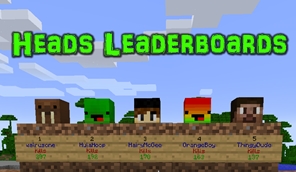
This plugin allows you to create sign leaderboards (with heads) using data in a MySQL database OR Flat File Storage. This plugin does not track any player data!! It merely gives you another way to display the data stored in your MySQL database OR store by minecraft or other plugins in Flat File Storage (Such as Kills, Wins, etc…).
Installation
- Copy the Jar file to your plugins directory.
- Edit the created config or use the Setup command to enter the required information for the MySQL database.
- Enable the plugin using the Enable command or by updating the config.
- Create your leaderboard(s).
- Edit the leadarboards.yml or use the Setup command to enter the required information for your leaderboard.
- Enable your leaderboard using the Enable command.
- Create leaderboard signs and place heads above them.
Basic Tutorial (Needs to Be Updated – Coming Soon)
Advanced Tutorial
Customizing Signs Tutorial
Commands and Permissions
| Command | Description | Permission |
|---|---|---|
| /hlb setup | Start the setup utility to enter the Database information in Config.yml | hlb.commands |
| /hlb enable | Enables or disables the plugin | hlb.commands |
| /hlb create <leaderboard> <leaderboard type> | Creates a new leaderboard named <leaderboard> of the type <leaderboard type>. Leaderboard type bust be either "sql" for MySQL or "ffs" for Flat File Storage | hlb.commands |
| /hlb delete <leaderboard> | Deletes the leaderboard named <leaderboard> | hlb.commands |
| /hlb list | Lists all of your created leaderboards | hlb.commands |
| /hlb setup <leaderboard> | Starts the setup utility for the selected leaderboard | hlb.commands |
| /hlb enable <leaderboard> | Enables or disables the selected leaderboard | hlb.commands |
| /hlb reload | Reloads the plugin config files | hlb.commands |
| /hlbupdate | Updates all enabled leaderboards | hlb.update |
| Allows the user to create and destroy HLB signs | hlb.signs | |
| Color Codes | black(0), dark blue(1), dark green(2), dark aqua(3), dark red(4), dark purple(5), gold(6), gray(7), dark gray(8), blue(9), green(a), aqua(b), red(c), light purple(d), yellow(e), white(f) | You can use either the "color name" or the "Minecraft Color Code", but do not use the & |
MySQL Leaderboard Sample (Enemy Kills from "Stats" by Lolmewn
Flat File Storage Leaderboard Sample
Flat File SQLite Database Leaderboard Sample
HLB Signs
 |
Place a sign, putting [hlb] on the first line, <the leaderboard name> on the second line, and the position you want to display on the sign on the third line. Optional: Place a Skull above the sign (either directly above or on top of the block the sign is on). Run /hlbupdate or wait for the leaderboard to update!! |
To Do List
Customizable colors for HLB signs.The ability to do reverse order leaderboards.The ability to set the length of the leaderboards.The ability to use databases that store player names in a separate table.- SUGGESTIONS??
Compatible Plugins
The following plugins have been tested and work with HeadsLeaderBoards. In addition, any MySQL database created by a bukkit plugin should work. If you encounter a plugin/database that doesn't work, please create a ticket and I'll look into it.
- PVP Stats
- ScoreboardStats
- Skywars
- Stats
- Statistics
- MCmmo
Metrics
This plugin now uses Metrics. This will help me keep track of how many servers are using the plugin. The plugins metrics can be view at the link below. To opt out of metrics, set opt-out: to "true" in the metrics config in your plugins directory.


Add a comment