

 Get 0.05 TON 💎
Earlier Versions
| Name | Size | Uploaded | Game Version | Downloads | |
| HorseStats v5.0.3 release | 70.32 KB | Aug 23, 2019 | 1.14 | 2,690 |  Download Download |
| HorseStats v5.0.2 release | 70.84 KB | Aug 9, 2018 | 1.13 | 1,510 | Download |
| HorseStats v5.0 release | 70.87 KB | May 20, 2017 | 1.12 | 2,074 | Download |
| HorseStats v4.1 release | 70.16 KB | Jan 16, 2017 | 1.11 | 393 | Download |
| HorseStats v4.0 release | 67.71 KB | Oct 31, 2016 | 1.10 | 332 | Download |
| HorseStats v3.4.2 release | 59.51 KB | Jun 17, 2016 | 1.10 | 597 | Download |
| HorseStats v3.4.1 release | 59.32 KB | Mar 31, 2016 | 1.9 | 504 | Download |
| HorseStats v3.4 release | 59.15 KB | Mar 4, 2016 | 1.9 | 435 | Download |
| HorseStats v3.3.2 release | 59.79 KB | Jul 7, 2015 | 1.8 | 1,163 | Download |
| HorseStats v3.3.1 release | 58.68 KB | Mar 24, 2015 | 1.8 | 537 | Download |
| HorseStats v3.2 release | 49.37 KB | Jan 30, 2015 | 1.8 | 473 | Download |
| HorseStats v3.1 release | 52.06 KB | Aug 23, 2014 | CB 1.7.9-R0.2 | 581 | Download |
| HorseStats v3.0.2 release | 53.16 KB | May 31, 2014 | CB 1.7.9-R0.1 | 460 | Download |
| HorseStats v3.0.1 release | 36.29 KB | May 26, 2014 | CB 1.7.9-R0.1 | 240 | Download |
| HorseStats v1.6 release | 15.32 KB | Sep 30, 2013 | 1.6.2 | 825 | Download |
| HorseStats v1.5.2 release | 14.69 KB | Sep 13, 2013 | 1.6.2 | 614 | Download |
| HorseStats v1.5.1 release | 14.67 KB | Sep 8, 2013 | 1.6.2 | 589 | Download |
| HorseStats v2.2 beta | 22.59 KB | Jan 3, 2014 | CB 1.7.2-R0.2 | 435 | Download |
| HorseStats v1.5 beta | 14.60 KB | Sep 8, 2013 | 1.6.2 | 214 | Download |
| HorseStats v1.4.2 beta | 15.10 KB | Sep 5, 2013 | 1.6.2 | 225 | Download |
| HorseStats v1.3.1 beta | 13.84 KB | Aug 19, 2013 | 1.6.2 | 417 | Download |
| HorseStats v1.3 beta | 13.44 KB | Aug 17, 2013 | 1.6.2 | 208 | Download |
| HorseStats v1.2 beta | 12.34 KB | Aug 6, 2013 | 1.6.2 | 241 | Download |
| HorseStats v1.1 beta | 10.63 KB | Jul 31, 2013 | 1.6.2 | 178 | Download |
| HorseStats v3.0 alpha | 37.04 KB | May 11, 2014 | CB 1.7.2-R0.3 | 363 | Download |
| HorseStats v2.2.0.2 alpha | 24.21 KB | Apr 13, 2014 | CB 1.7.2-R0.3 | 219 | Download |
| HorseStats v1.7 alpha | 15.20 KB | Dec 2, 2013 | 1.7.2 | 246 | Download |
| HorseStats v1.6_b alpha | 15.26 KB | Oct 5, 2013 | 1.6.4 | 303 | Download |
| HorseStats v1.0 alpha | 6.58 KB | Jul 26, 2013 | 1.6.2 | 131 | Download |
Screenshots

Description

Overview
This project is no longer actively maintained.
Features
Stat Display
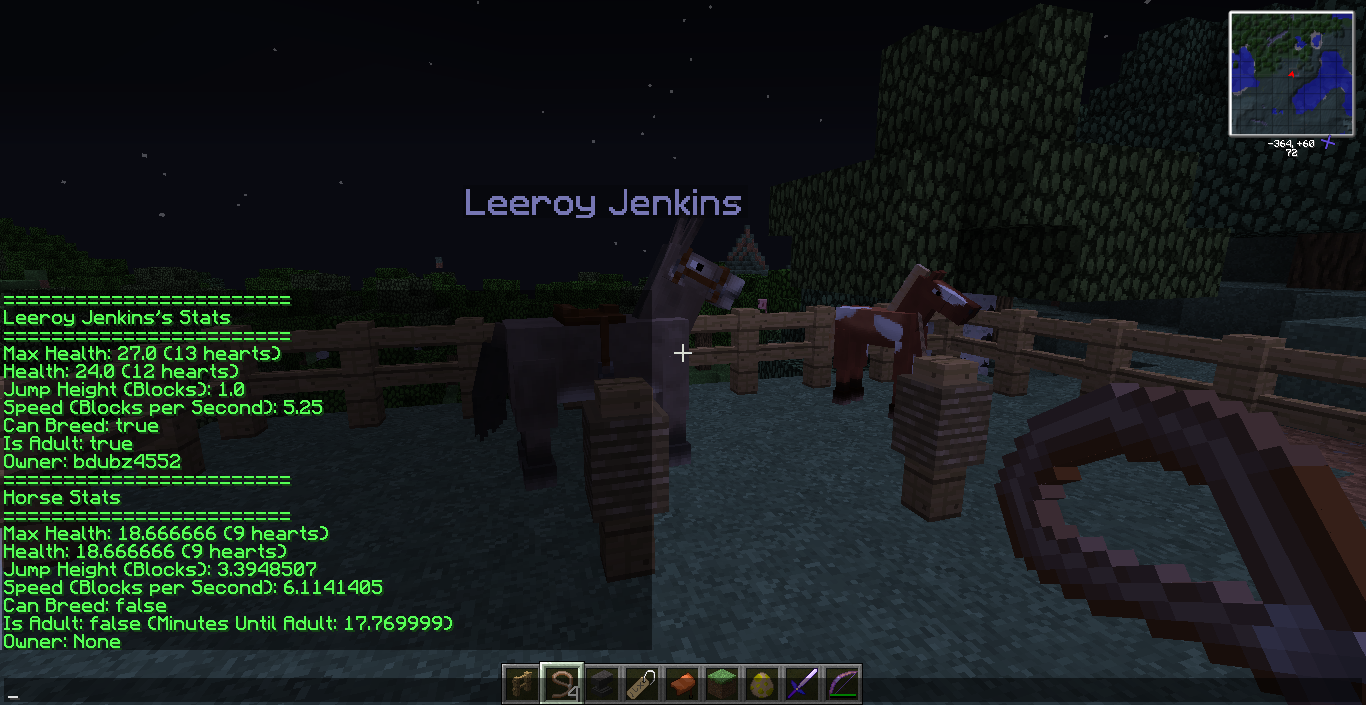
- The core purpose of HorseStats is to display a horse's information in your chat window. Simply punch a horse with a lead in your hand to view it's information in your chat window.
- As of version 5.0, stats also save to the item lore of the lead stack the horse was punched with.
- The item for the stat display is configurable in the HorseStats configuration file.

Teleportation
- HorseStats has horse teleportation capabilities. Punching a horse with an Ender Pearl in your hand will select or deselect that horse for teleporting. After a horse has been selected, you can use the command /htp to teleport the horse.
- The teleport function Bukkit/Spigot provides does not work if the entity's containing chunk is unloaded.
- The horse will not "deselect" after one teleport operation, meaning you can chain multiple teleports over long distances. If your teleport fails for some reason however, it will deselect to prevent further problems.
- The item for teleporting is configurable in the HorseStats configuration file.
HorseStats Internal Permissions
- HorseStats has a permissions system that manages who has permission to access a player's horses.
- This is not to be confused with the normal permissions system that a server uses; it is a separate, internal, HorseStats-only system!
- The command for viewing and managing who has permission to access your horses is /hperm.
- Permissions are separated into two types: damage and interaction.
- While permitted players are effectively treated as co-owners, they are not allowed to use /untame or /setowner.
Anarchy Mode
- Anarchy mode is a configuration setting that will bypass all ownership safeguards.
- If you are a grief or anarchy server, or you just don't believe in locking down animals, then enabling this will disable the HorseStats Internal Permissions system and make all horses fair game.
- This will also disable the SQL connection from initiating.
Owner Tracking
- On occasion the vanilla game or another plugin can create a horse that has the tamed flag set, but no owner assigned.
- HorseStats can detect and correct this by force untaming these horses so that they can be re-tamed and have a proper owner assigned.
- This action is triggered when a player punches a horse with the stat display item.
- Skeleton horses that spawn in from lightning strikes are always flagged as tame without an owner. Because the above behavior would render them un-rideable, the lead user is instead made the owner immediately.
Language Support
- HorseStats ships with one language pack included for US English, with the file name "en-us.yml".
- If you would like to translate it for your own use, make a copy of the file and edit it as you wish. Then change the language-pack setting in your configuration to match.
- Note that using a custom language pack means you must manually update it. HorseStats will automatically update the en-us.yml language pack, but no others.
- If you would like to submit a language pack to be distributed with HorseStats, contact me via PM here on BukkitDev.
Update Notifier
- HorseStats uses the Updater provided by Gravity to check for updates. It communicates with Curse to check for newer versions of HorseStats.
- The update notifier does not automatically download updates.
- Any players with the HorseStats.plugin-alerts permission will be told that a new version is available upon joining the server.
- The update notifier can be disabled via the config setting update-checks.
Commands and Permissions
- See the commands and permission nodes on the Commands and Permissions page.
Configuration Settings
- See the configuration settings on the Configuration Settings page.
Installation
- If this is your first time, simply download the HorseStats build that matches your server, and drop it in your plugins folder.
- If you are updating HorseStats, download the new version, delete the old HorseStats jar from your plugins folder, and drop in the new version. Check your server console at startup. If HorseStats says your configuration file or language pack is out of date, you may need to rename your current files so that new ones can generate and you can copy over your old settings.
Data Storage
- HorseStats utilizes SQL to store data for the HorseStats Internal Permissions system.
- If you have no idea about SQL, that's perfectly fine! You can run HorseStats out-of-the-box and the SQL will take care of itself.
- Supported drivers are MySQL and SQLite.
Later Updates
- Waiting for something to break again, basically.
Known Issues and Bugs
- Teleporting a horse from one world to another at one point corrupted a huge amount of horse data on my test server. I have not been able to reproduce this behavior other than the one time it happened, back in MC 1.6. For safety, teleporting from one world to another is disabled by default in the config, but can be enabled if desired.
GitHub
- HorseStats is open source under the MIT License, and the HorseStats GitHub repository is public to view and fork.
- I do not follow "convention" with my commits; you will find that they often encompass a lot of things and are not focused to one particular task.
- I don't do pull requests. I like to keep my projects to my own work, but if you have code problems please let me know in the project's Issues tab.



Add a comment