

 Get 0.05 TON 💎
Earlier Versions
| Name | Size | Uploaded | Game Version | Downloads | |
| Fabric 1.18.2 - Version 1.0.1 release | 387.77 KB | Nov 27, 2022 | 1.18.2 | 9 |  Download Download |
| Fabric 1.19.2 - Version 1.0.1 release | 387.77 KB | Nov 27, 2022 | 1.19.2 | 20 | Download |
| Forge 1.18.2 - Version 1.0.1 release | 383.90 KB | Nov 27, 2022 | 1.18.2 | 24 | Download |
| Forge 1.19.2 - Version 1.0.1 release | 380.95 KB | Nov 27, 2022 | 1.19.2 | 37 | Download |
| Forge 1.19.2 - Version 1.0.0 release | 381.07 KB | Aug 22, 2022 | 1.19.2 | 46,457 | Download |
| Forge 1.19 - Version 1.0.0 release | 381.09 KB | Aug 21, 2022 | 1.19 | 432 | Download |
| Forge 1.18.2 - Version 1.0.0 release | 383.89 KB | Aug 16, 2022 | 1.18.2 | 56,976 | Download |
| Forge 1.17.1 - Version 1.0.0 release | 382.67 KB | Jan 7, 2022 | 1.17.1 | 21,403 | Download |
| Forge 1.16.5 - Version 2.0 release | 380.91 KB | Jan 7, 2022 | 1.16.5 | 31,618 | Download |
| Forge 1.17.1 - Version 0.6 release | 380.42 KB | Aug 18, 2021 | 1.17.1 | 92,981 | Download |
| Forge 1.16.5 - Version 1.0 release | 311.02 KB | Feb 6, 2021 | 1.16.5 | 72,828 | Download |
| Forge 1.15.2 - Version 3.3 release | 114.92 KB | Sep 1, 2020 | 1.15.2 | 524,935 | Download |
| Forge 1.14.4 - Version 1.2 release | 88.03 KB | Mar 31, 2020 | 1.14.4 | 4,068 | Download |
| Forge 1.12.2 - Version 1.3 release | 85.69 KB | Mar 31, 2020 | 1.12.2 | 60,535 | Download |
| Fabric 1.19.2 - Version 1.0.0 beta | 387.76 KB | Sep 12, 2022 | 1.19.2 | 6,852 | Download |
| Fabric 1.18.2 - Version 1.0.0 beta | 387.76 KB | Sep 11, 2022 | 1.18.2 | 3,473 | Download |
| Forge 1.18.2 - Version 0.7.1 beta | 382.75 KB | Apr 17, 2022 | 1.18.2 | 21,305 | Download |
| Forge 1.18.1 - Version 0.7.1 beta | 382.38 KB | Jan 31, 2022 | 1.18.1 | 13,436 | Download |
| Forge 1.18.1 - Version 0.7.0 beta | 382.17 KB | Jan 7, 2022 | 1.18.1 | 2,427 | Download |
| Forge 1.18.1 - Version 0.6 beta | 379.04 KB | Jan 6, 2022 | 1.18.1 | 201 | Download |
Screenshots

Description


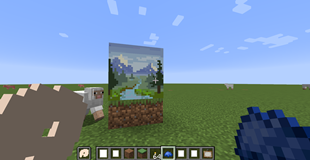
This mod lets you craft a blank canvas and a palette, with which you can paint your own pictures and hang them on a wall like the vanilla paintings. Let your creativity roam free or paint memes and experience the joy of painting.
If you are interested in making music as well, check Music Maker Mod, another one of my mods.
Features
- Color mixing mechanic faithful to vanilla and fun to use
- Painted canvases can be hanged on a wall
- Multiple brush sizes
- Multiple canvas sizes and shapes
- All 16 million colors are available
- Undo mistakes with CTRL+Z
New in 1.16.4-1.1 and 1.16.5-1.0:
There is now a color picker tool on full palettes.
- Click its icon to switch to color picking
- Then click and hold to pick a color on the canvas and bring it to one of the custom color slots on the palette

There are also some sound effects now, because it was too boring to paint in silence.
New in 1.15.2-3.3 and 1.16.2-1.1:
- You can now see what the painting looks like in inventory and on hand!
- You can now place small canvases on the floor and ceiling!
- You can now rotate square shaped (small and large) canvases by right clicking!
- You can now place more than one canvas on different faces of the same corner or edge!

Usage Guide
- First you need to craft (or get from the creative inventory) a palette and a canvas. Crafting recipes are given below.
- When crafting a palette, any combination of dyes will do, but you need at least one dye.
- You can then fill the palette with other dyes if you want.
- There are currently four kinds of canvases. The basic one is 1 block sized. The others are 1×2, 2×1 and 2×2 block sized.
- Using a canvas (by itself) with right-click lets you view its content.
- Using a palette (by itself) lets you open the palette interface, where you can mix colors to create custom ones.
- Using a canvas in one hand and a palette on the other lets you open both interfaces at once, where you can paint on the canvas using the colors on your palette. You can mix colors here as well.
- The color mixing rules work the same way as the vanilla leather armor dyeing mechanic.
- Change the brush size with the mouse wheel and undo mistakes with the CTRL+Z shortcut
- After painting a canvas, you can use it on a wall similar to vanilla paintings to hang it on the wall. Hitting the hanged canvas or breaking a block it rests on will drop it back as an item.
Crafting Recipes


To craft a palette, you need at least one kind of dye:

You can fill an existing palette with other dyes later:

You can copy signed paintings:

Credits to Edgewalker_Blue for providing the Simplified Chinese translation.
About shaders:
This mod doesn't support custom shaders. The paintings will show up fine with some of them and not with others. Unfortunately, there is not much I can do about this.
Add a comment