


 Get 0.05 TON 💎
Earlier Versions
| Name | Size | Uploaded | Game Version | Downloads | |
| keymap-0.4.2-beta.3+1.18.1-fabric.jar beta | 438.38 KB | May 20, 2022 | 1.18.2 | 3 |  Download Download |
| keymap-0.4.2-beta.3+1.17.1-fabric.jar beta | 438.35 KB | May 20, 2022 | 1.17.1 | 1 | Download |
| keymap-0.4.2-beta.2+1.18.1-fabric.jar beta | 438.38 KB | May 16, 2022 | 1.18.2 | 150 | Download |
| keymap-0.4.2-beta.2+1.17.1-fabric.jar beta | 438.35 KB | May 16, 2022 | 1.17.1 | 5 | Download |
| keymap-0.4.0-beta.0+1.18.1-fabric.jar beta | 428.02 KB | May 13, 2022 | 1.18.2 | 113 | Download |
| keymap-0.4.0-beta.0+1.17.1-fabric.jar beta | 428.00 KB | May 13, 2022 | 1.17.1 | 7 | Download |
| keymap-0.3.2-beta.4+1.18.1-fabric.jar beta | 116.71 KB | Apr 9, 2022 | 1.18.2 | 566 | Download |
| keymap-0.3.2-beta.4+1.17.1-fabric.jar beta | 116.68 KB | Apr 9, 2022 | 1.17.1 | 17 | Download |
| keymap-0.3.2-beta.2+1.18.1-fabric.jar beta | 117.06 KB | Apr 7, 2022 | 1.18.2 | 258 | Download |
| keymap-0.3.2-beta.2+1.17.1-fabric.jar beta | 117.04 KB | Apr 7, 2022 | 1.17.1 | 11 | Download |
| keymap-0.3.2-beta.1+1.18.1-fabric.jar beta | 116.53 KB | Apr 6, 2022 | 1.18.2 | 55 | Download |
| keymap-0.3.2-beta.1+1.17.1-fabric.jar beta | 116.51 KB | Apr 6, 2022 | 1.17.1 | 10 | Download |
| keymap-0.3.1-beta.0+1.18.1-fabric.jar beta | 110.31 KB | Apr 6, 2022 | 1.18.2 | 60 | Download |
| keymap-0.3.1-beta.0+1.17.1-fabric.jar beta | 110.29 KB | Apr 6, 2022 | 1.17.1 | 8 | Download |
| keymap-0.3.0-beta.3+1.18.1-fabric.jar beta | 109.54 KB | Apr 3, 2022 | 1.18.2 | 96 | Download |
| keymap-0.3.0-beta.3+1.17.1-fabric.jar beta | 109.52 KB | Apr 3, 2022 | 1.17.1 | 10 | Download |
| keymap-0.3.0-beta.2+1.17.1-fabric.jar beta | 155.35 KB | Apr 3, 2022 | 1.17.1 | 19 | Download |
| keymap-0.3.0-beta.2+1.18.1-fabric.jar beta | 155.37 KB | Apr 2, 2022 | 1.18.2 | 60 | Download |
| keymap-0.2.0-beta.0+1.17.1-fabric.jar beta | 75.60 KB | Mar 24, 2022 | 1.17.1 | 36 | Download |
| keymap-0.2.0-beta.0+1.18.1-fabric.jar beta | 75.62 KB | Mar 24, 2022 | 1.18.2 | 181 | Download |
| keymap-0.1.0-beta.0+1.18.1-fabric.jar beta | 67.87 KB | Mar 23, 2022 | 1.18.1 | 88 | Download |
Description
# Keymap


### News
Working with curseforge’s editor is kinda hard so I prolly won’t be updating this page much anymore, instead, you can check out the github readme for this project here to get up to date news and stuff, with that in mind, I’ll also strip out the changelogs and stuff from this page, except for the ###new, and ###layout support sections.
### New
Language Selection screen + new config screen


### Layout support

So the layout per language thingy is now kinda working, I made a tiny tool to help with the keyboard layout creation over here so anyone can help with project.
> `NOTE:` At the moment of writing, if the mod is unable to detect the presence of a layout file for the language, it defaults to `en_us`.

Current language/locale support:
- en_us :: English(US)
- de_de :: Deutsch (Deutschland)
- da_dk :: Dansk (Danmark)
- no_no :: Norsk bokmal (Norge)
- fr_fr :: Frances (French) :: also includes bepo and afnor variation (thanks github/arthurbambou)

If you want a language added but can't help, send over a language request via Github issues over here, with the title `[Layout Request] <Language>`, with an image attachment of the expected keyboard layout, images from Google, or you own keyboard is fine.

If you are able to work with the tool mentioned above, export the file via the export button (making sure that the language code is correct), following this, you can:
- submit a pull request on the keymap repo (_place the yaml file under `/src/main/resources/assets/keymap/layouts`_).
or
- submit an issue here, with the title `[Layout Support] <Language>`, with the yaml file from the export attached.

Thanks!
### What
– A visual keymapping mod, specially helpful if you have tons of mods that add keybinds
### Why
– Why not, also, vanilla keybind screen + controlling isn’t cutting it, and for some reason, searching with controlling is
slow on my machine
– ~~Why use a keybind instead of replacing the keybinds screen? idk, I find it easier to use that way, do hit me up if you prefer to have it replace the keybinds screen as a configurable feature~~ (_check “How” section_)
### How
#### to open the keymapper
– The default keybind is " ` ", aka, the grave accent key, the key below the escape key, or the key along with the tilde " ~ "
#### to restore old keybind UI
– If you’d like to have the old Keybinding screen on the options>controls>keybinds menu, then disable Override Keybind Screen (access it via ModMenu)
#### to use a custom keyboard layout
– Currently, this is only doable by running the game once to generate the config then modifying the <minecraft_dir>/config/keymap_keys.json file, unfortunately this requires you to know the exact keyCodes for your current keyboard layout (I’m open for help on this one, tho I will still look into it as much as I could).
### Required Mods
– Fabric API
– Cloth Config API
– ModMenu (_to access config_)
### Features
– Visualize all assigned keys
– Visualize keys with multiple assignments
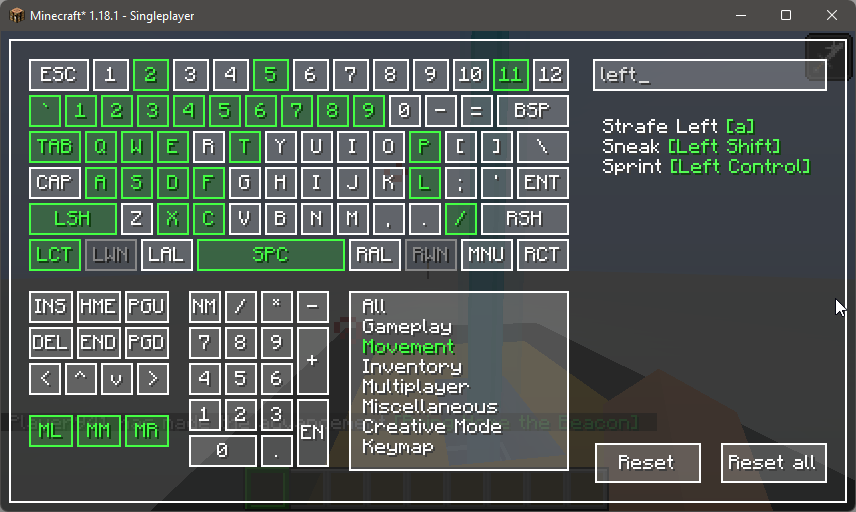
– Filter by searching and/or by category
– You can also filter the keybind with its bound key by using square brackets eg; `[left button]`
– Set keybinds by either pressing a keyboard key or by clicking on the any virtual keys (_except mouse buttons, which can only be set with the virtual keys_)
– Sleek UI (_lol_)
– ~~OCD Triggering misalignment of some panels ( _:D_ )~~ (_removed :<_)
– Completely replaces the default keybinds screen (_enabled by default, disable via modmenu config_)
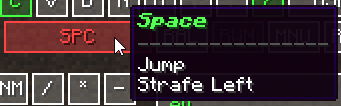
– Shows all keybinds bound to a key via tooltip
– Malilib supported along with it’s chained hotkeys
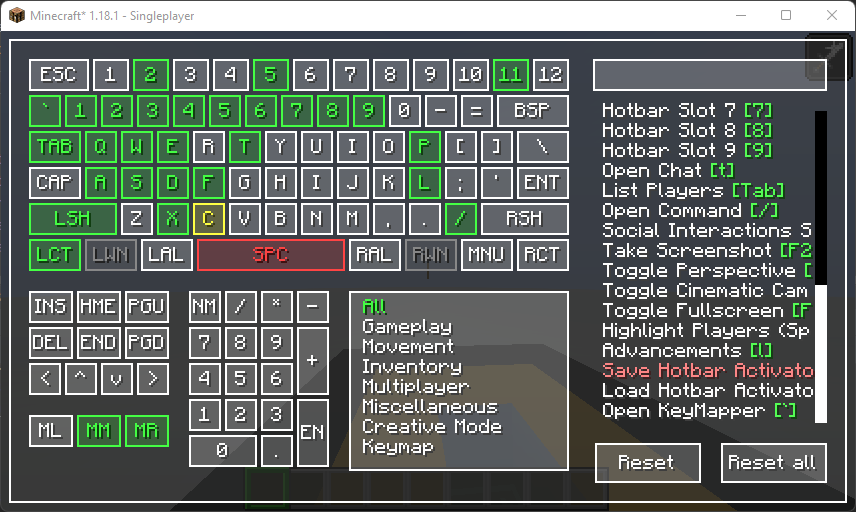
### Images?
– Status
– ⬜ `Available`
– ???? `Set`
– ???? `Conflict`
– ???? `Bound to selected item`
– Malilib
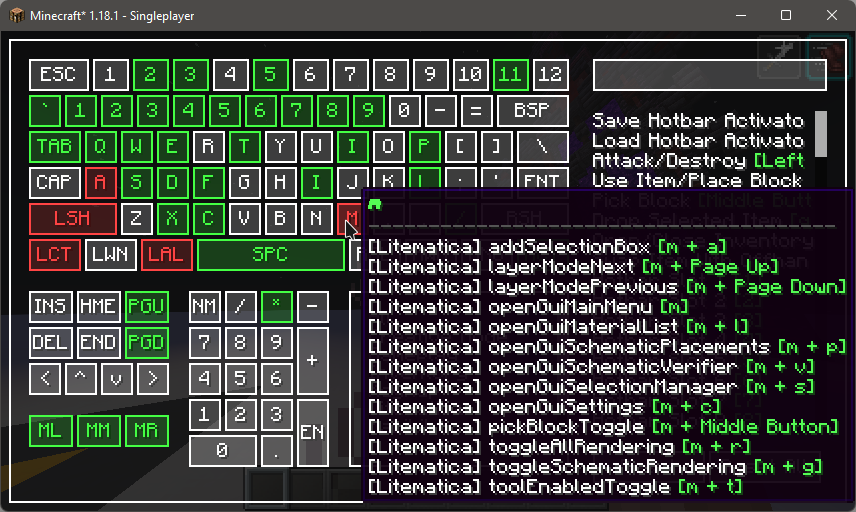
– Assigned keybinds on hover
– Filter by category + search
### Latest Changes (0.3.0)
#### 0.3.2 beta 4
– fix mouse scroll bug
– refactor code with lombok
– lots of other refactoring (hopefully all still works)
– prolly some other stuff too, that I just kinda forgot
– reimplement selected highlight
### Help I can’t xx
– **Can’t rebind mouse keys?**
– Currently, rebinding mouse key requires the user to click on the `ML`, `MM`, and `MR` buttons to assign the `Left button`, `Middle Button`, and `Right Button` respectively.
### BUG!
– Github Issues
### TODO
– [x] Support Malilib hotkeys
– [ ] ~~Add conflict counter in the case that a key has more than 2 keys bound to it~~ (_replaced by hover tooltips_)
– [x] Show the actions bound to the key on hover
– [x] Show the key bound to the action on hover
– [x] Show the mod bound to a category on hover ~~(_if that’s even possible_)~~ (_currently only works for malilib mods, will look into support for other mods soon_)
– [x] Support overriding the default keybind screen
– [ ] Support different keyboard layouts
– [ ] Differentiate conflicting keybinds from keybinds with malilib chains for easier navigation
– [ ] Clicking on virtual key wil filter the keybind list
### Modpack?
– Sure, credits would be highly appreciated~
### Support

#### Deprecation notice
Complete UI widget rewrite, everything under v1 is practically obsolete, kept just for personal reference, will prolly be removed on succeeding updates
Add a comment