


 Get 0.05 TON 💎
Earlier Versions
| Name | Size | Uploaded | Game Version | Downloads | |
| Little More Mod 1.7.10 release | 117.88 KB | Jan 1, 2018 | 1.7.10 | 4,533 |  Download Download |
| Little More Mod 1.11.2 release | 599.59 KB | Aug 27, 2017 | 1.11.2 | 1,447 | Download |
Screenshots


Description
Supported versions:
1.11.2 VERSION REQUIRES FORGE VERSION 13.20.1.2454.
1.7.10 VERSION REQUIRES FORGE VERSION 10.13.4.1614.
Mod review of the 1.8 version that doesn't exist anymore.
What does the mod add?
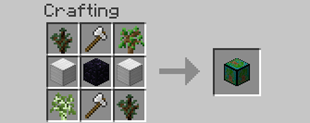
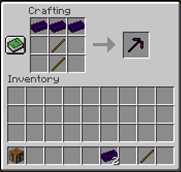
This mod adds two new ores and two new blocks, ruby and sapphire. It also adds new tools and new armors, lapis, ruby, sapphire, quartz, obsidian and emerald. You're also able to make battle axes.
When obsidian armor is crafted, it will get enchanted with Blast Protection V because explosions can't destroy obsidian. Use it against creepers or ghasts. The emerald armor and the new emerald tools are now the best and strongest in vanilla minecraft. To craft emerald tools you will need obsidian sticks and for the sword, you'll need obsidian ingots (Use "Just Enough Items" to see the recipes).
Can I use the mod in my modpack?
Feel free to use the mod in any modpacks. You don't need to ask for permission because your request will probably be ignored. When using the mod, Please use the Curse/Curseforge download and do not rehost the files.
Languages
You can choose between two different languages: English and Swedish.
BUGS?
If you find any bugs please let me know in the comments.
How To Install This Mod:
Download and extract the zip file on the Desktop.
Double click the Forge installer and click on Install Client.
Go to your mods folder (…\.minecraft\mods\) and drag the mod into the mods folder. Done!


Add a comment