


 Get 0.05 TON 💎
Earlier Versions
| Name | Size | Uploaded | Game Version | Downloads | |
| LoreTag v1.3.1 release | 10.42 KB | Dec 5, 2015 | 1.8.3 | 559 |  Download Download |
| LoreTag v1.3.0 release | 9.92 KB | Dec 4, 2015 | 1.8.1 | 167 | Download |
| LoreTag v1.2.0 release | 8.52 KB | May 25, 2015 | 1.8.1 | 291 | Download |
| LoreTag v1.1.0 release | 8.39 KB | May 21, 2015 | 1.8.1 | 165 | Download |
Screenshots


Description
FOR BUKKIT 1.5.2 TO 1.10
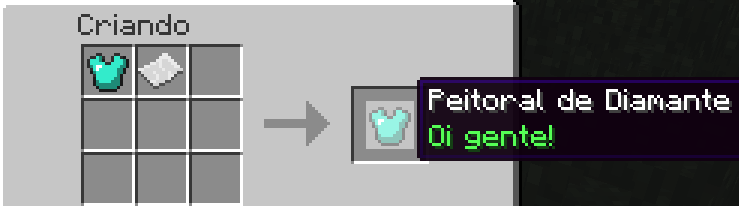
LoreTag allow your players with permissions to craft the item lore using name_tag as a line of item lore line!
Brasileiro ou Português, página traduzida: CliqueAqui
Craft for 1.6.1 to 1.10:

Craft for 1.5.2:
Features:
- You only need to craft the item like the image on top of the plugin page. No special commands and no complications;
- Using only name_tag, you can set one line, or 6 lines of your item lore using the craft table;
- You can personalize the list of allowed itens to allow change the lore;
- Additional command to setlore with number and colored messages;
- Permissions for each line;
- Reload command to reload all changes you make on item-list configuration;
Command:
Theres only one command to set the lore and one to reload:
- /lt setlore <1-6> <Text to Lore> : Use to set the lore line of an item. The message can have colors using "&" color codes;
- /lt reload: To reload the plugin.
Permissions:
- loretag.command.setlines : To use the command /lt setlore <1-6> <Text to Lore>;
- loretag.lines1-3 : To allow player the permission to change the lore lines 1, 2 and 3;
- loretag.lines1-6 : To allow player the permission to change the lore lines 1, 2, 3, 4, 5 and 6;
- loretag.reload : To use the command /lt reload;
- loretag.* : To give all permissions – Default for OPs;
Or a permission for each line:
- loretag.line <1 – 6> : Give this permission to control what line the player can change. All default for OPs.
You need to give all permissions after 1 to give the next.
Eg.: To you give the perm "loretag.line6", you need to give the perms from 1 to 5 too!
Configuration:
Here's the configuration file to choose what itens can have the lore changed by craft name_tags:
item-list:
- GOLD_BOOTS
- GOLD_CHESTPLATE
- GOLD_HELMET
- GOLD_LEGGINGS
- DIAMOND_BOOTS
- DIAMOND_CHESTPLATE
- DIAMOND_HELMET
- DIAMOND_LEGGINGS
- CHAINMAIL_BOOTS
- CHAINMAIL_CHESTPLATE
- CHAINMAIL_HELMET
- CHAINMAIL_LEGGINGS
- IRON_BOOTS
- IRON_CHESTPLATE
- IRON_HELMET
- IRON_LEGGINGS
- LEATHER_BOOTS
- LEATHER_CHESTPLATE
- LEATHER_HELMET
- LEATHER_LEGGINGS
You can find all item names here: Click here!
Other Amazing Plugins
| Ultimate Translator | SedexPet |
|---|---|
 Real-Time Translator Real-Time Translator |
 Send Pets to your friends Send Pets to your friends |
| PvPDiffTimer | RedProtect |
 PvP and Difficulty at Day/Night PvP and Difficulty at Day/Night |
 Antigrief Plugin Antigrief Plugin |




Add a comment