


 Get 0.05 TON 💎
Earlier Versions
| Name | Size | Uploaded | Game Version | Downloads | |
| MakeUp-UltraFast-8.6g.zip release | 316.27 KB | Sep 6, 2022 | 1.19.2 | 6,150 |  Download Download |
| MakeUp-UltraFast-8.6f.zip release | 316.21 KB | Sep 6, 2022 | 1.19.2 | 1,265 | Download |
| MakeUp-UltraFast-8.6e.zip release | 316.56 KB | Sep 3, 2022 | 1.19.2 | 8,074 | Download |
| MakeUp-UltraFast-8.6d.zip release | 343.35 KB | Aug 10, 2022 | 1.19.2 | 69,197 | Download |
| MakeUp-UltraFast-8.6c.zip release | 343.14 KB | Aug 3, 2022 | 1.19.1 | 25,398 | Download |
| MakeUp-UltraFast-8.6b.zip release | 343.15 KB | Jul 29, 2022 | 1.19.1 | 18,000 | Download |
| MakeUp-UltraFast-8.6a.zip release | 342.84 KB | Jul 23, 2022 | 1.19.1 | 20,184 | Download |
| MakeUp-UltraFast-8.6.zip release | 342.87 KB | Jul 16, 2022 | 1.19.1 | 23,089 | Download |
| MakeUp-UltraFast-8.5c.zip release | 560.33 KB | Jun 30, 2022 | 1.19.1 | 61,935 | Download |
| MakeUp-UltraFast-8.5b.zip release | 560.32 KB | Jun 28, 2022 | 1.19 | 31,105 | Download |
| MakeUp-UltraFast-8.5a.zip release | 559.95 KB | Jun 28, 2022 | 1.19 | 661 | Download |
| MakeUp-UltraFast-8.5.zip release | 560.37 KB | Jun 25, 2022 | 1.19 | 7,155 | Download |
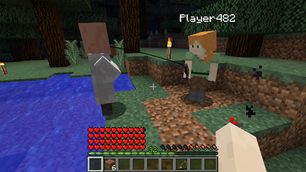
Screenshots


Description

Windows ✓ – Linux ✓ – MacOS ?
Intel ✓ – Nvidia ✓ – AMD ?
Version 5.39:
- The project was ported to GLSL version 120 for maximum compatibility.
- Some dithering functions have changed for compatibility with this version.
Agreement:
- You can freely modify the code, as long as it is distributed under the same license: LGPL 3 or compatible.
- That distribution must have another name, but give explicit credit to the original source.
Highlights
- All effects are optional. Build your perfect shader!
- Smart and unobtrusive Depth of Field
- Simple and fast autoexposure
- Motion blur
- Enhanced ambient occlusion
- Water reflection and refraction
- Waving plants
- Volumetric clouds
- Bloom
- Chromatic aberration
- TAA Antialiasing
- Shaders for all native dimensions
Support
If you want to support the project, click on the donation button that appears on this page, in the "About Project" section. Thanks!
It's not that fast!
- Try disabling the Bloom, Depth or Field or Shadows, are FPS eaters.
- If that doesn't work, try disabling Ambient Occlusion.
Install
- You need Optifine to use the shader: https://optifine.net/downloads
- Put this shaderpack inside .minecraft\shaderpacks
- Launch Minecraft.
- Go to Options -> Video Settings -> Shaders.
- Choose MakeUp-UltraFast.


Add a comment