

 Get 0.05 TON 💎
Earlier Versions
| Name | Size | Uploaded | Game Version | Downloads | |
| mcRSS 1.3.0 release | 33.95 KB | Jan 21, 2013 | CB 1.4.7-R0.1 | 894 |  Download Download |
| mcRSS 1.2.0 release | 31.35 KB | Jan 3, 2013 | CB 1.4.6-R0.3 | 650 | Download |
| mcRSS 1.1.1 release | 31.21 KB | Sep 12, 2012 | CB 1.3.1-R2.0 | 734 | Download |
| mcRSS 1.1.0 release | 31.08 KB | Sep 6, 2012 | CB 1.3.1-R2.0 | 661 | Download |
| mcRSS 1.0.0 beta | 17.74 KB | Sep 1, 2012 | CB 1.3.1-R2.0 | 305 | Download |
Screenshots


Description
mcRSS

mcRSS – Ingame RSS Reader
Version: 1.3.0
Author: Maxim Van de Wynckel (Maximvdw)
Are you using mcRSS on your server ? Added your own RSS feeds? PM me your IP if you want, so I can come take a look
on how your RSS feed looks, maybe I can improve my plugin then 😉
Features
Current Version
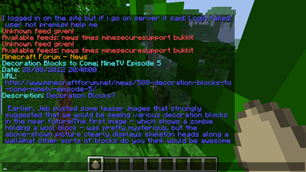
- Read an rss feed
- Read individual posts in a feed
- Broadcast an rss feed or individual posts to all players
- Show a rss feed to specific player
- Add / Remove rss feeds ingame
- Read/Store Feeds in books

Upcomming features
- Gonna change the lay-out of the book (Width is too small)
About
mcRSS is an ingame RSS reader for bukkit. It allows you to view or show individual
topics that are in the RSS feed. There are various uses for this plugin:
- You can use it to view your favorite RSS feeds ingame
- You can use it to show or view new topics on your forum
mcRSS was originally designed to work for Drupal Taxonomy. But is now further developed to work for
other feeds aswell.
About me
I'm a Dutch developer. This is the first plugin I will publish. Mostly I made plugins for myself.
Installation
To install mcRSS:
- Download mcRSS.jar
- Put mcRSS.jar into the root of your plugins folder
- Start your server, mcRSS will generate the config file
- Goto plugins/mcRSS/
- Open the config.yml And rss.yml file with your favorite editor
- Edit the settings, more information is given in the file
- Once you finished the configuration reload or restart your server
Commands
mcRSS uses commands to view RSS feeds,
or to control the plugin. However we are working to find a way
to show the text in books.
Commands can be found on this page
Permissions
Each command and argument has its own permission in mcRSS.
Use a permissions plugin to who may use certain functions , and who can't
Permissions can be found on this page
Configuration
mcRSS has a config.yml that will be created after the first load.
Also a rss.yml file will be created to store RSS feeds.
The default file contains 4 example feeds
Configuration can be found on this page
Updating: When a configuration file is updated as well , the old
one will be overridden by the newest version
FAQ's
Can I add my own RSS feeds?
Yes, in the config file you can add / remove any RSS Feeds
How many feeds can I add?
mcRSS is limited to 128 RSS feeds to prevent crashes
Does this work on normal HTML pages?
No, mcRSS uses RSS XML files to gather the data
How to add RSS feeds to my Drupal forum?
To add RSS feeds to Drupal, you have to install the module
Taxomony. This will create a little RSS icon at each page.
You can right click on it and select "Copy link url" and paste
it into the config file.
Add a comment