

 Get 0.05 TON 💎
Earlier Versions
| Name | Size | Uploaded | Game Version | Downloads | |
| MineChess 1.14.1 release | 187.24 KB | Jan 14, 2023 | 1.19.3 | 11 |  Download Download |
Screenshots

Description
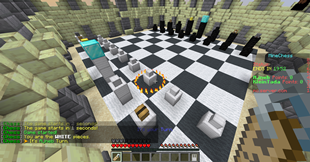
Simple chess minigame plugin for minecraft 1.8-1.19
Before creating an arena it’s important to set the Main Lobby using /chess setmainlobby
To create a Chess Arena just follow these steps.
1) Use the /chess create <arena> command.
2) To build the chess board use the /chess build <arena> command. Be careful because this will place the board next to you, replacing all blocks sorrounding you. That’s why you need to build the arena before decorating it.
3) Set the arena spawn by using /chess setspawn <arena>. You can place the spawn in the air since the players will have access to fly during the game.
4) Use the /chess enable <arena> command to allow players to join the arena.
5) Finally, you can create a Sign to join the arena. Just use the following format:
[Chess]
arena_name
Commands
-/chess create <arena> Creates a new arena.
-/chess delete <arena> Deletes an arena.
-/chess join <arena> Joins an arena.
-/chess joinrandom <arena> Joins a random arena.
-/chess leave Leaves from the arena.
-/chess spectate <arena>/<player> Spectates an arena or player.
-/chess setmainlobby Defines the minigame main lobby.
-/chess enable <arena> Enables an arena.
-/chess disable <arena> Disables an arena.
-/chess build <arena> Builds the arena in your current position.
-/chess setspawn <arena> Sets the arena spawn.
-/chess stats <player> Shows you player stats.
-/chess reload Reloads the configuration files.
Permissions:
– chess.admin (Access to all commands)
– chess.stats (Access to /chess stats command)
– chess.stats.others (Access to /chess stats <player> command)



Add a comment