


 Get 0.05 TON 💎
Earlier Versions
| Name | Size | Uploaded | Game Version | Downloads | |
| minihud-fabric-1.18.1-0.21.2.jar release | 306.64 KB | Jan 21, 2022 | 1.18.1 | 0 |  Download Download |
| minihud-fabric-1.17.1-0.20.0.jar release | 228.77 KB | Jan 10, 2022 | 1.17.1 | 5,172 | Download |
| minihud-fabric-1.17.1-0.19.0-dev.20211027.183903.jar release | 226.46 KB | Nov 30, 2021 | 1.17.1 | 23,689 | Download |
| minihud-fabric-1.16.5-0.19.0-dev.20210917.191825.jar release | 217.96 KB | Nov 30, 2021 | 1.16.5 | 2,743 | Download |
| minihud-fabric-1.17.1-0.19.0-dev.20210707.150016.jar release | 233.60 KB | Jul 7, 2021 | 1.17.1 | 121,553 | Download |
| minihud-fabric-1.17.1-0.19.0-dev.20210707.011159.jar release | 232.28 KB | Jul 6, 2021 | 1.17.1 | 1,550 | Download |
| minihud-fabric-1.16.4-0.19.0-dev.20201103.184029.jar release | 228.27 KB | Nov 3, 2020 | 1.16.5 | 177,595 | Download |
| minihud-fabric-1.16.3-0.19.0-dev.20200912.222204.jar release | 228.00 KB | Sep 13, 2020 | 1.16.3 | 22,962 | Download |
| minihud-fabric-1.16.2-0.19.0-dev.20200819.013355.jar release | 227.87 KB | Aug 18, 2020 | 1.16.2 | 9,340 | Download |
| minihud-fabric-1.16.2-0.19.0-dev.20200812.031115.jar release | 227.92 KB | Aug 12, 2020 | 1.16.2 | 1,900 | Download |
| minihud-fabric-1.16.1-0.19.0-dev.20200701.005153.jar release | 227.51 KB | Jun 30, 2020 | 1.16.1 | 14,652 | Download |
| minihud-fabric-1.15.2-0.19.0-dev.20200427.222110.jar release | 200.23 KB | Apr 27, 2020 | 1.15.2 | 14,724 | Download |
| minihud-fabric-1.15.2-0.19.0-dev.20200121.203515.jar release | 196.60 KB | Feb 12, 2020 | 1.15.2 | 17,936 | Download |
| minihud-fabric-1.14.4-0.19.0-dev.20191007.003640.jar release | 193.30 KB | Oct 6, 2019 | 1.14.4 | 17,542 | Download |
| minihud-fabric-1.14.4-0.19.0-dev.20190825.170729.jar release | 190.40 KB | Aug 25, 2019 | 1.14.4 | 6,137 | Download |
| minihud-fabric-1.14.4-0.19.0-dev.20190720.191339.jar release | 190.11 KB | Jul 20, 2019 | 1.14.4 | 5,115 | Download |
| minihud-fabric-1.14.3-0.19.0-dev.20190626.044813.jar release | 190.12 KB | Jul 5, 2019 | 1.14.3 | 1,171 | Download |
| minihud-rift-1.13.2-0.19.0-dev.20190615.230313.jar release | 176.58 KB | Jun 15, 2019 | 1.13.2 | 1,047 | Download |
| minihud-fabric-1.14.2-0.19.0-dev.20190527.190919.jar release | 109.96 KB | May 27, 2019 | 1.14.2 | 1,376 | Download |
| minihud-fabric-1.14.0-0.19.0-dev.20190527.190901.jar release | 109.92 KB | May 27, 2019 | 1.14 | 488 | Download |
| minihud-rift-1.13.2-0.19.0-dev.20181218.034609.jar release | 108.42 KB | Dec 18, 2018 | 1.13.2 | 3,267 | Download |
| minihud-rift-1.13.2-0.19.0-dev.20181216.202233.jar release | 108.29 KB | Dec 16, 2018 | 1.13.2 | 220 | Download |
| minihud-rift-1.13.2-0.19.0-dev.20181212.221432.jar release | 102.63 KB | Dec 12, 2018 | 1.13.2 | 278 | Download |
| minihud-1.12.2-0.13.1.jar +9 More+9 Others release | 51.38 KB | Mar 4, 2018 | 1.12.2 | 22,436 | Download |
| minihud-1.12.2-0.13.0.jar +2 More+2 Others release | 49.18 KB | Mar 1, 2018 | 1.12.2 | 217 | Download |
| minihud-1.12.2-0.12.1.jar +2 More+2 Others release | 44.38 KB | Feb 28, 2018 | 1.12.2 | 223 | Download |
| minihud-1.12.0-0.12.0.jar release | 42.33 KB | Aug 3, 2017 | 1.12.2 | 3,864 | Download |
| minihud-1.11.2-0.12.0.jar release | 42.16 KB | Aug 3, 2017 | 1.11.2 | 438 | Download |
| minihud-1.12.0-0.11.1.jar release | 31.17 KB | Jul 25, 2017 | 1.12 | 293 | Download |
| minihud-1.11.2-0.11.1.jar release | 31.16 KB | Jul 25, 2017 | 1.11.2 | 202 | Download |
| minihud-1.12.0-0.11.0.jar release | 28.06 KB | Jul 24, 2017 | 1.12 | 175 | Download |
| minihud-1.11.2-0.11.0.jar release | 28.05 KB | Jul 24, 2017 | 1.11.2 | 126 | Download |
| minihud-1.12.0-0.10.0.jar release | 26.06 KB | Jun 11, 2017 | 1.12 | 668 | Download |
| minihud-1.11.2-0.10.0.jar release | 26.07 KB | May 22, 2017 | 1.11.2 | 314 | Download |
| minihud-1.10.2-0.10.0.jar release | 25.73 KB | May 22, 2017 | 1.10.2 | 596 | Download |
| minihud-1.11.2-0.9.1.jar release | 25.62 KB | Apr 27, 2017 | 1.11.2 | 456 | Download |
| minihud-1.10.2-0.9.1.jar release | 25.32 KB | Apr 27, 2017 | 1.10.2 | 169 | Download |
| minihud-1.11.2-0.9.0.jar release | 25.23 KB | Mar 17, 2017 | 1.11.2 | 453 | Download |
| minihud-1.10.2-0.9.0.jar release | 25.03 KB | Mar 17, 2017 | 1.10.2 | 864 | Download |
| minihud-1.11.2-0.8.0.jar release | 24.20 KB | Mar 14, 2017 | 1.11.2 | 169 | Download |
| minihud-1.10.2-0.8.0.jar release | 24.00 KB | Mar 14, 2017 | 1.10.2 | 183 | Download |
| minihud-1.11.2-0.7.1.jar release | 23.01 KB | Mar 4, 2017 | 1.11.2 | 222 | Download |
| minihud-1.10.2-0.7.1.jar release | 22.81 KB | Mar 4, 2017 | 1.10.2 | 186 | Download |
| minihud-1.11.2-0.7.0.jar release | 23.00 KB | Mar 3, 2017 | 1.11.2 | 191 | Download |
| minihud-1.10.2-0.7.0.jar release | 22.80 KB | Mar 3, 2017 | 1.10.2 | 173 | Download |
| minihud-1.11.2-0.6.0.jar release | 21.46 KB | Mar 2, 2017 | 1.11.2 | 150 | Download |
| minihud-1.10.2-0.6.0.jar release | 21.27 KB | Mar 2, 2017 | 1.10.2 | 168 | Download |
| minihud-1.11.2-0.5.2.jar release | 20.56 KB | Dec 27, 2016 | 1.11.2 | 662 | Download |
| minihud-1.11.0-0.5.1.jar release | 20.35 KB | Dec 20, 2016 | 1.11 | 185 | Download |
| minihud-1.10.2-0.5.1.jar release | 20.37 KB | Dec 20, 2016 | 1.10.2 | 264 | Download |
| minihud-1.11.0-0.5.0.jar release | 20.32 KB | Dec 12, 2016 | 1.11 | 176 | Download |
| minihud-1.10.2-0.5.0.jar release | 20.34 KB | Dec 12, 2016 | 1.10.2 | 161 | Download |
| minihud-1.11.0-0.4.5.jar release | 19.05 KB | Nov 29, 2016 | 1.11 | 361 | Download |
| minihud-1.11.0-0.4.4.jar release | 18.51 KB | Nov 16, 2016 | 1.11 | 320 | Download |
| minihud-1.10.2-0.4.3.jar release | 18.52 KB | Oct 23, 2016 | 1.10.2 | 262 | Download |
| minihud-1.10.2-0.4.2.jar release | 18.35 KB | Jun 29, 2016 | 1.10.2 | 767 | Download |
| minihud-1.10.0-0.4.2.jar release | 18.34 KB | Jun 23, 2016 | 1.10 | 383 | Download |
| minihud-1.9.4-0.4.2.jar release | 18.34 KB | Jun 15, 2016 | 1.9.4 | 293 | Download |
| minihud-1.9.4-0.4.1.jar release | 18.34 KB | May 21, 2016 | 1.9.4 | 323 | Download |
| minihud-1.9-0.4.1.jar release | 18.35 KB | May 21, 2016 | 1.9 | 339 | Download |
| minihud-1.9.4-0.4.0.jar release | 18.24 KB | May 21, 2016 | 1.9.4 | 176 | Download |
| minihud-1.9-0.4.0.jar release | 18.24 KB | May 21, 2016 | 1.9 | 227 | Download |
| minihud-1.8.9-0.4.0.jar release | 18.22 KB | May 21, 2016 | 1.8.9 | 969 | Download |
| minihud-1.9.4-0.3.0.jar release | 17.03 KB | May 21, 2016 | 1.9.4 | 177 | Download |
| minihud-1.9-0.3.0.jar release | 17.03 KB | May 21, 2016 | 1.9 | 220 | Download |
| minihud-1.8.9-0.3.0.jar release | 17.01 KB | May 21, 2016 | 1.8.9 | 305 | Download |
| minihud-1.9.4-0.2.0.jar release | 15.46 KB | May 19, 2016 | 1.9.4 | 276 | Download |
| minihud-1.9-0.2.0.jar release | 15.46 KB | May 6, 2016 | 1.9 | 168 | Download |
| minihud-1.8.9-0.2.0.jar release | 15.44 KB | May 6, 2016 | 1.8.9 | 245 | Download |
| minihud-1.8-0.2.0.jar release | 15.48 KB | May 6, 2016 | 1.8 | 410 | Download |
| minihud-1.9-0.1.0.jar release | 12.91 KB | Apr 22, 2016 | 1.9 | 277 | Download |
| minihud-1.8.9-0.1.0.jar release | 12.89 KB | Apr 22, 2016 | 1.8.9 | 474 | Download |
| minihud-fabric-1.17.0-0.19.0-dev.20210609.185508.jar beta | 220.27 KB | Jun 9, 2021 | 1.17 | 30,006 | Download |
| minihud-fabric-1.17.0-0.19.0-dev.20210608.211830.jar beta | 220.06 KB | Jun 8, 2021 | 1.17 | 2,716 | Download |
| minihud-fabric-1.16.1-0.19.0-dev.20200630.023335.jar beta | 227.51 KB | Jun 30, 2020 | 1.16.1 | 3,612 | Download |
| minihud-forge-1.15.2-0.19.0-dev.20200412.215359.jar beta | 178.62 KB | Apr 12, 2020 | 1.15.2 | 8,884 | Download |
| minihud-forge-1.14.4-0.19.0-dev.20200412.215053.jar beta | 176.15 KB | Apr 12, 2020 | 1.14.4 | 1,444 | Download |
| minihud-forge-1.14.4-0.19.0-dev.20191210.230927.jar beta | 174.33 KB | Dec 10, 2019 | 1.14.4 | 3,012 | Download |
| minihud-rift-1.13.2-0.19.0-dev.20190609.195448.jar beta | 196.53 KB | Jun 11, 2019 | 1.13.2 | 258 | Download |
Screenshots


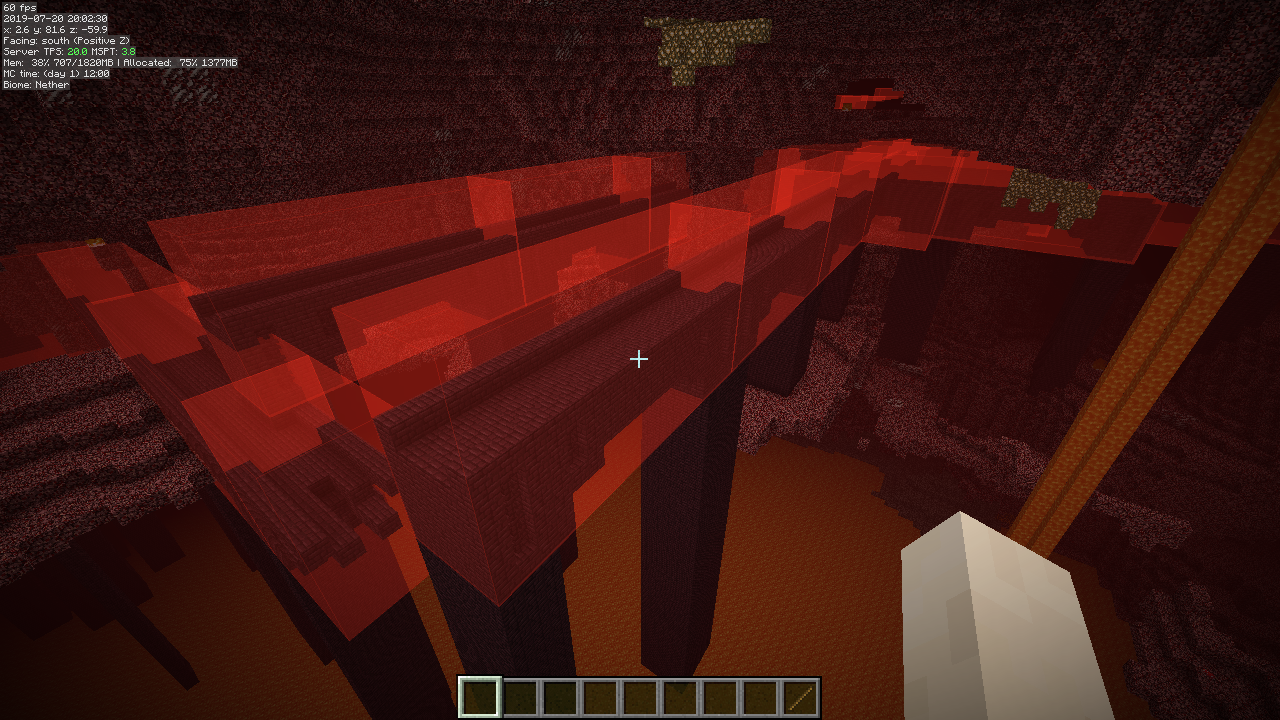


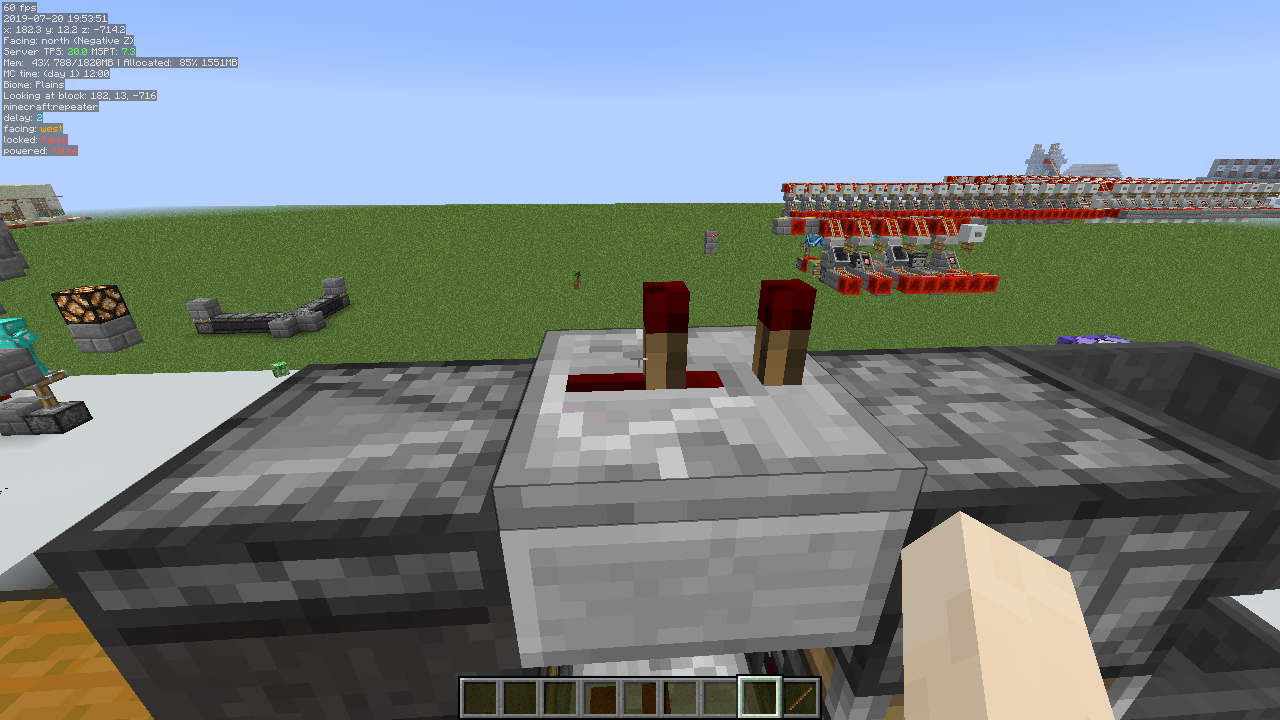
Description
Description
A client-side mod that allows displaying various "info lines" on the screen ("mini-F3"). The alignment (screen corner), background and text color and font size are configurable. Note: This is a client-side-only mod! You can't put it on a server.
The mod also has various "overlay renderers", such as:
- Structure Bounding Boxes (These only work in single player, without a server-side mod! Currently the only server-side mods that send the data in a format that MiniHUD knows about are Servux and QuickCarpet. If you have FabricCarpet, then you also need Servux.
- Spawn Chunks
- Light Level overlay with markers and/or numbers (configurable)
- Region File Boundaries
- Random Tick range
- Shapes: A mob Despawn Sphere, plus 24 and 32 block Spawn Spheres, a generic configurable radius Sphere, a Circle/Cylinder. More shapes are also planned.
- Block Grid
- Mob spawn algorithm chunks range (< 1.14 only, in 1.14+ it's the same as the random ticked chunks)
- Height map (used by the mob spawn algorithm)
(note that many of these currently are only available in the more recent LiteLoader, Rift and Fabric versions.)
The mod also adds hotkeys for toggling on/off the vanilla debug renderers for blocks collision boxes, heightmap, entity path finding etc.
The displayed information lines can also be toggled on/off with hotkeys, and the HUD itself can be toggled ON and OFF.
Some example screenshots are on the Images page.
Generic info
- The default in-game config menu hotkey is H + C
- The default on/off toggle key is H
- You can provide the world seed for MiniHUD (only used for the Slime Chunks info line and overlay) in multiplayer either by running the vanilla /seed command if you have the permission, or you can give it manually with a regular chat message in the form minihud-seed 12345. In single player the mod grabs the seed directly.
NOTE: MiniHUD also requires the MaLiLib library mod.
Be sure to download the correct version of both mods from the Files page!
https://www.curseforge.com/minecraft/mc-mods/malilib
Overlay colors are all opaque, what to do?!
In the current 0.19.0-dev versions for MC 1.16+, there are a bunch of features that are temporarily ported over from the main development version on 1.12.2. Due to it being a temporary port, I didn't bother trying to fix everything that is broken due to there being missing things in malilib, and there is currently also a bug in malilib's Color Edit menu in 1.13.2+ which causes the alpha channel (transparency) to reset to fully opaque when you use the Color Editor menu.
So currently, until the new malilib and other mod updates with the latest code from 1.12.2 can happen, you just have to manually fix the color value after using the color editor. Basically you just need to change the first two letters (after the #) in the hex color code from FF (fully opaque) to something between 30 to 60 or so, and then toggle off/on the overlay or shape in question to update it.
Different mod loaders vs. mod versions
Be sure to download the correct version for the mod loader you are using!
The newer builds will all include the mod loader name in the mod filename.
(Also note that the 1.13.2 versions ONLY work on MC 1.13.2, and NOT on the earlier 1.13 versions!)
For MC 1.14.x there are currently versions for the Fabric mod loader, those versions have '-fabric' in their filename.
Future Forge versions will also include -forge in the mod file name.
Key combinations
The mod's main rendering toggle key is by default H.
The in-game config menu hotkey is by default H + C.
Recent MiniHUD versions that use malilib
For the more recent versions of MiniHUD that use malilib, all the hotkeys are in MiniHUD's own in-game config menu, which by default opens with H + C.
Old Forge versions of MiniHUD
For the old Forge versions of the mod, the keybinds can be changed in the vanilla Controls menu.
For the old Forge versions:
- Toggle Mode key (by itself): Toggle the HUD state ON/OFF.
- Toggle Mode key + "info key": Toggle ON/OFF the different pieces of information (the keys can be set in the mod configs).
Available information
NOTE: The information below this is outdated and doesn't include everything that is in the recent LiteLoader, Rift and Fabric versions of the mod.
Look through the in-game config menu to see everything that is available in addition to the things mentioned below.
The following information is currently available:
- Real time (ie. a clock…)
- World time in ticks
- World time formatted to days, hours, minutes
- Player's current block position
- Player's current position in chunk
- Player's coordinates
- Player's current dimension ID
- Player's yaw rotation
- Player's pitch rotation
- Player's current moving speed
- Player's facing
- The Chunk the player is currently in
- The region file the player is currently in
- Looked-at-entity's name and health
- Looked-at-entity's registry name (1.11+) or ID (1.10.2)
- The block the player is looking at
- Block's registry name and the BlockState properties of the looked-at-block (like on the F3 screen)
- Current light level
- Current biome
- Current biome's registry name.
- Current FPS
- Entity count
- C value (rendered chunk sections) from F3
- P value (number of particles) from F3
- Current local difficulty number (from F3)
- Is the current chunk a slime chunk. Note: in multiplayer you need to manually run the /seed command!
Starting from version 0.13.0, there is now a region file boundary overlay renderer. The default hotkey to toggle it ON/OFF is Toggle (H) + J.
Note: Starting from version 0.9.0, you can change all these quick toggle keys via the config file or the in-game config menu.
Note: Starting from version 0.11.0, you can change the order of these info lines via the config file or the in-game config menu.
To temporarily (= not saved in the configs) toggle the info types while in-game, do this:
- In version 0.9.0 or later, press and hold the main Toggle key, and then press the configured hotkey for the info type you want to toggle
- Before version 0.9.0, first press and hold the indicated info type key and then press the Toggle key
Old Configuration options
Below are the bit mask values for the different information types. This is now redundant, just use the on/off options in the in-game config menu instead!
These were removed entirely in version 0.11.0.
- 1 = coordinates
- 2 = yaw
- 4 = pitch
- 8 = speed
- 16 = biome
- 32 = light level
- 64 = facing
- 128 = block position
- 256 = chunk position
- 512 = block looking at
- 1024 = fps
- 2048 = entity count
- 4096 = dimension id
- 8192 = world time (ticks)
- 16384 = world time (formatted)
- 32768 = IRL time (ie. a clock)
- 65536 = looking at entity
- 131072 = slime chunk
- 262144 = blockstate properties
Sum together the ones you want enabled by default. This means that those will show up when you load the game and then enable the MiniHUD by pressing the Toggle key.
Configuration
There are a few things that can be adjusted either via the in-game configuration menu or in the configuration file.
- The information to be displayed on the Info Lines HUD
- Font scale factor
- The font and backgrond colors
- Whether to use a font shadow in the text rendering
- Whether to use a background color for the text
- Whether to sort the displayed information lines by their length
- Whether to reverse the above mentioned sorting order
- Whether to use a custom format string for the coordinate line, and the format string to use
- Multiple options to configure the Light Level overlay
- The colors of all the overlay renderers
Note: The custom format string for the coordinates has to have three float number format specifiers.
An example of that would be "X: %.1f Y: %.1f Z: %.1f" (without the quotes) to give an output like: X: 1234.2 Y: 64.0 Z: 4321.7.
Vanilla debug renderers
Starting from mod version 0.12.0, there are hotkeys to toggle ON/OFF the debug renderers that exist in vanilla, but are normally not usable/accessible. The hotkeys for these can be set in the Hotkeys config category. Note: The neighbor updates debug renderer only works in single player.
Note: The pathfinding debug renderer also only works in single player, unless another mod sends the appropriate custom payload vanilla packet from the server, to add the path data to the debug renderer. Currently I'm not aware of any such mods however.
Some example screenshots of the debug renderers: Collision boxes: 
Height map: 
Neighbor updates: 
Pathfinding: 
Solid block faces: 
Water: 
Snapshot versions and latest development builds
There are (at least at times) versions of my mods available for the latest Minecraft snapshots here: https://masa.dy.fi/mcmods/client_mods/
That page also sometimes includes newer development builds than what is available here on MinecraftPatch.
If you encounter bugs, then try to update all the mods (from the ones that you use) from that page to see if the issue has been fixed already.
(There are at times changes in malilib or the mods that require both of them to be updated at the same time!)

![Flan’s Mod WW2 Bots [1.12.2]](https://minecraftpatch.com/wp-content/themes/template/img/nopicSani.png)
Add a comment