


 Get 0.05 TON 💎
Earlier Versions
| Name | Size | Uploaded | Game Version | Downloads | |
| v2.51 release | 77.27 KB | Jan 17, 2013 | CB 1.5.1-R0.1 | 6,378 |  Download Download |
| v2.4 release | 78.33 KB | Oct 17, 2012 | CB 1.3.2-R2.0 | 2,068 | Download |
| v2.3.2 release | 78.32 KB | May 25, 2012 | CB 1.2.5-R2.0 | 3,075 | Download |
| v2.3.1 release | 78.30 KB | May 21, 2012 | CB 1.2.5-R2.0 | 778 | Download |
| v2.3 release | 128.35 KB | May 17, 2012 | CB 1.2.5-R1.2 | 821 | Download |
| v2.2 release | 68.27 KB | Dec 30, 2011 | 1.0.0 | 6,397 | Download |
| v2.1 release | 68.21 KB | Dec 29, 2011 | 1.0.0 | 393 | Download |
| v1.7 release | 50.03 KB | Sep 29, 2011 | CB 1185 | 4,106 | Download |
| v1.6 release | 49.83 KB | Sep 29, 2011 | CB 1185 | 315 | Download |
| v1.5 release | 49.81 KB | Sep 28, 2011 | CB 1185 | 296 | Download |
| v1.4 release | 48.99 KB | Sep 28, 2011 | CB 1185 | 239 | Download |
| v1.3 release | 57.25 KB | Sep 27, 2011 | CB 1185 | 312 | Download |
| v1.1 release | 28.26 KB | Sep 1, 2011 | CB 1060 | 531 | Download |
Screenshots


Description

About mmoCore
mmoCore provides the common code for all mmoMinecraft plugins to use. For server admins this also provides commands to set plugin config values and update installed mmoMinecraft plugins.
The mmoMinecraft suite is a collection of plugins that together attempt to create a more mmorpg-like experience in Minecraft. The only plugin that they all require is mmoCore.

Get Spoutcraft & Spoutplugin Now! >> Get Spout!
Uses Spout if available to give player feedback. The client-side SpoutCraft isn't required (although it is recommended).
These plugins are still being coded, so more will join the list over time, and all the ones on the list will actually get created too!
Plugin List
- mmoChat – Configurable channels, including Party chat.
- mmoChatPirate – Adds a "Pirate" filter to mmoChat.
- mmoChatTitle – Adds a permissions based "Title" filter to mmoChat.
- mmoDamage – Control PVP and PVE damage events more easily.
- mmoInfo – Info bar for use by other plugins.
- mmoInfoArmor – Displays Players Armor Values in 20/20 format or new graphical display.
- mmoInfoBed – Adds a {bed} token to the mmoInfo token list. Displays Players' bed location.
- mmoInfoCompass – Adds a {compass} token to the mmoInfo token list.
- mmoInfoCoords – Adds a {coords} token to the mmoInfo token list.
- mmoInfoFood – Displays Player Food Values
- mmoInfoHealth – Displays Players Health Values in 20/20 format or new graphical display.
- mmoInfoLevel – Displays Player Experience Level and Exp values
- mmoInfoXP – Displays Player Experience to Next Level
- mmoInfoGold – Displays Player Economy balance in gold or currency based values.
- mmoInfoOnline – Displays Player Count & Server Slots via {online} token.
- mmoInfoTicks – Displays Server performance TPS value via the {ticks} token.
- mmoInfoTime – Displays Server Time via {time} token.
- mmoInfoWorld – Displays Players current world via {world} token, configurable naming.
- mmoParty – Leadership based parties with damage protection.
- mmoPet – Eventually allow taming other creatures, and give extra abilities to pets.
- mmoTarget – Visible target display, including health, owner and target's target.
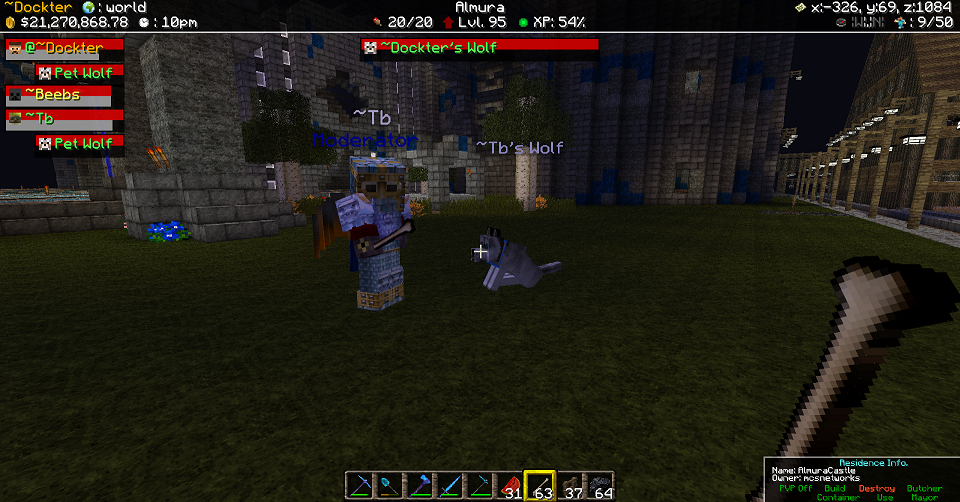
mmoMinecraft GUI Example
In the below example you can see the GUI elements above. This black bar along the top with the additional tokens you see are all part of mmoInfo Suite of plugins, as well as mmoParty, mmoTarget etc.
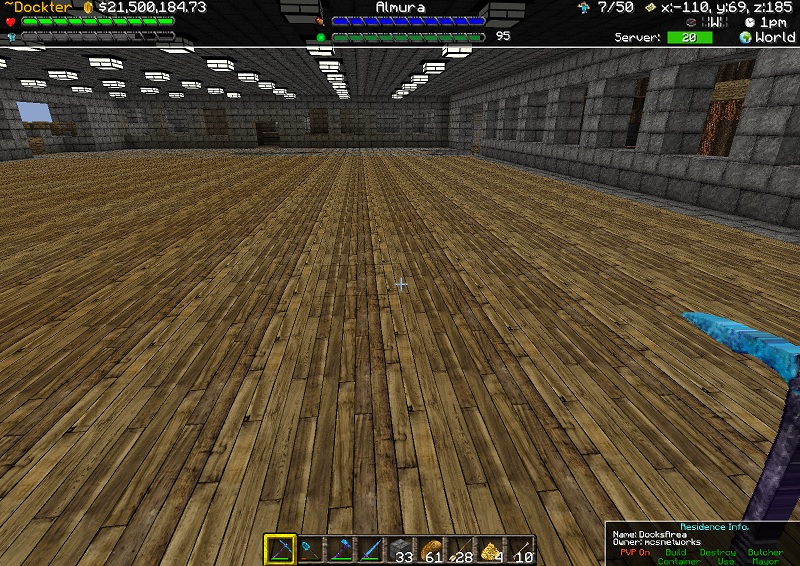
The below is an example of the new Graphics Bar displays for Health, Armor, Food, Level etc.
Commands
- /mmoupdate – Update all mmoMinecraft plugins.
- /mmoset – Show installed mmoMinecraft plugins.
- /mmoset <plugin> – Show all options (same as in plugin.yml).
- /mmoset <plugin> <option> – Show option current value (same as in plugin.yml).
- /mmoset <plugin> <option> <value> – Set option (same as in plugin.yml).
Data Folder
Normally all plugins have a separate folder in the same location as themselves for storing files. If instead you create a folder named "mmoMinecraft" in there then they will all use that instead. The old "*/config.yml" files become "mmoMinecraft/*.yml" instead. Any specific images etc for the client will be in a further folder inside that.
This is to make it easier to backup and restore your settings.
The file moving is automatic (you can manually undo it however).
Credits
A lot of people have contributed to this project and we greatly thank those involved. Here's a few of those Contributors:
- Rycochet
- Dockter
- Flenix
- FlayaN
- Xaymar
Dependencies
- Spoutcraft Client
- SpoutPlugin
Future
- Translation command (for other mmoMinecraft plugins)
- GUI for setting mmoMinecraft plugin config values without having to use /commands.
- GUI for installing / updating mmoMinecraft plugins.
- Improved Spout layout code, including the ability for the client to re-arrange the layout of supported plugins.
- More support widgets for plugin use.
Changelog
Commit log





Add a comment