


 Get 0.05 TON 💎
Earlier Versions
| Name | Size | Uploaded | Game Version | Downloads | |
| MobShop v2.1 release | 15.25 KB | Mar 28, 2015 | 1.8.1 | 854 |  Download Download |
| MobShop v2.0 release | 15.12 KB | Mar 12, 2015 | 1.8.1 | 221 | Download |
| Mob Shop v1.5 release | 9.96 KB | Mar 8, 2015 | 1.8.1 | 163 | Download |
| Mob Shop v1.4 release | 9.47 KB | Feb 4, 2015 | 1.8.1 | 350 | Download |
| Mob Shop v1.3 release | 8.19 KB | Jan 24, 2015 | 1.8.1 | 216 | Download |
| Mob Shop v1.2 release | 7.03 KB | Jan 20, 2015 | 1.8.1 | 195 | Download |
| Mob Shop v1.1 release | 6.49 KB | Jan 19, 2015 | 1.8.1 | 131 | Download |
| Mob Shop release | 5.45 KB | Dec 24, 2014 | 1.8.1 | 254 | Download |
Screenshots

Description

MobShop
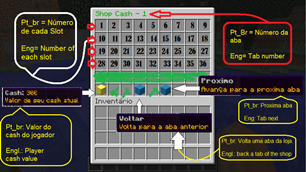
Want players to be able to buy mobs, but you don't want to make a shop? This plugin is for you! With this plugin you can have your players buy any mob in the game! All they have to do is type /mobshop or /ms and it pops up an Inventory GUI where they can buy all the mobs! You don't want your player buying bosses? You can even define in the configuration to make it so they can't buy bosses!
If you want to see all the pages in the shop, go to the MobShop Inventories Page.
Requirements
This plugin requires the latest version of Vault installed. You can download vault here.
Commands
This plugin only has 1 command: /mobshop. The permission is mobshop.use. This will open up an inventory GUI with all the mobs in it. You also do /mobshop reload to reload the plugin (permission mobshop.reload).
Configuration
All the mob costs are configurable. Opped players or players with permission mobshop.reload have an eye of the ender icon that when clicked, will reload the config. You can also configure the currency symbol. For example, if you use euros, you could set the euro symbol to the front. Or if you have a symbol at the end of the price, you could set it at the end and nothing in the front.
Configuration
Need help with the configuration? Click Here!
Current Mobs
All the mobs are added in the game!
Servers
Minemega: minemega.no-ip.org
OblivionsMC Network: play.oblivionmc.info
If you are using this plugin, PM me your server IP and I will put it here.
Source Code
You can view the source code here.


Add a comment