


 Get 0.05 TON 💎
Earlier Versions
| Name | Size | Uploaded | Game Version | Downloads | |
| Multi-Texture 2.0 release | 3.90 KB | Jan 25, 2015 | 1.8.1 | 2,166 |  Download Download |
| Multi-Texture release | 22.48 KB | Jan 24, 2013 | 1.6.1 | 2,498 | Download |
Screenshots

Description

MULTI-TEXTURE IS FULLY COMPATIBLE WITH SPIGOT 1.8
HD SERVER RESOURCE PACKS ARE TOTALLY COMPATIBLE WITH THIS PLUGIN!
Does your server need something new, unique, or maybe even revolutionary? Multi-Texture is just what you need!
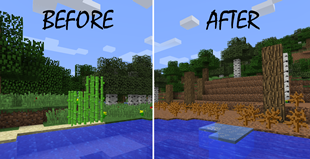
Multi-Texture is a plugin that aims to add the ability for users to choose a resource pack from a list provided from the server. This will give users on your server the option to pick from a variety of resource packs if they are not satisfied with one.
Installation Process:
Drop the Multi-Texture.jar into your plugins folder.
Restart the server.
Type this only once!: /texture addconfigexample
Open the auto-generated "Multi-Texture" folder in your plugins folder, then open the config file inside.
Edit the config to your liking! There is no limit to the number of resource packs you may add! Just follow the example config below as a guideline.
Restart your server again!
Commands:
/texture – Lists all the available resource packs from config
/texture <packname> – Prompts sender if he wants to download the pack (assuming it exists and the URL is not null)
/texture addconfigexample – Handy command to add an example to the config (Note: Sender must be OP!!)
TIP: This plugin would work very well with a command-based GUI such as ChestCommands
Example config.yml: (THE CONFIG IS CASE-SENSITIVE!)
Textures:
– Default
– Rome
– Gravy
– Wild
Default:
URL: http://download1278.mediafire.com/rvw43zr28fqg/766vj37uv6avu26/Default Texture Pack (1.8.1).zip?dl=1
Rome:
URL: http://download693.mediafire.com/sqd4eaodllfg/hynqyh1mdurng9y/Romecraft GERMANIA 15.zip?dl=1
Gravy:
URL: http://download1412.mediafire.com/b5fgbkw17keg/licgnq89l5h1kql/GravyCraftPack.zip?dl=1
Wild:
URL: http://download945.mediafire.com/ql91vgk0abpg/21qxterp5m4cl32/Wild_HD_v3.4.1.zip?dl=1
NOTICE THAT THE "R" IN "Realistic" IS CAPITALIZED IN THE TEXTURE LIST, AND ITS CONFIG AREA, SAME THING WITH THE "default" TEXTURE, IT'S ALL LOWERCASE IN THE TEXTURE LIST AND THE CONFIG AREA FOR DEFAULT!
Please note: When you make a new texture pack, and you name it something, if you name it with a capital letter, the name under config must have a capital letter, and when the command /texture <pack> is executed, it must be capital!
All URL's that correspond with a texture MUST BE THE DIRECT LINK TO THE TEXTURE'S ZIP FILE!
It is also recommended to try adding "?dl=1" to the end of the URL if you have a problem


Add a comment