

 Get 0.05 TON 💎
Earlier Versions
| Name | Size | Uploaded | Game Version | Downloads | |
| Mumble Integration 1.19-2.0.2 release | 43.76 KB | Jul 20, 2022 | 1.19 | 0 |  Download Download |
| Mumble Integration 1.19-2.0.1 release | 43.85 KB | Jun 12, 2022 | 1.19 | 99 | Download |
| Mumble Integration 1.18.2-2.0.1 release | 43.79 KB | Mar 10, 2022 | 1.18.2 | 225 | Download |
| Mumble Integration 1.18.1-2.0.1 release | 43.81 KB | Jan 15, 2022 | 1.18.1 | 354 | Download |
| Mumble Integration 1.17.1-2.0.1 release | 43.79 KB | Jan 15, 2022 | 1.17.1 | 69 | Download |
| Mumble Integration 1.18.1-2.0.0 release | 43.77 KB | Dec 12, 2021 | 1.18.1 | 205 | Download |
| Mumble Integration 1.18-2.0.0 release | 43.77 KB | Dec 5, 2021 | 1.18 | 67 | Download |
| Mumble Integration 1.17.1-2.0.0 release | 43.86 KB | Aug 1, 2021 | 1.17.1 | 166 | Download |
| Mumble Integration 1.16.5-2.0.0 release | 48.79 KB | May 7, 2021 | 1.16.5 | 855 | Download |
| Mumble Integration 1.16.4-2.0.0 release | 48.82 KB | May 7, 2021 | 1.16.4 | 99 | Download |
| Mumble Integration 1.16.3-2.0.0 release | 48.67 KB | May 7, 2021 | 1.16.3 | 26 | Download |
| Mumble Integration 1.16.2-2.0.0 release | 48.66 KB | May 7, 2021 | 1.16.2 | 31 | Download |
| Mumble Integration 1.16.1-2.0.0 release | 48.64 KB | May 7, 2021 | 1.16.1 | 20 | Download |
| Mumble Integration 1.15.2-2.0.0 release | 47.22 KB | May 7, 2021 | 1.15.2 | 34 | Download |
| Mumble Integration 1.14.4-2.0.0 release | 46.94 KB | May 7, 2021 | 1.14.4 | 24 | Download |
| Mumble Integration 1.16.5-1.1.1 release | 41.94 KB | Jan 18, 2021 | 1.16.5 | 2,185 | Download |
| Mumble Integration 1.16.4-1.1.1 release | 41.80 KB | Jan 4, 2021 | 1.16.4 | 4,091 | Download |
| Mumble Integration 1.16.3-1.1.1 release | 41.79 KB | Jan 4, 2021 | 1.16.3 | 141 | Download |
| Mumble Integration 1.16.2-1.1.1 release | 41.79 KB | Jan 4, 2021 | 1.16.2 | 32 | Download |
| Mumble Integration 1.16.1-1.1.1 release | 41.65 KB | Jan 4, 2021 | 1.16.1 | 46 | Download |
| Mumble Integration 1.15.2-1.1.1 release | 40.34 KB | Jan 4, 2021 | 1.15.2 | 62 | Download |
| Mumble Integration 1.14.4-1.1.1 release | 40.12 KB | Jan 4, 2021 | 1.14.4 | 44 | Download |
Screenshots


Description
This mod links Minecraft with Mumble.
This mod uses the Mumble Link Plugin v1.2.0.
It sends in game position and direction information to mumble for positional audio.
For more information about Mumble you find on https://www.mumble.info/.
This mod works only on the client side and doesn't work on the server side.
Support
Support: Supported Minecraft Versions
New Development and Fixes: 1.16.5
Bug Fixes: 1.15.2
Critical Bug Fixes: 1.14.4, 1.16.1-1.16.4
End of Support:
Client Config
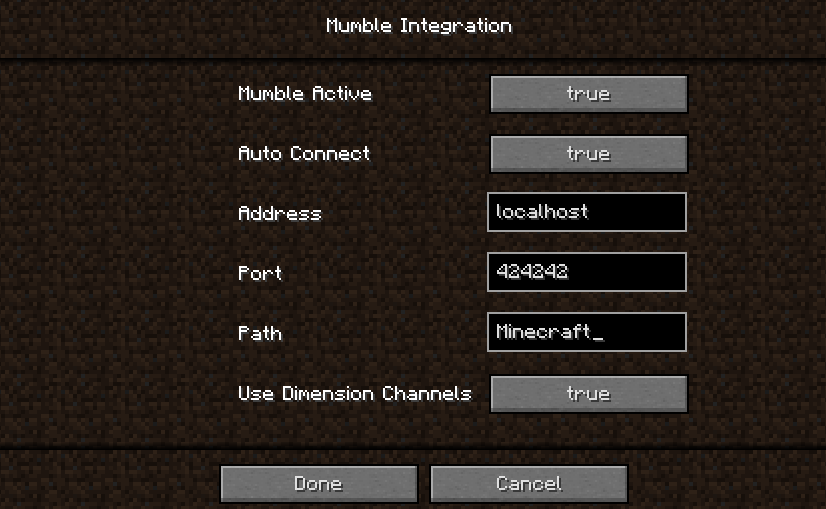
The config file can be found in the config folder and is named "mumbleintegration-client.toml".
– mumble_active / Mumble Active
Should the Mumble integration be active?
true: Minecraft is linked to Mumble
false: Minecraft is not linked to Mumble
– auto_connect / Auto Connect
Should Mumble be connect automated?
true: Mumble starts automated on entering a Minecraft world or connection to a server, if "use_dimension_channels" is active, it connects you to a dimension specific channel automated.
false: Mumble don't start automated and does not connect you to dimension specific channels.
– address / Address
Address of the Mumble server.
Only needed if "auto_connect" is true.
– port / Port
Port of the Mumble server.
Only needed if "auto_connect" is true.
– path / Path
Path of the Mumble channel.
Only needed if "auto_connect" is true.
– use_dimension_channels / Use Dimension Channels
Use subchannels for each dimension?
true: Connects you to a dimension specific channel automated, if "auto_connect" is active.
false: Don't connect you to a dimension specific channel automated.
Dimension Channels
Dimension Channel names must be the path of the registry name of a dimension and in this path underscore must be replaced with spaces and the name must be capitalized.
For example for the nether dimension:
Registry Name: "minecraft:the_nether"
Mumble Channel Name: "The Nether"
The Dimension Channels must be child channels of the channel set in the path. 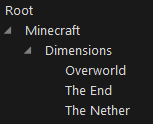
The Config can be changed in game (Main menu > Mods > Mumble Integration (Button Config)).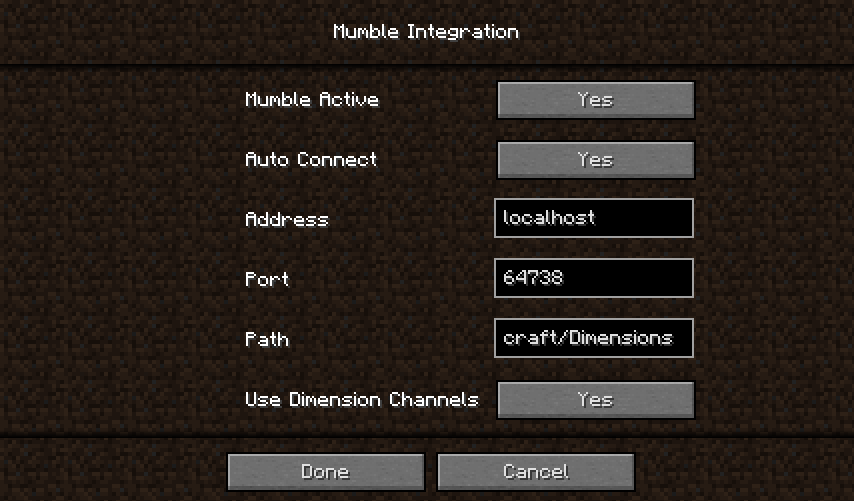
Thanks for the logo to Muse31.
You can use this mod in non-commercial modpacks without asking.
You can find more mods from me here.



Add a comment