

 Get 0.05 TON 💎
Earlier Versions
| Name | Size | Uploaded | Game Version | Downloads | |
| v1.67 release | 159.19 KB | Jan 1, 2014 | CB 1.7.2-R0.2 | 21,558 |  Download Download |
| v1.66 release | 162.56 KB | Oct 16, 2013 | 1.6.4 | 7,583 | Download |
| v1.65 release | 163.87 KB | Sep 15, 2013 | CB 1.6.2-R1.0 | 4,114 | Download |
| v1.64 release | 151.86 KB | Aug 18, 2013 | CB 1.6.2-R0.1 | 2,835 | Download |
| v1.63 release | 148.50 KB | Aug 4, 2013 | 1.6.1 | 2,930 | Download |
| v1.62 release | 140.07 KB | Jul 5, 2013 | 1.6.2 | 3,018 | Download |
| v1.61 release | 138.04 KB | Apr 30, 2013 | CB 1.5.2-R0.1 | 10,176 | Download |
| v1.60 release | 137.42 KB | Mar 8, 2013 | CB 1.4.7-R1.0 | 7,322 | Download |
| v1.59 release | 138.10 KB | Jan 26, 2013 | CB 1.4.7-R1.0 | 7,751 | Download |
| v1.58 release | 137.94 KB | Jan 19, 2013 | CB 1.4.7-R0.1 | 2,975 | Download |
| v1.57 release | 137.94 KB | Jan 7, 2013 | CB 1.4.6-R0.3 | 3,569 | Download |
| v1.56 release | 135.82 KB | Dec 24, 2012 | CB 1.4.5-R1.0 | 3,001 | Download |
| v1.55 release | 147.97 KB | Nov 21, 2012 | CB 1.4.5-R0.1 | 5,002 | Download |
| v1.54 release | 143.74 KB | Nov 5, 2012 | CB 1.4.2-R0.2 | 2,584 | Download |
| v1.53 release | 142.43 KB | Oct 29, 2012 | 1.4.2 | 1,682 | Download |
| v1.52 release | 145.75 KB | Oct 9, 2012 | CB 1.3.2-R1.0 | 3,318 | Download |
| v1.51 release | 142.56 KB | Oct 3, 2012 | CB 1.3.2-R1.0 | 1,283 | Download |
| v1.50 release | 141.36 KB | Sep 30, 2012 | CB 1.3.2-R1.0 | 1,005 | Download |
| v1.49 release | 197.07 KB | Sep 23, 2012 | CB 1.3.2-R0.1 | 1,553 | Download |
| v1.48 release | 338.29 KB | Aug 7, 2012 | CB 1.3.1-R1.0 | 8,018 | Download |
| v1.47 release | 336.26 KB | Jun 21, 2012 | CB 1.2.5-R3.0 | 7,415 | Download |
| v1.46 release | 335.78 KB | Jun 6, 2012 | CB 1.2.5-R3.0 | 2,317 | Download |
| v1.45 release | 314.70 KB | Apr 9, 2012 | CB 1.2.5-R1.0 | 23,489 | Download |
| v1.44 release | 312.72 KB | Mar 18, 2012 | CB 1.2.3-R0.2 | 3,390 | Download |
| v1.43 release | 308.71 KB | Mar 2, 2012 | CB 1.1-R6 | 2,199 | Download |
| v1.42 release | 288.99 KB | Feb 25, 2012 | CB 1.1-R4 | 937 | Download |
| v1.41 release | 289.11 KB | Feb 20, 2012 | CB 1.1-R4 | 874 | Download |
| v1.4 release | 287.62 KB | Feb 12, 2012 | CB 1.1-R3 | 1,386 | Download |
| v1.34 release | 187.28 KB | Jan 13, 2012 | CB 1.0.1-R1 | 3,440 | Download |
| v1.33 release | 187.80 KB | Dec 25, 2011 | CB 1.0.1-R1 | 2,110 | Download |
| MyWorlds version 1.32 release | 176.21 KB | Dec 6, 2011 | 1.0.0 | 2,275 | Download |
| MyWorlds version 1.30 release | 171.11 KB | Nov 23, 2011 | CB 1337 | 1,349 | Download |
| MyWorlds version 1.29 release | 171.84 KB | Nov 15, 2011 | CB 1337 | 809 | Download |
| MyWorlds version 1.28 release | 140.59 KB | Nov 3, 2011 | CB 1337 | 1,117 | Download |
| MyWorlds version 1.22 release | 128.82 KB | Oct 22, 2011 | CB 1317 | 600 | Download |
Screenshots


Description

Version: 1.65 | Craftbukkit/Spigot: CB 1.5.1 R1.0 / CB 1.6.1 / CB 1.6.2
Description
This plugin features everything related to worlds. Features:
- Load, unload, copy, delete, save and create worlds (Read more…)
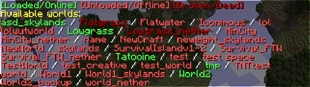
- Show information of worlds and list available chunk generators and worlds
- Set world game mode, difficulty, time, weather, autosaving, PvP
- Set world mob spawn restrictions
- Evacuate worlds to clear them from players
- Repair broken worlds to some extend
- Make portals cross-world, one-way, simple, no commands needed
- World-specific chat rooms using permissions
- Automatically load worlds when the server starts and persistent settings
- Extensive permission system, you can even set who can enter what world
- Can act as a tool for other plugins to teleport players from one world to the other
- Simple teleportation commands
- Set OP lists for specific worlds to make players operator on certain worlds
- Easy-to-remember commands: with aliases and chat-message help
- World inventory separation, merging and disabling (clear)
- Main world where players spawn can be configured
- Can set to re-spawn all players on the main world at all times
- Remember the last known position of a player on a world, and teleport him to it (Read more…)
- Auto-import the configuration from Multiverse (Read more…)
Separate inventories?
Yes, MyWorlds now supports per-world inventories. This feature is by default disabled, to enable it, set useWorldInventories to true in the config.yml. By default no worlds share inventories and player inventories are saved and loaded per world. To share inventories, use /world inventory merge followed up by the world names to merge. Split (or detach) gives all worlds specified a separate non-shared inventory. You can use /world inventory enable or disable to disable inventories for worlds. Enabled inventories will save data, disabled won't and result in all items being cleared.
Advice for having plugin-generated or flat worlds
The main world loads (and generates) before My Worlds enables. The Bukkit plugin architecture makes it impossible to load My Worlds before worlds load, since that causes some other incompatibilities. Anyway, if you want to have a 'main' world that is not a nether/the_end/overworld Vanilla world, you will have to do the following:
- Set up the main world to be anything you like (even if you don't use it on your server…you need one)
- Create a new world for the world type you want (flatworld, custom chunk generator, etc.)
- Stop the server and open up the config.yml of MyWorlds
- Change 'mainWorld' to your newly created custom world
- Start the server again and notice how new players join your custom world
- Optionally: disable the 'keep spawn in memory' for the 'server' main worlds (you are not using)
Just to avoid any confusions: it is impossible to let My Worlds alter or replace the main worlds generated by the server. If there is any fix to this or you know 'some way' to do it, let us know. We do consider halting the server enabling process asking for you to create the main worlds, after which enabling continues as usual. But for this, we need to disable the default main worlds from loading up.
Links
For more information:
Managing Worlds
For help with loading, creating, saving, unloading, etc. worlds.
Commands
Permissions
Configuration
World Configuration
Localization
Portals
Look at the source on GitHub
Look at the changelog
Disclaimer (because things CAN go wrong)
I am not responsible for world damages done by this plugin or by certain commands this plugin performs. If you, for example, loaded 20 worlds and hosted it on a buggy computer with 30 players, odds are the server (and your computer) will crash and worlds become corrupted. Repair can fix worlds, but this does not recover damaged chunks, so don't think you are always covered. Also, never forget to make backups of your worlds, but I guess this is common sense…
Just a warning for those that blame their own mistakes on the plugin developer 🙂
Metrics
This plugin sends server count statistics to MCStats.org. You can (globally) opt out in the PluginMetrics/config.yml file.
Development Builds

Click here to Download development builds of this Plugin




Add a comment