

 Get 0.05 TON 💎
Earlier Versions
| Name | Size | Uploaded | Game Version | Downloads | |
| MythicMobsCreator v1.3.2 release | 172.43 KB | Jun 26, 2017 | 1.12 | 2,572 |  Download Download |
| MythicMobsCreator v1.3.1 release | 155.40 KB | Feb 18, 2017 | 1.11 | 631 | Download |
| MythicMobsCreator v1.3 release | 155.22 KB | Feb 18, 2017 | 1.11 | 67 | Download |
| MythicMobCreator.jar release | 104.48 KB | Feb 16, 2017 | 1.11 | 145 | Download |
Screenshots
Description
This is a third party tool to help creating yml files of MythicMobs. You need to download it in order to use this resource!
Introduction
MythicMobCreator is a java application that allow you to create MythicMobs easily through user friendly interface. This can reduce huge amount of time compared to painfully working with bunch of yml codes.
How to use
- Make sure you have java(of course you do)
- Place the MythicMobCreator.jar into any folder
- Just double click the MythicMobCreator.jar
-
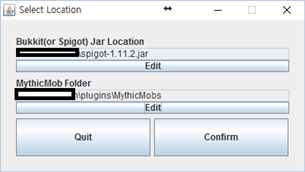
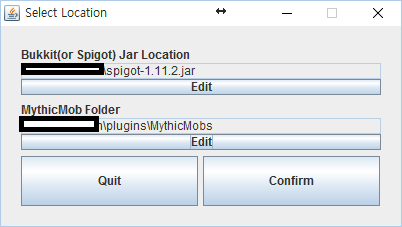
- For example, …\spigot-1.11.2.jar for first column
- And …\plugins\MythicMobs for the second columnYou will first see Select Location: You need to set the location of spigot_blahblah.jar and the MythicMobs folder.

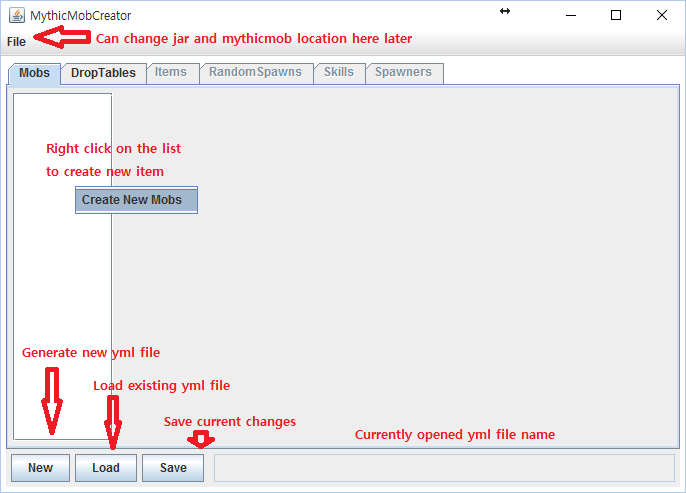
- Then you will be moved to the MythicMobCreator: Only Mobs section can be used for now, as I'm working on the other sections. Probably Mobs section is most useful among the all btw.

- Now you are all set to use MythicMobCreator!
——————————————————————————————-
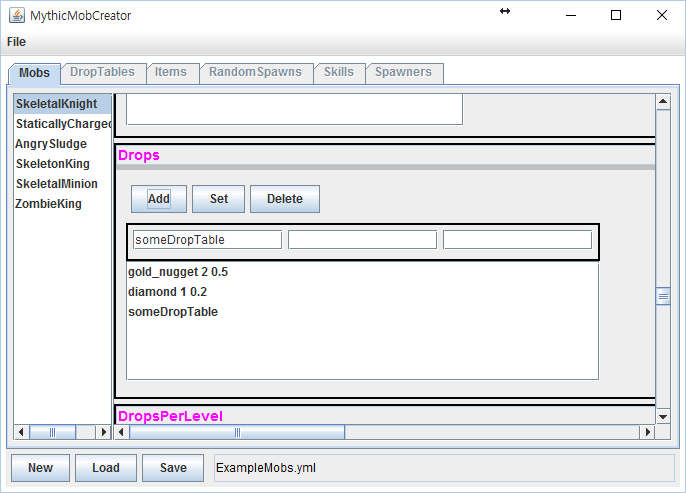
Most of the settings are pretty straightforward,. For example, if you are editing the Drops part, you will see three empty text fields.
Just like you expected, the first field is item's name, second field is quantity of item, and the last field is possibility. And if you want to add dropTable instead of item, simply type it in the first field and leave other fields blank. (But do not fill only two fields as the editor will be upset about it)
Other fields are just like that as well.
If you have any question, leave a comment or email me: wysohn2002@naver.com
Q&A
Q: When I double click the .jar file, it doesn't do anything
A: Right click on it -> navigate to Run With menu -> Choose other application. You will need to find java.exe where ever you installed your java first place. Usually it's under C:\Program Files\Java\jre…\bin



Add a comment