


 Get 0.05 TON 💎
Earlier Versions
| Name | Size | Uploaded | Game Version | Downloads | |
| nbttooltip-1.5.0-fabric.jar release | 883.91 KB | Jan 6, 2022 | 1.18.1 | 302 |  Download Download |
| nbttooltip-1.4.0-fabric.jar release | 876.74 KB | Aug 22, 2021 | 1.17.1 | 2,052 | Download |
| nbttooltip-1.3.0-fabric.jar release | 878.15 KB | Jun 18, 2021 | 1.17 | 1,225 | Download |
| nbttooltip-1.2.0-fabric.jar release | 876.58 KB | Jun 1, 2021 | 1.16.5 | 1,141 | Download |
| nbttooltip-1.1.2-fabric.jar release | 874.76 KB | Mar 21, 2021 | 1.16.5 | 1,135 | Download |
| nbttooltip-1.1.1-fabric.jar release | 872.45 KB | Mar 16, 2021 | 1.16.5 | 138 | Download |
| nbttooltip-1.1.0-fabric.jar release | 870.54 KB | Mar 6, 2021 | 1.16.5 | 379 | Download |
| nbttooltip-1.0.6-fabric.jar release | 374.72 KB | Sep 5, 2020 | 1.16.2 | 1,556 | Download |
| nbttooltip-1.0.5-fabric.jar release | 372.05 KB | Sep 5, 2020 | 1.16.2 | 35 | Download |
| nbttooltip-1.0.4-fabric.jar release | 9.57 KB | May 26, 2020 | 1.16-Snapshot | 735 | Download |
| nbttooltip-1.14.x-fabric-1.0.3.jar release | 9.51 KB | May 16, 2019 | 1.15.2 | 3,832 | Download |
| nbttooltip-1.14-1.0.2.jar release | 10.39 KB | Apr 4, 2019 | 1.14-Snapshot | 410 | Download |
| nbttooltip-1.14-1.0.1.jar release | 10.35 KB | Mar 4, 2019 | 1.14-Snapshot | 102 | Download |
| nbttooltip-1.14-1.0.0.jar release | 8.37 KB | Mar 3, 2019 | 1.14-Snapshot | 43 | Download |
| nbttooltip-0.6.jar release | 12.32 KB | May 31, 2018 | 1.12.2 | 19,724 | Download |
| nbttooltip-0.5.jar release | 9.72 KB | Jan 10, 2018 | 1.12.2 | 2,962 | Download |
| nbttooltip-0.4.jar release | 6.01 KB | Jan 7, 2018 | 1.12.2 | 170 | Download |
| nbttooltip-0.3.jar release | 6.16 KB | Sep 12, 2017 | 1.12.1 | 325 | Download |
| nbttooltip-0.2.jar +1 More release | 5.59 KB | Aug 17, 2017 | 1.12.1 | 219 | Download |
| nbttooltip-0.1.jar +1 More release | 5.50 KB | Aug 17, 2017 | 1.12.1 | 141 | Download |
Screenshots

Description
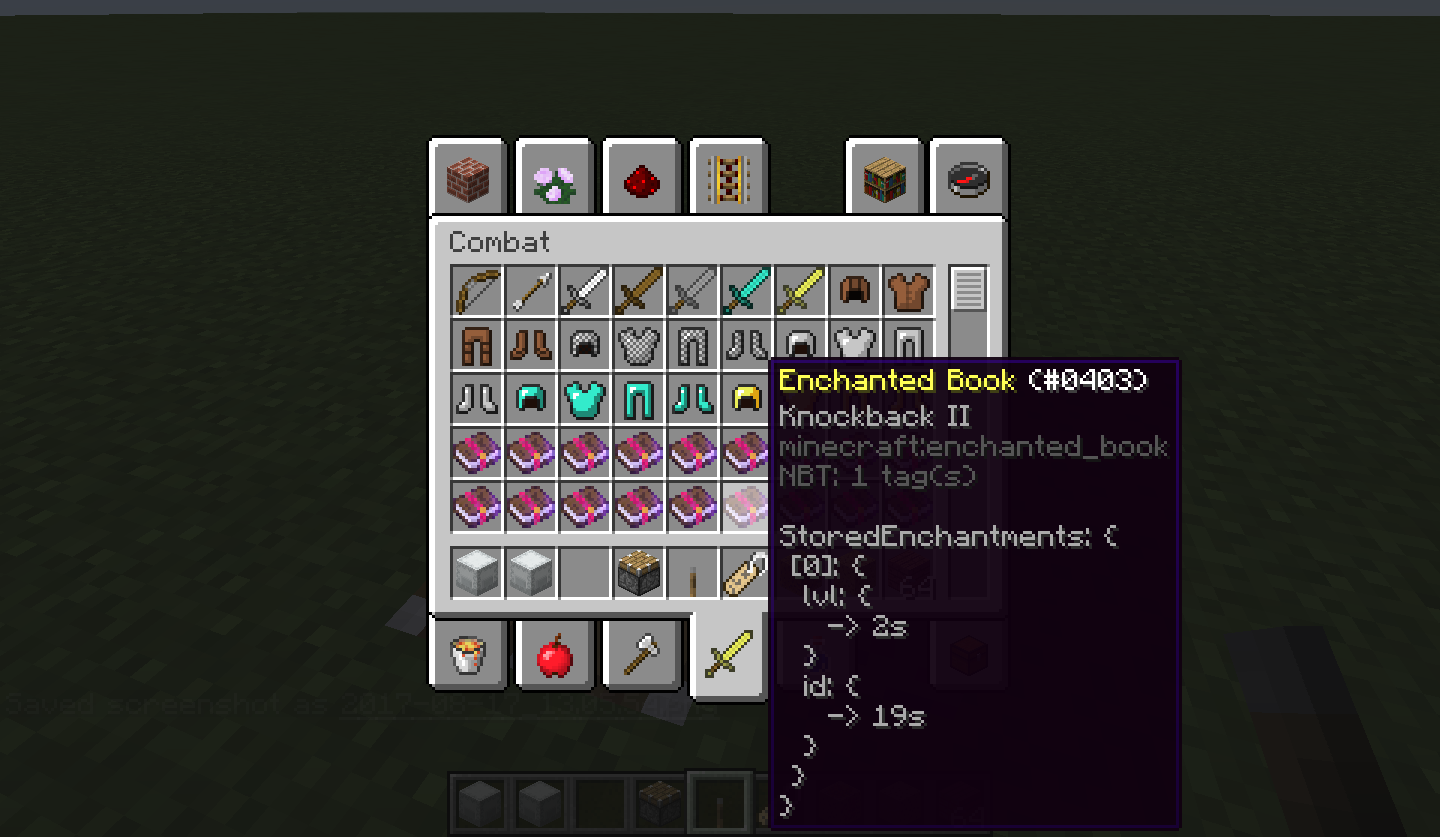
A little map dev/mod dev utility to help people working with nbt items and tiles.
Item NBT
To see an Item NBT tag just activate the advanced tooltips by pressing F3+H, the tag will appear inside the tooltip. Longer tags will be presented in an auto scrolling view, the scroll speed can be controlled with SHIFT, to pause scrolling, and ALT, to speed it up. The default scrolling speed and the maximum number of tag lines shown at once can be configured.
Tile Entity NBT (Not available in newer versions)
To see a Tile Entity NBT right click with an arrow on the block you're interested in. One or two popup windows will appear, depending on your configuration and what mode (SP/MP/LAN) you're playing.
One window will hold the server-side information (Only if you're playing SP) the other one will show client-side information (Both SP and MP). What windows are shown is configurable.
The client tag will often be a subset of the information contained inside the server one, this is because of how minecraft deals with syncing the tags. In general, it's up to the TE's creator to decide what data gets sent to the client (A modder should remove all the data unecessary to the client, to reduce the network load: this prevents you from seeing all the data if playing on a server).
The windows are separate from the Minecraft window, and should appear in the background, without interrupting your game, and they can be closed without effects on the game. Only one set (Server + Client) will be shown at a time, to prevent flooding your screen with popups: opening a new one will just replace the existing one.
Other Info
- This mod is client-side, it does not need to be installed on servers.
- Some servers might consider this mod cheating, check with your server admin if it's fine to install this on your client.
- You are free to use this mod on whatever pack you desire
Add a comment