


 Get 0.05 TON 💎
Earlier Versions
| Name | Size | Uploaded | Game Version | Downloads | |
| 1.0.0 - 20w16a beta | 12.52 KB | Apr 16, 2020 | 1.16-Snapshot | 303 |  Download Download |
Description
Inactive due to no demand for it
Nethermode
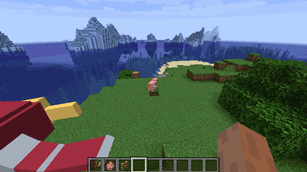
This small mod moves the world spawn where new players/respawning players will be teleported to into the Nether. Since 1.16 the Nether has everything needed for a normal/full Minecraft playthrough (cobblestone, wood, food, ores, light, obsidian for portals, etc), and this mod allows you to start your playthrough inside the Nether. The spawnpoint can be changed like normal using Respawn Anchors or Beds.
Features/Goals
- The closest Ruined Portal to the coordinates of the normal overworld spawn is used as the new Nether spawn
- No files are modified (the spawn position will not be changed in the level.dat)
- Works in Singleplayer or Multiplayer(only needs to be installed on the server, vanilla clients can join)
- Doesn't change anything else. Try a vanilla hardcore challenge, play casual with friends or combine it with mods like NetherHigher or BetterNether to create an awesome Nether modpack.
Known problems
- The
/setworldspawncommand will not work correctly - Some seeds will not be playable because the ruined portal(which are used as spawn target) are sometimes generated in lava lakes/solid walls. In that case you should try a different seed or make the spawn usable using Creative. (A good example seed with cobblestone and wood right at the spawn would be
-2398046749708295495
Contact
If you have some ideas/knowhow on how to improve the mod (for example the in lava portal spawns) feel free to get in touch on the Fabric Discord tr7zw#4005 or on the LogisticsCraft Discord.
License
This project is available under the CC0 license. Feel free to learn from it and incorporate it in your own projects/modpacks.
Add a comment