


 Get 0.05 TON 💎
Earlier Versions
| Name | Size | Uploaded | Game Version | Downloads | |
| okzoomer-4.0.1+1.16.2 release | 596.96 KB | Sep 2, 2020 | 1.16.5 | 1,040,305 |  Download Download |
| okzoomer-4.0.0+1.14.4 release | 517.44 KB | Aug 20, 2020 | 1.14.4 | 2,140 | Download |
| okzoomer-4.0.0+1.15.2 release | 580.87 KB | Aug 20, 2020 | 1.15.2 | 3,781 | Download |
| okzoomer-4.0.0+1.16.2 release | 597.51 KB | Aug 17, 2020 | 1.16.2 | 3,162 | Download |
| okzoomer-3.0.1-20w12a release | 508.84 KB | Mar 23, 2020 | 1.16-Snapshot | 7,406 | Download |
| okzoomer-2.1.4-1.15.2 release | 507.13 KB | Mar 23, 2020 | 1.15.2 | 8,985 | Download |
| okzoomer-2.1.3-1.15.2 release | 507.17 KB | Mar 22, 2020 | 1.15.2 | 117 | Download |
| okzoomer-3.0.0 release | 506.16 KB | Mar 7, 2020 | 1.16-Snapshot | 387 | Download |
| okzoomer-2.1.2 release | 489.21 KB | Feb 5, 2020 | 1.15.2 | 7,075 | Download |
| okzoomer-2.1.1 release | 490.59 KB | Feb 4, 2020 | 1.15.2 | 505 | Download |
| okzoomer-1.1.0 release | 458.53 KB | Feb 4, 2020 | 1.14.4 | 743 | Download |
| okzoomer-2.1.0 release | 490.27 KB | Feb 4, 2020 | 1.15.2 | 78 | Download |
| okzoomer-2.0.1 release | 478.02 KB | Jan 7, 2020 | 1.15.1 | 1,507 | Download |
| okzoomer-2.0.0 release | 478.01 KB | Jan 6, 2020 | 1.15.1 | 69 | Download |
| okzoomer-1.0.4 release | 474.97 KB | Jan 4, 2020 | 1.15.1 | 257 | Download |
| okzoomer-1.0.3 release | 458.87 KB | Dec 22, 2019 | 1.15.1 | 539 | Download |
| okzoomer-1.0.2 release | 457.25 KB | Dec 15, 2019 | 1.15.1 | 278 | Download |
| okzoomer-1.0.1 release | 448.21 KB | Dec 8, 2019 | 1.15 | 275 | Download |
| okzoomer-1.0.0 release | 447.42 KB | Dec 8, 2019 | 1.15-Snapshot | 36 | Download |
| [Quilt] Ok Zoomer 5.0.0-beta.9+1.19 beta | 253.81 KB | Jul 4, 2022 | 1.19 | 2 | Download |
| [Quilt] Ok Zoomer 5.0.0-beta.8+1.19 beta | 253.81 KB | Jun 26, 2022 | 1.19 | 3,224 | Download |
| [Quilt] Ok Zoomer 5.0.0-beta.7+1.18.2 beta | 257.98 KB | Apr 22, 2022 | 1.18.2 | 19,349 | Download |
| okzoomer-5.0.0-beta.6+1.18.2 beta | 437.73 KB | Apr 10, 2022 | 1.18.2 | 27,947 | Download |
| okzoomer-5.0.0-beta.5+1.18.2 beta | 394.55 KB | Mar 9, 2022 | 1.18.2 | 38,104 | Download |
| okzoomer-5.0.0-beta.4+1.18.2 beta | 394.38 KB | Mar 8, 2022 | 1.18.2 | 4,513 | Download |
| okzoomer-5.0.0-beta.3+1.17.1 beta | 263.44 KB | Nov 27, 2021 | 1.18.1 | 1,050,773 | Download |
| okzoomer-5.0.0-beta.2+1.17 beta | 480.71 KB | Jun 21, 2021 | 1.17.1 | 513,061 | Download |
| okzoomer-5.0.0-beta.1+21w03a beta | 627.27 KB | Jan 23, 2021 | 1.17-Snapshot | 6,844 | Download |
| okzoomer-4.0.0-beta.3+1.16.2 beta | 598.30 KB | Aug 16, 2020 | 1.16.2 | 605 | Download |
| okzoomer-4.0.0-beta.2+1.16.2 beta | 588.80 KB | Aug 12, 2020 | 1.16.2 | 626 | Download |
| okzoomer-4.0.0-beta.1+1.16.2 beta | 588.28 KB | Aug 11, 2020 | 1.16.2 | 254 | Download |
| okzoomer-2.1.0-beta.4 beta | 490.01 KB | Feb 4, 2020 | 1.15.2 | 139 | Download |
| okzoomer-2.1.0-beta.3 beta | 488.38 KB | Jan 31, 2020 | 1.15.2 | 192 | Download |
| okzoomer-2.1.0-beta.2 beta | 483.04 KB | Jan 18, 2020 | 1.15.2 | 402 | Download |
| okzoomer-2.1.0-beta.1 beta | 478.46 KB | Jan 13, 2020 | 1.15.1 | 228 | Download |
| okzoomer-4.0.0-alpha.5+1.16.1 alpha | 581.18 KB | Jul 29, 2020 | 1.16.1 | 35,924 | Download |
| okzoomer-4.0.0-alpha.4.1.16.1 alpha | 596.69 KB | Jul 3, 2020 | 1.16.1 | 21,953 | Download |
| okzoomer-4.0.0-alpha.3.1.16.pre5 alpha | 589.24 KB | Jun 14, 2020 | 1.16 | 12,528 | Download |
| okzoomer-4.0.0-alpha.2.1.16.pre2 alpha | 570.42 KB | Jun 6, 2020 | 1.16-Snapshot | 98 | Download |
| okzoomer-4.0.0-alpha.1.20w21a alpha | 568.29 KB | May 27, 2020 | 1.16-Snapshot | 121 | Download |
Screenshots

Description

My official statement about 1.17:
Ok Zoomer will continue to be maintained as-is, however, the original plan of having a server-side part of the mod which could restrict the client-side's capabilities will be refreshed as a separate mod which will have more options than just disabling the zoom (like making the functional parts of the zoom behave like OptiFine's). This is being done due to the addition of spyglasses.
If you are worried about losing the advantages of Ok Zoomer like its transitions, do not worry, because its logic is being split into LibZoomer, a library that can be used by other mods, such as mods that add custom spyglasses.
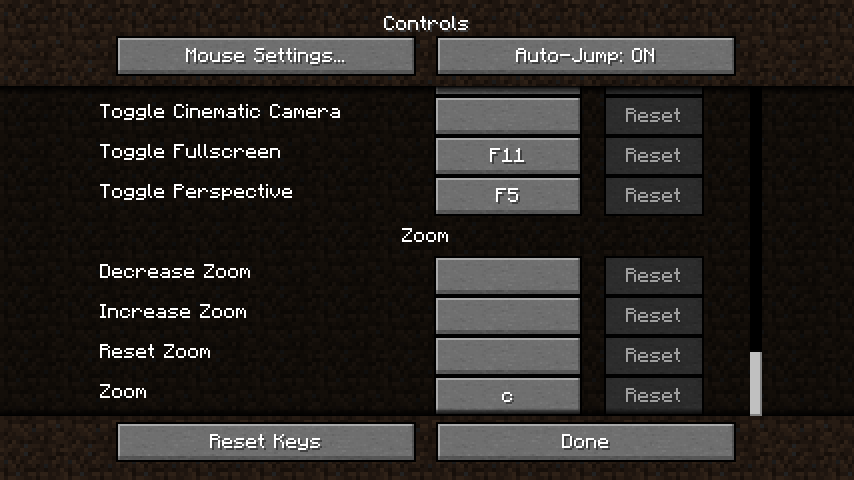
Ok Zoomer is a mod that adds a configurable feature-packed zoom key, which allows for zooming. By default, the zoom key is bound to C with the zoom itself being different, with features like zoom scrolling, smooth transitions and reduced mouse sensitivity. However, this isn't the end of the story, because here, you are in charge of your own zoom! Through the config screen (which is accessible through the Mod Menu), the zoom is completely configurable, and if the default behavior isn't exactly what you want, you can change the smallest details or even restore the OptiFine zoom with a press of a button!
This mod requires the Fabric API to be installed and currently works on Minecraft 1.16.2+, Mod Menu is optional but is the only way which this mod's config screen can be opened.
A presentation video can be seen here.
For details about the config, check the following spoilers:
Features:
Cinematic Camera:
The classic way of moving the camera around which OptiFine uses, but more compatible with Vanilla's cinematic camera itself! It has 3 modes: off, vanilla and multiplied. Vanilla is exactly like the game's cinematic camera feature, and Multiplied multiplies the values used for the smoothiness, reducing or increasing the lingering.
Reduce Sensitivity:
The alternative way of moving the camera around, introduced by WI Zoom. When zoomed in, the mouse sensitivity is divided dynamically, the further is zoomed in, the slower the mouse is, allowing for more precision. Can be enabled or disabled.
Zoom Transitions:
A feature from this mod itself, it adds transitions between zooming in and out instead of a sudden change. It has 3 modes: off, smooth and linear. Smooth transitions are similar to Vanilla's dynamic FOV while linear transitions takes constant steps until it reaches the state.
Zoom Mode:
The behavior of the zoom key itself. It has 3 modes: hold, toggle and persistent. Hold needs the key to be hold in order to zoom, Toggle allows for toggling the zoom with the key, Persistent makes the zoom permanent, with the key being used in order to scroll the zoom (recommended with a 1.0 zoom divisor).
Zoom Scrolling:
Another feature introduced by WI Zoom, it allows for using the mouse wheel in order to zoom in or zoom out, its specifics can be adjusted in the Values section.
Extra Keybinds:
Adds more 3 keybinds, "Increase Zoom", "Decrease Zoom" and "Reset Zoom". Best used in combination of a toggled or persistent zoom. Can be disabled or enabled, but requires a Minecraft restart in order to apply the changes.
Zoom Overlay:
Adds a overlay while zoomed in. The texture is a vignette by default, but it can be changed with a resource pack. The texture path is "assets/okzoomer/textures/misc/zoom_overlay.png"
Values:
Zoom Divisor:
The divisor which is ultimately applied to the FOV while zoomed in.
Minimum/Maximum Zoom Divisor:
The minimum zoom divisor which zoom scrolling or the extra keybinds can reach.
(Lesser) Scroll Steps:
The amount which decreases or increases the zoom divisor when scrolled or when the extra keybinds are used, the lesser scroll step is used when the zoom divisor is below the default and the regular when above it.
Cinematic Multiplier:
The multiplier which is applied to the cinematic camera while the Multiplied mode is used.
Smooth Multiplier:
The multiplier used by the smooth transition, higher is faster, lower is slower.
Minimum/Maximum Linear Step:
The limits of the linear transition's step, used in order to stop the transition from going too fast or too slow.
Tweaks:
Reset Zoom With Mouse:
Allows for resetting the zoom with the mouse's middle button, meant to be used along with zoom scrolling or extra keybinds, effective with a persistent zoom.
Unbind Conflicting Key:
Unbinds the "Save Toolbar Activator" is both it and the zoom key are set to C, it's enabled when the config file is created but it disables itself once the key's unbound, it can be enabled in the config screen in case the automatic unbinding doesn't work.
Print owo on Start:
When enabled, this mod will print "[Ok Zoomer] owo what's this" or variations of it in the console log when config is loaded, originally meant as a signal that this is an indev version of the mod, it can be enabled, independent of the stability.
Presets:
Reset to Preset:
Allows for changing the config with presets that already have the values filled, the preset is applied once the config is saved. Has 3 presets: default, classic and persistent. Default changes the values to the config screen's defaults, Classic changes the values to match OptiFine's zoom. Persistent changes the values to behave more like a FOV change mod than a zoom mod.
Add a comment