


 Get 0.05 TON 💎
Earlier Versions
| Name | Size | Uploaded | Game Version | Downloads | |
| OTGEdit 1.0.13 release | 41.39 MB | Aug 30, 2017 | 1.12.1 | 6,168 |  Download Download |
Description
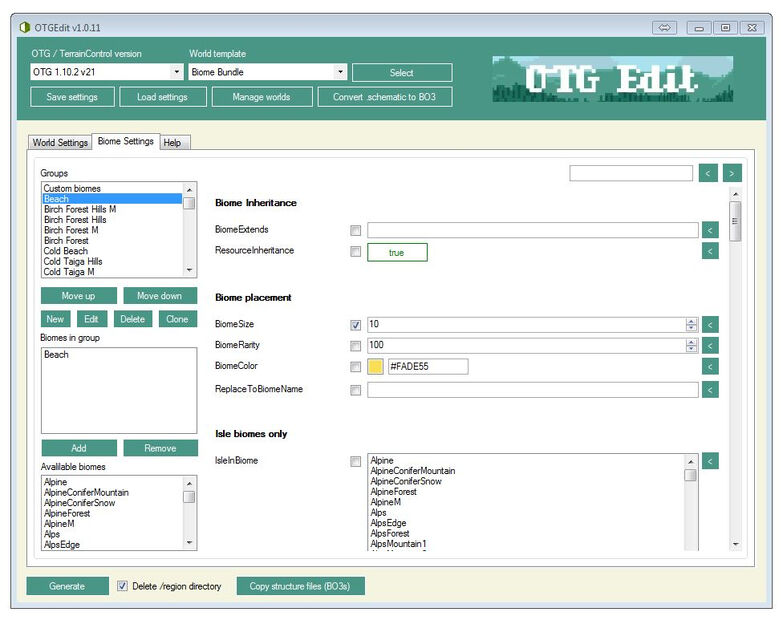
*Note: OTGEdit is no longer being maintained. With OTG v8/v9, users can export BO3's and BO4's ingame via the /otg export (required worldedit) and /otg spawn commands. For world/biome editing, we hope to create an ingame UI in the future, or at least an app that works for all users (Windows/Mac/Linux). OTGEdit should still work fine, however it's versionconfig xml files need to be manually updated with a text editor to work with newer OTG versions. If you'd like to update the files and make OTGEdit work for newer versions of OTG (v8 and up), give us a holler on the OTG Discord, thanks!
OTGEdit
OTGEdit is a graphical user interface for Open Terrain Generator (OTG), TerrainControl (TC) and Minecraft Worlds (MCW). OTGEdit can be used to create, import, edit and generate worlds. OTGEdit can also convert schematic files to BO3's.
OTGEdit is a WinForms app and works for Windows only. If you're a Java coder who would like to port OTGEdit to Java, please let us know!
Wiki: http://openterraingen.wikia.com/wiki/OTGEdit
Github: https://github.com/PG85/OTGEdit
To package your worldpack as a mod see: https://github.com/PG85/WorldPacker
Virus scanner note
If you scan TCEE.exe using VirusTotal you will get 1 scanner reporting a virus, this is a false positive however, the files are 100% clean. If you look at the results of the scan you'll see that only the virusscanner "Qihoo" sees the file as a virus. However, Qihoo has been known to "cheat" on virusscans (see: http://vrworld.com/2015/05/04/qihoo-360-antivirus-cheating/). It automatically marks files that are not digitally signed by big companies as viruses, which means that small free-ware/open-source developers can have a big problem as even completely clean and harmless files are marked as viruses by Qihoo. Even the people at MinecraftPatch tested and approved this file and you can test it yourself using every other virusscanner except VirusTotal, it's clean.
For a good article on how to check a file for viruses including testing for false positives see: http://lifehacker.com/397236/how-can-i-find-out-if-a-file-really-has-a-virus

Add a comment