


 Get 0.05 TON 💎
Earlier Versions
| Name | Size | Uploaded | Game Version | Downloads | |
| OverpoweredInventory-1.12-2.3.1.jar release | 87.32 KB | Jul 8, 2017 | 1.12.2 | 70,823 |  Download Download |
| OverpoweredInventory-1.11.2-2.3.1.jar release | 87.40 KB | Apr 10, 2017 | 1.11.2 | 6,680 | Download |
| OverpoweredInventory-1.11.2-2.3.0.jar release | 86.85 KB | Mar 17, 2017 | 1.11.2 | 5,908 | Download |
| OverpoweredInventory-1.10.2-2.3.0.jar release | 86.33 KB | Aug 21, 2016 | 1.10.2 | 47,088 | Download |
| OverpoweredInventory-1.8.9-2.1.0.jar release | 70.45 KB | Jan 20, 2016 | 1.8.9 | 17,802 | Download |
| OverpoweredInventory-1.8.9-2.0.2.jar release | 70.05 KB | Jan 11, 2016 | 1.8.9 | 1,409 | Download |
| OverpoweredInventory-1.8.8-2.0.2.jar release | 70.72 KB | Jan 9, 2016 | 1.8.8 | 2,533 | Download |
| OverpoweredInventory-1.8.8-2.0.1.jar release | 69.38 KB | Jan 2, 2016 | 1.8.8 | 5,879 | Download |
| OverpoweredInventory-1.7.10-2.0.0.jar release | 56.65 KB | Dec 12, 2015 | 1.7.10 | 46,682 | Download |
| OverpoweredInventory-1.8.8-2.0.0.jar release | 89.24 KB | Dec 9, 2015 | 1.8.8 | 1,654 | Download |
| OverpoweredInventory-1.8.8-1.0.14.jar release | 91.57 KB | Nov 30, 2015 | 1.8.8 | 1,602 | Download |
| OverpoweredInventory-1.8-1.0.13.jar release | 92.58 KB | Oct 13, 2015 | 1.8 | 28,801 | Download |
| OverpoweredInventory-1.8-1.0.11.jar release | 92.01 KB | Oct 11, 2015 | 1.8 | 1,116 | Download |
| OverpoweredInventory-1.7.10-1.0.10.jar release | 86.08 KB | Oct 6, 2015 | 1.7.10 | 5,055 | Download |
| OverpoweredInventory-1.8-1.0.10.jar release | 89.35 KB | Oct 6, 2015 | 1.8 | 532 | Download |
| OverpoweredInventory-1.8-1.0.9.jar release | 89.35 KB | Oct 4, 2015 | 1.8 | 353 | Download |
| OverpoweredInventory-1.8-1.0.8.jar release | 85.32 KB | Oct 1, 2015 | 1.8 | 3,355 | Download |
| OverpoweredInventory-1.7.10-1.0.8.jar release | 85.55 KB | Oct 1, 2015 | 1.7.10 | 905 | Download |
| OverpoweredInventory-1.8-1.0.6.jar release | 70.23 KB | Sep 18, 2015 | 1.8 | 3,167 | Download |
| OverpoweredInventory-1.7.10-1.0.6.jar release | 70.69 KB | Sep 17, 2015 | 1.7.10 | 1,606 | Download |
| OverpoweredInventory-1.7.10-1.0.5.jar release | 62.74 KB | Aug 27, 2015 | 1.7.10 | 10,200 | Download |
| OverpoweredInventory-1.8-1.0.5.jar release | 62.41 KB | Aug 26, 2015 | 1.8 | 10,232 | Download |
| OverpoweredInventory-1.8-1.0.4.jar release | 59.45 KB | Aug 7, 2015 | 1.8 | 20,145 | Download |
| OverpoweredInventory-1.8-1.0.3.jar release | 87.12 KB | Aug 6, 2015 | 1.8 | 522 | Download |
| OverpoweredInventory-1.8-1.0.2.jar release | 56.47 KB | Jul 29, 2015 | 1.8 | 4,509 | Download |
| OverpoweredInventory-1.8-1.0.1.jar release | 56.50 KB | Jul 27, 2015 | 1.8 | 630 | Download |
| OverpoweredInventory-1.8-1.0.0.jar release | 56.41 KB | Jul 26, 2015 | 1.8 | 595 | Download |
Screenshots

Description
If you have a major bug and i didnt notice it on the issue tracker or on the comments section feel free to poke me on twitter.
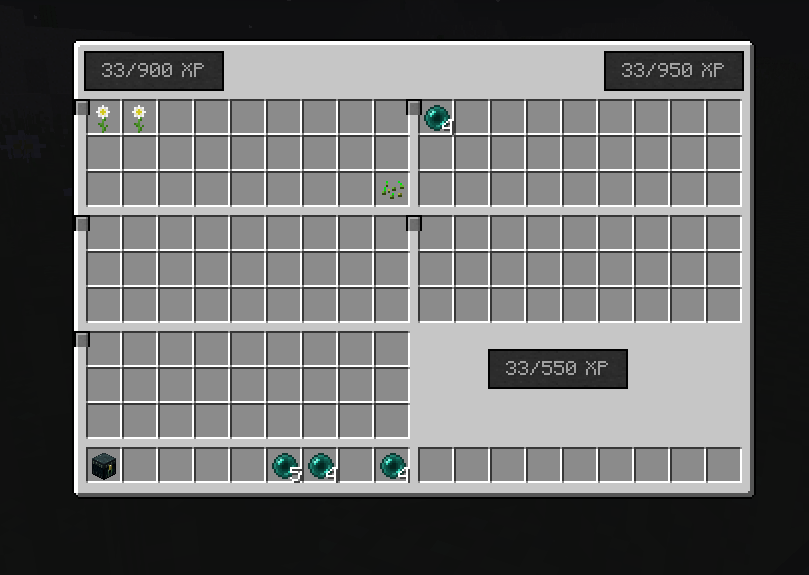
Version 2.0.0 is a complete rewrite and overhaul of the mod. It is completely different. Screenshots are mostly showing the 1.x version which is still supported and valid. (Version 2 is just an optional upgrade. Version 2 will only be for 1.8)
– Full compatibility with all other mods, uses a standalone inventory screen
– See the screenshots for more details
– IMPORTANT : If the screen is too big for your game screen, you have two options.
— change to GUI SCALE: NORMAL or bigger.
— Go to the powerinventory.cfg and make it smaller using is_large=false
– IMPORTANT : IF YOU ARE UPGRADING FROM AN OLD VERSION OF THE MOD
-> Delete your configs
-> EMPTY YOUR ENTIRE PLAYER INVENTORY into chests to save it. Remember, this is 2.0 a whole remake, the old inventory is gone
– Open the Overpowered Inventory with a hotkey (B) or a button that renders above your inventory
– In other words, it works with baubles, custom npcs, inventory control keys, thaumcraft, balkins weapons, etc etc.
– Unlock features step by step using experience points
– Config control over exp costs
– it has zero changes to the vanilla inventory
– Still has the dual hotbars feature
- Contents of the extra slots in this inventory is ignored by 'keepInventory' gamerule
– No more compass, clock, uncrafting, 3×3 crafting, or exp bottles. Some of these may return depending on user demand. I moved the Uncrafting feature to a standalone mod "Uncrafting Grinder" and made tons of fixes and updates.
– Still works with all screen resolutions, so for GUI Scale Small or Auto you can use the config file to make the screen smaller.
– Please give me your bugs, features, and comments !
– Added the Sort, Deposit, and Merge filter buttons into the new inventory (they work the same as in 1.x)
New stuff for 1.10.2 – 2.3.0
- Data is now stored in /saves/worldname/playerdata/_PlayerName.opi instead of just NBT data
– There is also a .opibk bakup file, replace the original with this file RIGHT AWAY if there is a problem.
– You can also use these files to transfer items between worlds, by moving them around
Please report any bugs for the 1.10.2 version to the github issue tracker (link above).
Video of normal size:
Video of small version:
[Below is everything for 1.x.x and previous]
Basic Features
(scroll to bottom for changelog / newest features)
– Expands your inventory space to three different larger sizes, the default 'normal' is 15 rows by 25 columns = 375 total slots.
– Adds four special slots to hold ender pearls, ender chest, clock, and compass.
– Also includes a 3×3 crafting grid instead of 2×2. So, this is kind of a sequel to my Inventory Crafting mod, but with tons more features added on top. (I will still be supporting both mods in individually. Also, special thanks to Funwayguy, I this was partly inspired/influenced by InfiniteInvo1.7.10)
-A keybinding is added to use the ender pearl from this slot (regardless of what is in your hotbar).
– Sneaking with a clock/compass in the slot will show them on the screen (same way as the navigation buff in my Power Apples mod)
– Small button in your inventory to open your ender chest inventory without placing one down (if its in the slot)
– You can store experience by filling Bottles o Enchanting by putting empty bottles in a special slot in the far right. The two buttons on the top right deposit your items into nearby chests automatically. This is not a 100% lossless conversion, since Bottles o Enchanting give randomly 3-11 exp. By default, it costs 10 exp to fill a bottle; change this in the config file.
– Arrow buttons cycle inventory left and right, or push them all to one corner. When a chest or other container is open, you only see the first row and a bit squished in just like the normal combined inventory.
– Two special buttons in the top right will deposit your items into all nearby chests all at once with a single click. 'Merge' will only add to existing item stacks (for example, a chest with one cobblestone and nothing else will get that cobble filled up with 63 more, empty slots in the chest are ignored and other items are ignored). Deposit all will dump everything possible. By default this only uses chests up to 12 blocks away; this can be tweaked in the config file. It does use both trapped and regular chests, but no other containers.
– When opening any other vanilla container, the top right has two buttons, the first to go to your inventory, and the "X" to close.
– The text 'Crafting' is removed
– Added a config file to remove your character model from the inventory (but this still has the black space there, kind of silly I know)
– By default, ender pearls have been buffed to stack to 64; you can revert this in the config file to send it back to 16.
– Tested in SSP, SMP, with and without keepInventory gamerule. Even so, please BACK UP your worlds before installing (goes for every mod, not just this one).
WARNING: Playing with Options > Video Settings > GUI Scale: Auto or Large may zoom everything in too much so it goes way off the screen. Suggested to use Small or Normal.
– Using this while in CREATIVE mode will have some weird issues, the armor slots and lots of other stuff gets messed around, it is intended for SURVIVAL.
# Configuration file: is in powerinventory.cfg . Some options also available using the ingame Mods -> Config button (find the mod in the forge list)
Please let me know if you have any ideas for additions to the mod, or if anything crashes or goes wrong.
Change Log:
New in 1.0.13
– Fixed a bunch of bugs
– Added a blacklist in the config file in case you want to block any items from the 'uncrafting' feature. Also works with items from other mods
Version 1.0.12 had a few bugs so I removed it from download. For example, it crashed your game when 'Uncrafting" certain items.
New in 1.0.11
– Second hotbar in your inventory. Swap hotbars with a keybinding, default is 'H'
– Also useful to stash items that get ignored by the merge, sort, and deposit features
Fixed 1.0.10
- Fix some slots showing up outside of the graphic in some config settings
New in 1.0.9
– Merge and deposit buttons compatible with generic containers including ones from other mods (as long they use a Tile Entity that implements IInventory)
– New in game configuration GUI (MC1.8 only) use the 'config' button inside the 'mods' button on the main menu.
– New options to allow all sorts of items stack up to 64 – boats, doors, cakes, and more. Can be disabled in the config.
– By default the player hunger bar shows even when mounted – use the config file to set back to normal
New in 1.0.8
– Large size screen option is new, before was only normal and small in the config file. Large is 16×28 = 448. Way more overpowered than normal! The old "normal_small" config entry is now just "size" and it can be normal, small, or large.
– Config to hide outlines of empty slots – some users get black squares or other graphic artifacting.
– Config entries to disable either the exp bottle slot or the uncrafting slot individually
– Config entry for Compatibility mode – for users with mod conflicts. Currently this is very limited, it will hopefully get expanded on if enough people are actually using it.
Version 1.0.7 had a missing texture and was removed sorry everyone my bad.
New in 1.0.6
– New uncrafting slot and button – looks up recipes on the fly. Does not work with things like crafting tables, because there is no way to know what kind of wood was used.
– Fixed some visual issues with the smaller version of the ui.
– Out for both 1.7.10 and 1.8
New in 1.0.5
– New sort button added in the lower right. Will toggle between two sort types.
– Added navigation buttons to the container overlay, so you can move your giant inventory around while a rummaging in a chest
-Ported back to 1.7.10
New in 1.0.4
– Config option for smaller sized GUI Scale / monitors:
# Valid values are only exactly normal/small. WARNING: BACKUP YOUR WORLD BEFORE CHANGING THIS. Changes your inventory size, for use if your GUI Scale requirements are different. normal = regular 15×25 inventory size, small = 6×18 [default: normal]
S:normal_small=normal
New in 1.0.3:
– Keybinding to open ender chest default 'I'
– The Fill and Ender chest buttons are hidden if not useable.
– more config file options
– changes to fix shift clicking out of some slots like the crafting / results
Reminder: always make world backups!
Fixed in 1.0.2: The Deposit All button is bugged in older versions, sometimes deleting items. *

Add a comment