


 Get 0.05 TON 💎
Earlier Versions
| Name | Size | Uploaded | Game Version | Downloads | |
| v1.7.2 release | 1.02 MB | Aug 21, 2022 | 1.19.1 | 5 |  Download Download |
| v1.6.1 release | 1.03 MB | Aug 4, 2022 | 1.19.1 | 225 | Download |
| v1.6 release | 996.01 KB | Jul 20, 2022 | 1.19.1 | 170 | Download |
| v1.5 release | 927.07 KB | Jul 5, 2022 | 1.19 | 181 | Download |
| v1.4 release | 1.39 MB | Jun 24, 2022 | 1.19 | 94 | Download |
| v1.3 release | 1.34 MB | Jun 17, 2022 | 1.19 | 84 | Download |
| v1.2 release | 864.05 KB | Jun 8, 2022 | 1.19 | 156 | Download |
| v1.1 release | 809.96 KB | Jun 1, 2022 | 1.18.2 | 22 | Download |
Screenshots


Description
About
PlayerStats is a Minecraft server plugin that adds a command to view player statistics in top-10 format or individually. Currently supports version 1.18.2 on platforms:
- Bukkit
- Spigot
- Paper
- Purpur
Update: PlayerStats now also works on the latest 1.19 Spigot build!
Features
Easy to use
– One central command that can:
- Explain how to use the plugin with /statistic
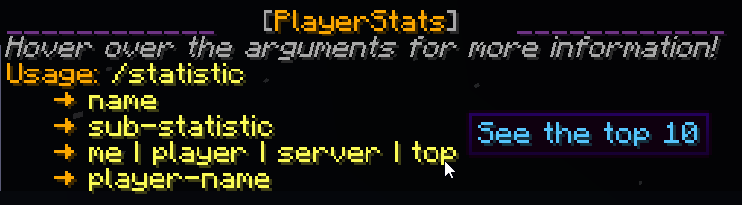
- Show you the top 10 on your server for all possible statistics with /statistic … top

- See those same statistics for any individual player with /statistic … player

- Or look up the combined total of everyone on your server!

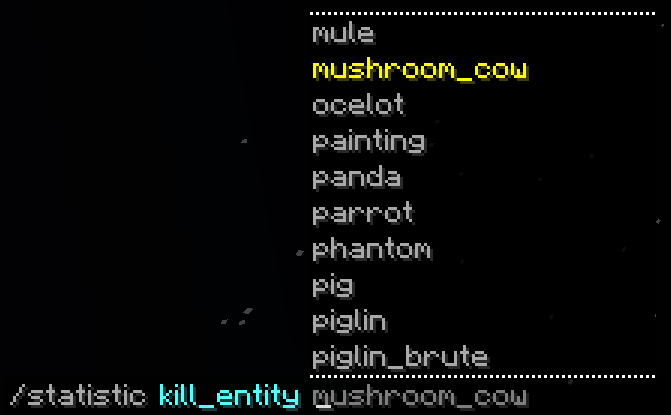
- Guide you through the available options while you type with an extensive tab-complete feature
– No set-up required
- PlayerStats will work correctly regardless of how long your server has already existed – it doesn’t have to be present when you start a new world
- Data is retrieved directly from already existing playerfiles, so you don’t have to set up a database, use scoreboards, or anything of the sort
– Safe
- PlayerStats uses multi-threading to ensure server performance does not suffer and players cannot crash the server by spamming its commands
- This also means that for small to medium-sized servers, calculating statistics will be very fast. For large servers (+/-10.000 players), please read the disclaimer below!
Customizable
– You can customize the following:
- Only show statistics for whitelisted players
- Exclude statistics from banned players
- Limit statistics based on when a player last joined. This option can be particularly useful if you have had a lot of players join your server in the past whose statistics aren’t of particular interest to your current player-base. On top of that, limiting the amount of players shown in the top 10 will greatly increase performance speed.
- The colors you want the output to be
- You can go for default Minecraft chat colors, or even use hex colors!
- Whether you want the output to have additional style, such as italics
– You can configure the following permissions:
- playerstats.stat for using the general command (true for everyone by default)
- playerstats.reload for reloading the config (only for OP players by default)
Disclaimer
How PlayerStats performs, will heavily depend on the amount of unique players that have joined your server, and on the specs of the machine it is running on. I have done elaborate testing on my local server, and it is currently also running on the SMP I play on. Looking up an individual statistic is always nearly instant, but for a top statistic it can vary.
If you have a large amount of unique players (+/-10.000), you could run into performance issues. If you notice it takes a long time to calculate top statistics, I recommend limiting the amount of included players by setting a number-of-days-since-last-joined limit in the config. Additionally, if you run into issues, you could revoke the permission playerstats.stat for most players, and only allow selected players (such as staff, for example) to use it.
I am working to improve performance for larger servers in the future, and I’d love to hear feedback on how the plugin is performing!
Author Info
I am a relatively new programmer, and this is one of my first projects. I greatly enjoyed making it, and I tried to make it as efficient as I could. If you have any questions, remarks, or suggestions, please let me know! You can find me here on GitHub.


Add a comment