


 Get 0.05 TON 💎
Earlier Versions
| Name | Size | Uploaded | Game Version | Downloads | |
| PlayerPlus-1.4 release | 21.66 KB | Feb 20, 2013 | CB 1.4.7-R1.0 | 1,921 |  Download Download |
| PlayerPlus-1.2 release | 15.61 KB | Oct 9, 2012 | CB 1.3.2-R1.0 | 1,100 | Download |
| PlayerPlus-1.1 release | 15.59 KB | Oct 6, 2012 | CB 1.3.2-R1.0 | 711 | Download |
| PlayerPlus-1.0 release | 14.93 KB | Oct 4, 2012 | CB 1.3.2-R1.0 | 718 | Download |
Screenshots

Description
PlayerPlus
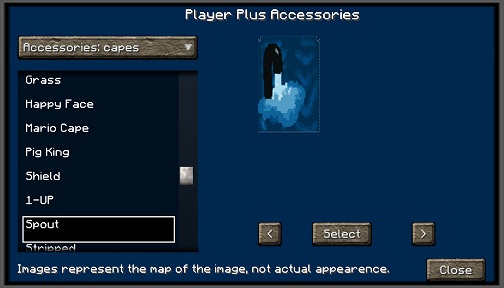
Version: 1.4
Version 1.4 now includes a complete library of 300+ images for the entire accessory library.
If you would like to see this in action, logon to our Minecraft server at: minesrv.almuramc.com
Overview
PlayerPlus is an addon for Spoutcraft / Spoutplugin enabled servers that allows a player to add:
- Wings
- Capes
- Bracelets
- TopHats
- Notch Hats
- Sunglasses (Not functional at the moment.)
- Earrings (Not functional at the moment.)
- Tails
How to Use?
Your server must have Spoutplugin & your users must be using Spoutcraft. Place the plugin into your servers plugin directory and start your server. This will cause the configuration files to be created. Stop your server and edit the config files for each accessory type using the below syntax that are now located in the /plugins/PlayerPlus directory.
"NAME" : "URL"
Diamond Pick: http://www.YOURSERVER.com/diamondpick.png
Configuration
File: config.yml
Options:
- PromptTitle: (Title of your PlayerPlus Window)
- TitleX: (numeric value used to help center your title in the guide window)
- Hot_Key: (Configurable Default HotKey to assign to PlayerPlus, is changeable client side afterwards in Controls.)
- GUITexture: Set your Custom Texture here or use my default.
- ForceDefaultCape: true = Force below specified DefaultCape.
- DefaultCape: [url]
Permissions
Here's a list of specific permissions nodes for this plugin and what each does.
- playerplus.* = All Abilities
- playerplus.use = Ability to use PlayerPlus (shows interface only)
- playerplus.use.bracelet = Ability to apply Bracelets
- playerplus.use.ears = Ability to apply Earrings
- playerplus.use.sunglasses = Ability to apply Sunglasses
- playerplus.use.tail = Ability to apply Tails
- playerplus.use.tophat = Ability to apply Tophats
- playerplus.use.notchhat = Ability to apply NotchHats
- playerplus.use.wings = Ability to apply Wings
- playerplus.use.capes = Ability to apply capes
Support
Support for this and all other AlmuraDev plugins can be found by joining our chat channel here:
Mibbit Chat Here
Dependencies
- Spoutcraft Client
- SpoutPlugin
Spoutcraft & SpoutPlugin
Get Spoutcraft & Spoutplugin Now! >> Get Spout!
Known Issues
- Sunglasses and Earrings are currently not working due to Spoutcraft bug.
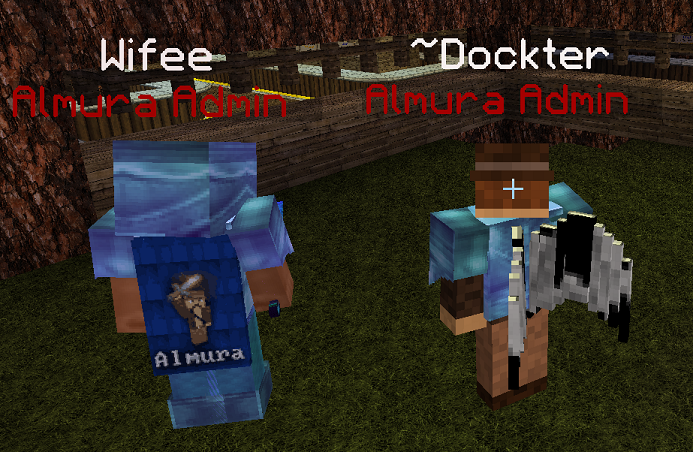
Example of a Character with Wings
Add a comment