


 Get 0.05 TON 💎
Earlier Versions
| Name | Size | Uploaded | Game Version | Downloads | |
| PrisonCells v1.2.5 release | 54.86 KB | Aug 4, 2015 | 1.8.1 | 42,181 |  Download Download |
| PrisonCells v1.2.4 release | 54.48 KB | Jul 21, 2015 | 1.8.1 | 770 | Download |
| PrisonCells v1.2.3 release | 54.45 KB | Jul 20, 2015 | 1.8.1 | 198 | Download |
| PrisonCells v1.2.2 release | 54.45 KB | Jul 19, 2015 | 1.8.1 | 280 | Download |
| PrisonCells v1.2.1 release | 54.12 KB | Jul 16, 2015 | 1.8.1 | 417 | Download |
| PrisonCells v1.2 release | 54.09 KB | Jul 14, 2015 | 1.8.1 | 300 | Download |
| PrisonCells v1.1.2 release | 49.74 KB | Jun 21, 2015 | 1.8.1 | 842 | Download |
| PrisonCells v1.1 release | 48.78 KB | Jun 13, 2015 | 1.8.1 | 375 | Download |
| PrisonCells v1.0.1 release | 46.34 KB | Mar 13, 2015 | 1.8.1 | 634 | Download |
| PrisonCells v1.0 release | 46.39 KB | Mar 8, 2015 | 1.8.1 | 291 | Download |
Screenshots


Description
Description

PrisonCells is a very lightweight Cell Plugin for Prison Servers.
It allows you to easily setup hundreds of Cells within minutes
and automatically does the rest for you.
You can rent a Cell for 1 day and extend your rental at anytime.
However if your time has run out, your Cell will be reset without any warning.
But you can also teleport to your Cell at any time you want as well as
teleport to an empty Cell to rent it.
And all Cells contain an Iron Door, however no Redstone Signal is required.
The Owner or members of the Cell can simply open/close it via Right Click.
And it's also extremely easy to setup.
Plus: It's going to automatically setup the WorldGuard Region
and manage it for you
A detailed Guide can be found further down the page.
This Plugin requires WorldEdit and WorldGuard to run as well as either Vault or PrisonGems
Commands/Permissions
| Command | Description | Permission | ||||
| /cell | Displays the Help Menu | No Permission required. | ||||
| /cell auto | Automatically teleports you to an empty Celll | PrisonCells.cell.auto | ||||
| /cell visit <Player> | Teleports yourself to someone's Cell | PrisonCells.cell.visit | ||||
| /cell home | Teleports you to your Cell | PrisonCells.cell.teleport | ||||
| /cell sethome | Sets the Home Location of your Cell | PrisonCells.cell.teleport | ||||
| /cell invite <Player> | Allows the specified Player to access your Cell | No Permission required. | ||||
| /cell kick<Player> | No longer allows the specified Player to access your Cell | No Permission required. | ||||
| /cell layout <Name> | Creates a new Cell Layout | PrisonCells.cell.admin | ||||
| /cell create<Name> | Creates a new Cell with the specified Layout | PrisonCells.cell.admin | ||||
| /cell delete | Deletes the Cell you currently stand in | PrisonCells.cell.admin | ||||
| /cell layouts | Lists all available Cell Layouts | PrisonCells.cell.admin |
Quickstart Guide
Usage Guide
You can locate an empty Cell using /cell auto
Once you found an empty Cell, simply right click its Sign and it will show you this GUI: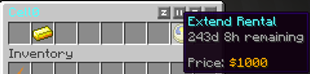
You can rent it for 1 day by clicking on the Gold Ingot, click the Clock to extend your/another Players Rental by 1 day.
The Cost can be configured by your Server Admin as well as the Type of Currency, it currently features Vault as well as PrisonGems as a Currency.
Once you own a Cell, you will quickly notice your Sign changing: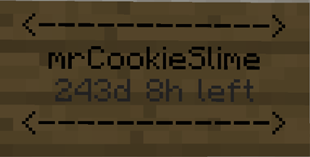
Setup Guide
Important Notes:
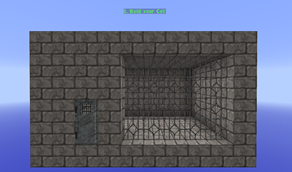
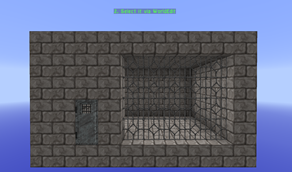
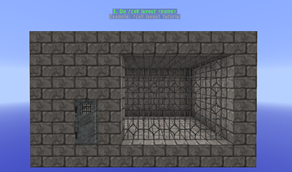
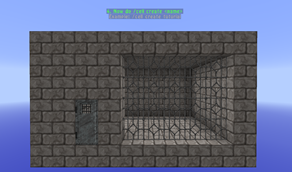
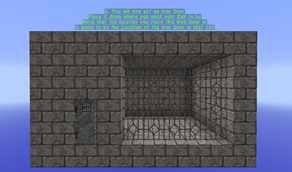
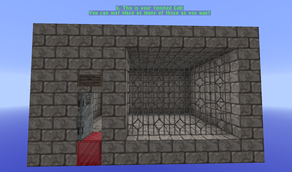
- When creating a Cell you must be standing OUTSIDE OF your Cell, standing inside will result in an Error
- All Cells must contain an Iron Door
- All Cells must have a Ceiling
- All Cells must have Walls
- The Iron Door must be placed within a Wall, placing it inside the Cell itself won't work.
Configuration
options:
  update-delay: 10 ## The delay (in minutes) in which the Plugin checks for Cells needing to be reset
  auto-update: true ## Specify whether this Plugin should automatically update
currency:
  type: VAULT ## Set the type of currency you want to use (VAULT / PRISONGEMS)
cells:
  max-days: 265
  layouts:
    standard:
       permission: '' ## What permission is required for Cells of this Type ("" means none)
       cost: 1000 ## How much Cells of this Type cost per day
Auto-Updater and Metrics
All my Plugins are using an Auto-Updater to make sure, you're always
using the latest and hopefully most bug free version of my Plugin.
If you don't want this Plugin to be auto-updated, you can turn it off
in the config file at "options -> auto-update: true/false"
They also use a Metrics-System which collects the following Informations:
A unique identifier
The server's version of Java
Whether the server is in offline or online mode
The plugin's version
The server's version
The OS version/name and architecture
The core count for the CPU
The number of players online
The Metrics version
Opting out of this service can be done by editing
plugins/Plugin Metrics/config.yml and changing opt-out to true.



Add a comment