


 Get 0.05 TON 💎
Earlier Versions
| Name | Size | Uploaded | Game Version | Downloads | |
| Reservationsv2.5.1 release | 29.31 KB | Dec 27, 2014 | 1.8.1 | 3,309 |  Download Download |
| Reservationsv2.5 release | 29.37 KB | Sep 26, 2013 | 1.6.4 | 11,731 | Download |
| Reservationsv2.4.1 release | 41.52 KB | Jul 21, 2013 | 1.6.2 | 2,988 | Download |
| Reservationsv2.4 release | 24.49 KB | Dec 22, 2012 | CB 1.5.1-R0.1 | 13,121 | Download |
| Reservationsv2.3.6 release | 23.16 KB | Oct 18, 2012 | CB 1.3.2-R2.0 | 6,539 | Download |
| Reservationsv2.3.5 release | 23.17 KB | Aug 9, 2012 | CB 1.3.1-R1.0 | 9,661 | Download |
| Reservationsv2.3.4 release | 23.50 KB | Jul 20, 2012 | 1.3.1 | 3,770 | Download |
| Reservationsv2.3.3 release | 23.30 KB | Jul 16, 2012 | CB 1.2.5-R4.0 | 1,379 | Download |
| Reservationsv2.3.2 release | 23.37 KB | Jul 15, 2012 | CB 1.2.5-R4.0 | 376 | Download |
| Reservationsv2.3.1 release | 23.52 KB | Jul 6, 2012 | CB 1.2.5-R4.0 | 1,888 | Download |
| Reservationsv2.3 release | 23.36 KB | Jun 19, 2012 | CB 1.2.5-R4.0 | 2,831 | Download |
| Reservationsv2.2 release | 244.70 KB | Jun 11, 2012 | CB 1.2.5-R4.0 | 1,363 | Download |
Screenshots


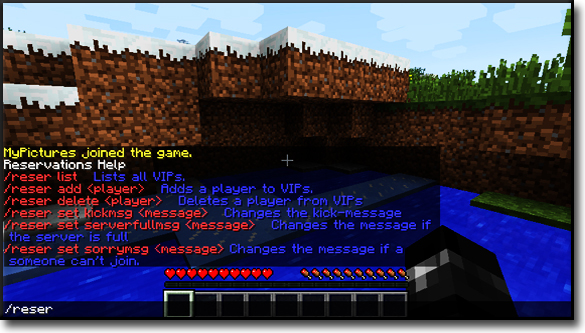
Description


Reservations is a plugin that provides kicking players on a full server if special players tries to join. You can use the rank system that will kick players with a lower rank, or/and the VIP system that extends the slots on a full server for VIPs.
Simple, but with enough features for everyone!
Configuration:
- Open config.yml
- For every new VIP make a new line in ranks, and type : [PlayerName]: ' '
- Example:
VIPs:
  HomerBond005: ''
  MyPictures: ''
  Jeb: ''
  AnotherPlayerHans: ''
- Change the messages.
- Set Permissions to true if you want to use Permissions, otherwise OP-only.
- Set PEXRankSystem to true if you want to use the ranks from PermissionsEx. (Tutorial will follow)
- Edit the ranks
- For every player you want to set the rank add it like the following:
Ranks:
  TheBoss: 1
  TheCoBoss: 2
  TheModerator: 3
  TheSupporter: 4
  ThePlayer: 5
  SomeoneYouDontLike: 6
- For every player you want to set the rank add it like the following:
- Set defaultRank to the rank, that newbies will have.
- Save it.
Commands:
You have to be OP to use the following ones or use the Permission nodes behind it!
- /reserv list – Lists all VIPs Reservations.list
- /reserv add <player> – Adds <player> to VIP list. Reservations.add
- /reserv delete <player> – Deletes <player from the VIP list. Reservations.delete
- /reserv set kickmsg <message> – Changes the message for kicking a non VIP, when a VIP joines a full server. Reservations.set.kickmsg
- /reserv set serverfullmsg <message> – Changes the message if the server is full. Reservations.set.serverfullmsg
- /reserv set sorrymsg <message> – Changes the message if a player can't join. Reservations.set.sorrymsg
You can use the commands /res, /reser, /reserve and /reservations if they aren't taken by other plugins (like residence).
Permissions:
Reservations.VIP – User(s) is(/are) VIP(s)
If you are not using PermissionsEx based ranks you can use 5 ranks as Permission that can be applied to groups and users:
- Reservations.rank.1 -> Rank 1
- Reservations.rank.2 -> Rank 2
- Reservations.rank.3 -> Rank 3
- Reservations.rank.4 -> Rank 4
- Reservations.rank.5 -> Rank 5
- etc.
You have to change the value for permissionBasedRanks in the config.yml to gain more ranks for the permissions. The default value is 10 that means you can add all ranks up to the permission Reservations.rank.10.
FAQs
See the FAQ page for more help.
Tutorials
I do not assume liability for the content of the videos!
- Tutorial in portuguese: (Thanks to AbsintoJ)
Make your own tutorials in different languages and I will add them to this description!
Add a comment