

 Get 0.05 TON 💎
Earlier Versions
| Name | Size | Uploaded | Game Version | Downloads | |
| Rule Control 1.4.0 release | 686.27 KB | Dec 2, 2021 | 1.17.1 | 41 |  Download Download |
| Rule Control 1.3.1 release | 1.01 MB | Jul 26, 2021 | 1.15.2 | 121 | Download |
| Rule Control 1.3.0 release | 1.03 MB | Jul 26, 2021 | 1.16.5 | 426 | Download |
| Rule Control 1.2.2 release | 1,020.61 KB | Jun 28, 2021 | 1.15.2 | 142 | Download |
| Rule Control 1.2.0 release | 1.02 MB | Jun 27, 2021 | 1.16.5 | 807 | Download |
| Rule Control 1.2.1 release | 1,020.56 KB | Jun 27, 2021 | 1.15.2 | 74 | Download |
| Rule Control 1.1.1 release | 863.18 KB | Jun 16, 2021 | 1.15.2 | 71 | Download |
| Rule Control 1.1.0 release | 872.20 KB | Jun 16, 2021 | 1.16.5 | 138 | Download |
| Rule Control 1.0.2 release | 708.73 KB | Mar 24, 2021 | 1.16.5 | 845 | Download |
| Rule Control 1.0.1 release | 694.65 KB | Mar 21, 2021 | 1.15.2 | 32 | Download |
| Rule Control 1.0.0 release | 708.76 KB | Mar 3, 2021 | 1.16.4 | 80 | Download |
Screenshots


Description

*And 1.15.2
About Rule Control:
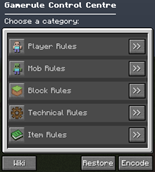
Rule Control is a lightweight mod that allows you to easily control all of your vanilla gamerules without the need for their commands.
All gamerules are divided into their respective categories.
These categories slightly differ from what Mojang declared in Minecraft 1.16.
This is to make them more 'logical' and accessible to newer Minecraft players (as for veterans as well):

This mod also comes with some custom gamerules, taking inspiration from gamerules that are exclusive for Minecraft Bedrock.
These reside under their respective categories and are as followed:
- Show Worldtime –> Displays the current world time as an overlay. –> (Default = false)
- Show Coordinates –> Displays the player's coordinates as an overlay. –> (Default = false)
- Sensitive TNT –> Whether TNT explodes immediately after igniting. –> (Default = false)
- Extinguish primed TNT –> Extinguishes ignited TNT, effectively disabling TNT in the world. –> (Default = false)
- Enable Command Blocks –> Enables command blocks. –> (Default = true)
- Disable Hunger –> Disables the need for food. –> (Default = false)
- Enable Creeper Firework –> Whether a Creeper's explosion is replaced by firework. –> (Default = false)
- Enable Slow Baby Zombies –> Slows down Baby Zombies to that of an adult Zombie. –> (Default = false)
- Enable Pvp –> Whether player versus player combat is enabled. –> (Default = true)
- Trample Farmland –> Whether farmland changes to dirt after being trampled. –> (Default = true)
- Natural Crop Growth –> Allows crops of all kinds to grow naturally through game ticks. –> (Default = true)
- Taming –> Whether tameable animals are allowed to be tamed. –> (Default = true)
- Enable Chat –> Whether players are allowed to communicate through the chatbox. –> (Default = true)
- Disable Zombie Sieges –> Disables the need for zombies to raid poor villages. –> (Default = false)
- Dimension Travel –> Whether players and other entities are allowed to hop into portals. –> (Default = true)
- Manual Item Drop –> Whether items can be dropped from the player's inventory/hotbar. –> (Default = true)
- Natural Item Despawn –> Allows items to despawn naturally after 6000 game ticks. –> (Default = true)
New gamerule ideas are always welcome!
Let me know in the comments.
Usage:
Use the following commands to access the Gamerule Control Centre:
- /gamerules
- /rulecontrol
- /rc
If you've created a password to encode the Gamerule Control Centre, use this command to retrieve it as an admin:
- /rcpassword
(This will only be a temporary command, until a working config is implemented)
Made a mistake or want to get back to default Minecraft?
Restore your configured gamerules to their default values at any point within the GUI.
For any other extra information, you can consult the Minecraft Wiki through the respective Wiki button inside the GUI.
It will generate a response with a clickable URL in the chat box.
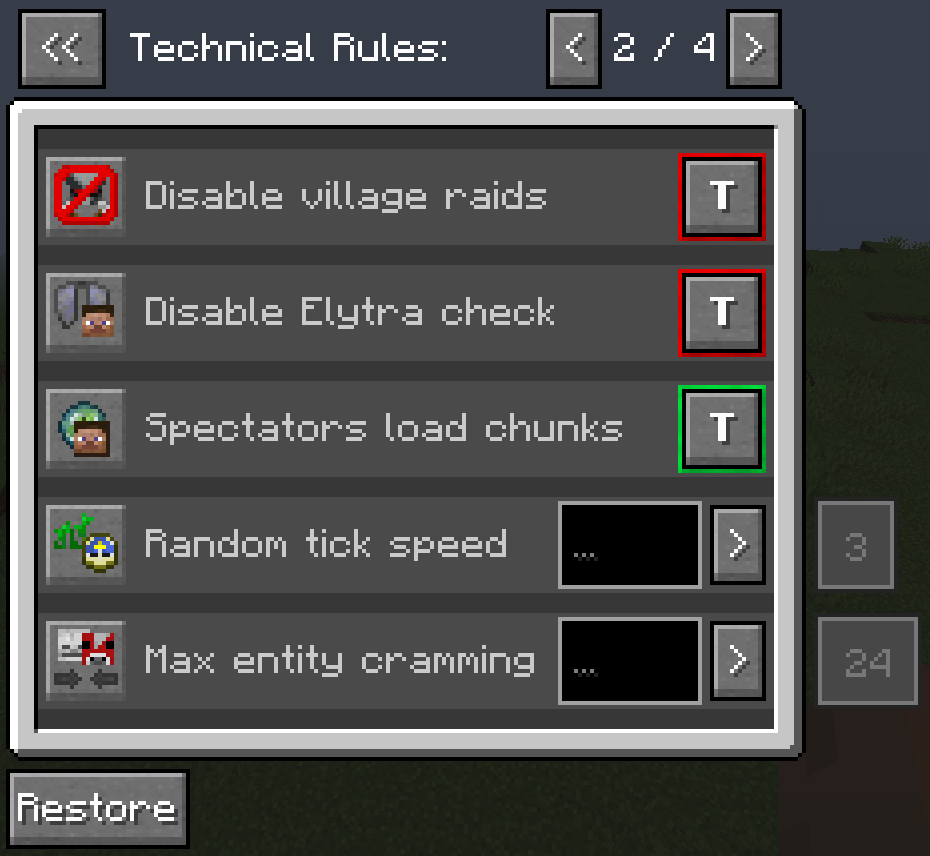
There are two types of gamerules:
- Logic Gamerules
- Number Gamerules
The logic gamerule can either be toggled on or off / yes or no / active or inactive.
Showing its respective green or red colour to indicate its status.


The number gamerule can be configured to be between a minimum -and maximum value that Minecraft can handle.
The minimum is -2.000.000.000 while the maximum respectively is 2.000.000.000.

To indicate that a number gamerule has changed from its default value, it will change to yellow text inside a blue text box.
Otherwise it will remain gray.

Server info:
Messages get logged in the server log when:
- A player changes the value of a number gamerule.
- A player restores all gamerules at once.
Gamerule wiki:
https://minecraft.gamepedia.com/Game_rule
Mod made with MCreator 2021.1
Add a comment