


 Get 0.05 TON 💎
Earlier Versions
| Name | Size | Uploaded | Game Version | Downloads | |
| ServerMotd 1.4 release | 6.54 KB | Aug 13, 2014 | CB 1.7.9-R0.2 | 39,855 |  Download Download |
| ServerMotd 1.3.1 release | 5.46 KB | Mar 27, 2014 | 1.7.4 | 5,643 | Download |
| ServerMotd 1.3 fix release | 5.42 KB | Mar 18, 2014 | 1.7.4 | 638 | Download |
| ServerMotd 1.3 release | 5.43 KB | Mar 4, 2014 | 1.7.4 | 802 | Download |
| ServerMotd 1.2 release | 4.68 KB | Oct 19, 2013 | 1.6.4 | 2,031 | Download |
| ServerMotd 1.1 release | 4.60 KB | Aug 26, 2013 | CB 1.6.2-R0.1 | 1,196 | Download |
| ServerMotd 1.0 release | 4.07 KB | Aug 25, 2013 | CB 1.6.2-R0.1 | 1,033 | Download |
Screenshots

Description

English – Español – Francais
ServerMotd allows you to change the motd of the server-list and the message to join the server. You can use all coloring and formatting codes.
Features
- This plugin is very easy to use!
- Change your MOTD in client server list
- Colorize your messages
- Change your welcome message
- Support Permissions
- Support formatting code
- Customize the plugin with commands or changing config.yml
- You can change the messages while the server runs
- Set the join message
- Set the left message
- Use the variable %player to name an user (f.e -> %player has joined the game)
- Disable the motd message if you are using other plugin (in the config)
- Set the server-icon.png of the server while it is running
- Display the balance and prefix of the player
- Display the bukkit's version
- Multi-line (line-break) in external motd message (server-list message)
Installation
- Download the plugin
- Drag the .jar file in your server's plugin folder
- Reload your server (If it's necesary)
- Ready!
Commands
- /motd (View motd)
- /setmod <message> (Set the welcome message)
- /externalmotd <message> (Set server-list motd)
- /motdjoin (set the join message)
- /motdleft (set the left message)
- /motd reload (reload the config.yml)
- /icon (set the icon of the server) (Example: /icon mypicture.png [This set a file called icono.png located at the main folder of the server, having a size of 64×64 to works correctly]
- Also, you can use this: /sm, /em, /mj and /ml (abreviatures)
Permissions
- motd.* (default: ops)
- motd.check (Check the motd) (default: all)
- motd.reload (reload the config.yml)
- motd.set (Permissions to use /setmotd, /externalmotd, /motdjoin, /motdleft)
- icon.set (Permission to use /icon command and receive notifications about possible errors with the image)
Variables
- %player (The server changes this for the player names)
- %newline (It sets a new line)
- %balance (show the player's balance) (requires vault!)
- %prefix (show the player's prefix) (requires vault!)
- %version (Display the bukkit's version)
- more soon (You can suggest variables in the comments)
Coloring and Formatting codes
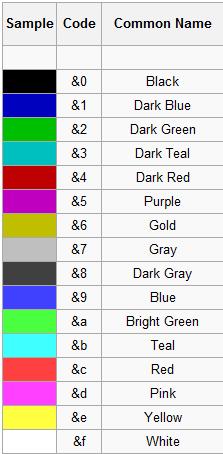
- &k Random
- &l Bold
- &m
Strike - &n Underlined
- &o Italic
- &r Reset
Configuration
- Config version: 1.3
- created by: aledanmar
- If you have other motd-server, set "enablemotd" to false, and the motd message will be removed.
- enablemotd: true
- motd:
- system: '&aServer list message'
- ingame: 'Default motd when you join the game, Change it in the config or with /setmotd <motd>'
- join: '%player joined the game'
- left: '%player left the game'
- icon:
- set: false
- name: server.png
You can change the messages in the config.yml or using commands
Known bugs
- None
Screenshots



Other languages
- English
- Español
- Francais
Bugs and Feature Requests
- Use Tickets for issues, bugs or feature requests
- Support in english and spanish!
- Plugin tested on 1.2.5, 1.3.2, 1.4.7, 1.5.2, 1.6.2, 1.7.4
Donate
Help support development of ServerMotd: Donate



Add a comment